
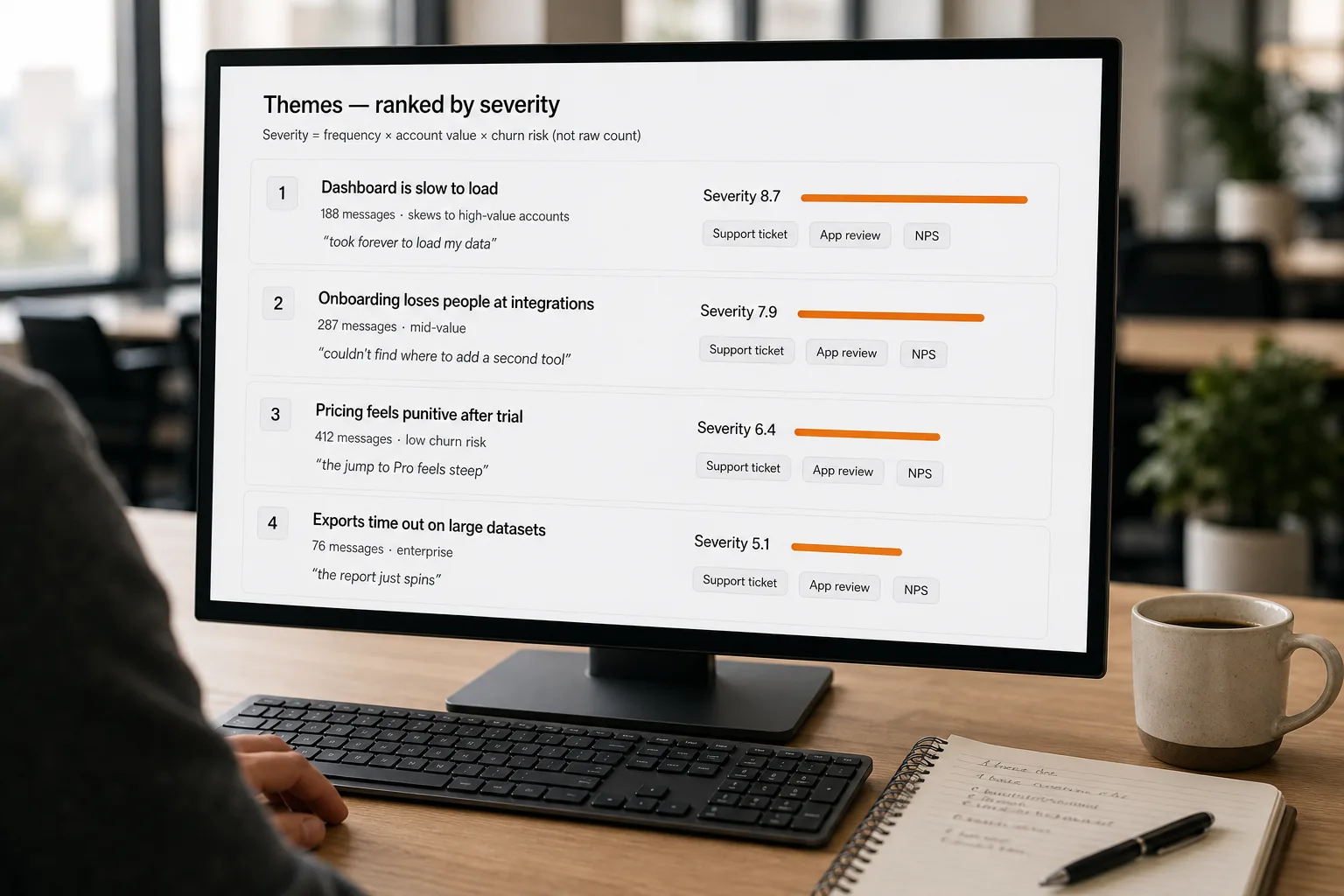
Finding patterns in customer feedback is what happens when, instead of someone reading every ticket and writing a weekly summary, the pile gets clustered and prioritised continuously — and humans only read the surfaced themes. Clustering here means grouping messages by what they’re about: AI puts the same underlying complaint into one bucket even when customers phrase it five different ways.
Customer feedback arrives faster than any team can read it. Support tickets, NPS comments, sales-call notes, app-store reviews, Slack messages, in-app surveys — by the time a leader can scan a quarter’s worth, the signal is months old.
What follows is the workflow itself — built for real volume (hundreds to thousands of pieces of feedback per week), real diversity of source channels, and a real obligation to act on what you find rather than just produce a dashboard nobody reads.
Where this fits — and where it doesn't
Use this if your feedback volume exceeds what a person can reasonably read each week, the feedback comes from multiple channels (support, sales, NPS, reviews, in-app), and you have a function (product, ops, customer success) that can actually act on what you find. Common fits: B2B SaaS with hundreds of customers, ecommerce with high review volume, consumer apps, customer-success teams.
Don’t use this if you have very low volume — fewer than ~50 pieces of feedback per week, where reading them all is faster and produces better understanding than running a pipeline. Don’t use it as a substitute for talking to customers — automated theme detection complements customer interviews, it doesn’t replace the qualitative depth.
What you'll need before starting
- Feedback data accessible programmatically — exports from Zendesk / Intercom / Help Scout, NPS responses, sales call notes from Gong / Granola / Otter, app store review APIs, Slack channels, customer interview transcripts.
- An agreed-on definition of what counts as “feedback” — does an internal team comment count? A vague “thanks!” reply? A bug report? Decide before you run the pipeline; output quality depends on input quality.
- A receiver — the function that will read the surfaced themes and decide what to do. The pipeline is wasted effort without one.
- An LLM API key (Claude, GPT, or Gemini) and an embeddings provider (OpenAI text-embedding-3 is the cheap default; open-source via Sentence Transformers if privacy-bound).
Six steps to a maintained feedback-pattern pipeline
- Define what “pattern” means for your team — before touching any tool
”Find patterns” is too vague to be useful. Pick the specific thing you want surfaced: themes (recurring topics — “checkout flow,” “dashboard performance”), sentiment shifts (week-over-week change in how customers feel about specific features), severity-weighted issues (frequency × business impact), or emerging signals (themes that didn’t exist last month). These need different pipelines. Most teams start with themes + severity-weighted prioritisation; sentiment alone is often too noisy to act on.
- Centralise feedback into one searchable store
Pull from every source into one database with a consistent schema — at minimum:
source · customer_id · timestamp · raw_text · channel · original_url. Dedupe identical or near-identical messages. This step is unglamorous and the most often skipped — but every downstream step is broken without it. Use a managed platform (Dovetail, Sprig, Chattermill) if your team won’t maintain custom infrastructure; build a small Postgres / S3 layer if you will. - Cluster into themes — embedding-based, not keyword-based
Convert each piece of feedback to an embedding (OpenAI
text-embedding-3-smallat $0.02/M tokens; or self-hostedbge-large-en-v1.5if privacy-bound). Cluster the embeddings — BERTopic is the open-source standard; managed platforms do this under the hood. The output is groups of feedback that are semantically related, not just keyword-matching. A customer complaining about “the dashboard is slow” clusters with one saying “took forever to load my data” — keyword search misses this; embeddings catch it. - Have an LLM label and summarise each cluster — with examples
Pass each cluster to an LLM with a prompt: “Read these N customer messages. Give them a short topic label (3–5 words). Write a 2-sentence summary of the common complaint or request. Quote 2 representative messages verbatim.” This turns clusters into something humans can scan. Force the verbatim quotes — they’re the difference between a generic “users want better performance” theme and a specific, actionable one. Hallucinated paraphrases are worse than no summary.
- Weight by severity, not just frequency — this is the prioritisation step that matters
”Most-frequent theme” is the wrong sort key. A theme mentioned 200 times by free-tier users matters less than a theme mentioned 8 times by your largest accounts. Compute a severity score per theme:
frequency × average_account_value × churn_risk_signal. Churn-risk signal can be as simple as “customer used the word ‘cancel’ or ‘switch’ in the message.” Surface themes by severity-weighted impact, with frequency as a secondary view. The team learns to act on the right priorities rather than the loudest ones. - Close the loop — track which themes got addressed and what the customer impact was
The most expensive failure mode is a beautiful dashboard that nobody acts on. Make the workflow concrete: each surfaced theme gets an owner and a status (open / investigating / shipping / resolved). When something ships, the pipeline notes the next 30 days of feedback on that theme — did mentions decrease? Did sentiment shift? This loop is what converts the pipeline from “we have insights” to “we ship fixes that move the metric.” Without it, the team drifts back to ignoring the dashboard within a quarter.
What it costs and what to expect
The accuracy numbers tell you the technology is good enough; the time-to-pipeline numbers tell you it’s tractable. The crossover numbers tell you whether to build or buy.
Other ways to solve this
Dovetail. Strongest fit when a research function — not product — owns the feedback layer. Excellent at qualitative analysis of interviews and longer feedback. Less optimal for high-volume support / NPS firehose where speed matters more than depth.
Sprig. Best for product-led growth teams that want in-app micro-surveys tied to specific user behaviour. Combines feedback collection with AI analysis in one product; lighter on integration breadth than enterprise platforms.
Chattermill. Enterprise-tier; best for organisations with multiple feedback channels (call centres, social, surveys, support) that need a unified semantic-analysis layer with industry-specific models. Higher cost, deeper analysis.
Topic modelling without LLMs (BERTopic, LDA). Right answer for privacy-bound or budget-bound teams comfortable with Python. Topic quality is meaningfully lower than LLM-augmented approaches; cluster labels are mathematical (top keywords) rather than human-readable.
A weekly human read of a sampled cohort. Still the right answer for low volume (< 200/week) and high-stakes feedback (key accounts). Sample 30–50 messages weekly, read them carefully, summarise yourself. Highest fidelity; lowest scale.
FAQ
How is this different from sentiment analysis?
Sentiment analysis assigns a positive / negative / neutral score to each piece of feedback. That's a one-dimensional signal that doesn't tell you what to do — "sentiment is down 12% this month" doesn't surface why or what to fix. Theme detection plus severity weighting tells you the specific issues to address. Most teams find theme detection more actionable; sentiment is best as a tracking metric, not a roadmapping input.
Will the pipeline find issues I haven't thought of, or just confirm what I already know?
Both — and the second is more common than the first in the early months. The pipeline's first job is to quantify what you already suspect, which lets you prioritise honestly. Genuinely novel themes emerge over quarters as the comparison baseline gets richer. Plan for the early value to be "we now know which of our suspected issues actually matter"; the surprise-finding value compounds over time.
How do I avoid the LLM hallucinating themes that aren't really there?
Two safeguards: (1) require the LLM to quote 2 verbatim messages per theme — if it can't, the theme is suspect; (2) sample-validate themes monthly by reading the underlying messages yourself and checking whether the label and summary match. Hallucinated themes are rare but real, especially for small clusters. (See AI hallucinations explained for the broader pattern.)
Should we run the pipeline weekly, monthly, or in real-time?
Weekly is the right cadence for most teams. Real-time produces noise (an angry tweet doesn't warrant a roadmap change); monthly is too slow to catch emerging issues before they become large. Weekly cadence with a Friday review meeting (45 minutes, top 5 themes by severity) tends to be the cadence that gets sustained.
Can the pipeline track sentiment over time per theme?
Yes, and it's one of the more useful views once the pipeline is running. "Mentions of dashboard performance increased 40% over the last quarter while sentiment on the theme dropped from -0.2 to -0.6" is a much sharper signal than aggregate sentiment alone. Per-theme trend lines turn the surfaced data into a leading indicator of churn risk.
Is open-source good enough or do we need a managed platform?
Open-source (BERTopic + Sentence Transformers + an LLM labelling step) is genuinely good enough for the analytical work. The reason teams pay for managed platforms is rarely the model quality — it's the integrations (your support tools, your survey tool, your CRM), the dashboard surface that non-technical stakeholders can use, and the workflow tooling for routing themes to owners. If you have engineering capacity to build that wrapper, self-build is fine; if not, the managed platform earns its money on workflow, not on the AI itself.