
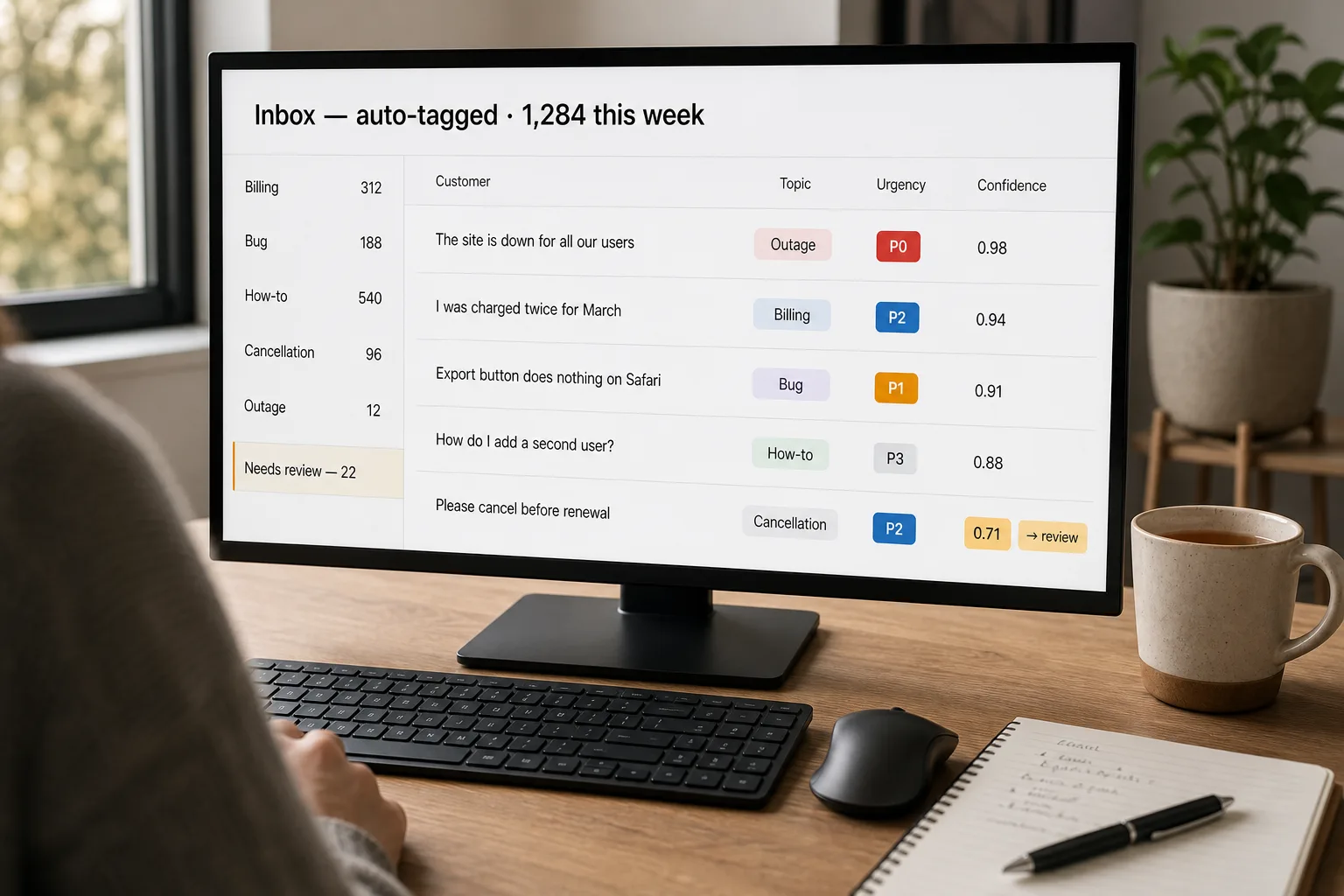
A support inbox at 8am has 200 new tickets. Most are routine billing questions and password resets. A few are security incidents that need engineering attention in the next hour. One is a customer threatening to escalate publicly. A senior agent currently spends 30 minutes reading and tagging tickets before any of them get routed. Five seconds per ticket adds up to hours every week, and the tags get applied inconsistently because the rules live in people’s heads.
Auto-categorisation promises to fix this. Most implementations fail in one of two ways. Either they over-confidently mis-route — the algorithm thinks every ticket is a billing question because most historically are — or they’re so cautious that everything ends up in a human-review queue, which is exactly where the workflow started.
This piece is the workflow that lands in between. Cheap inference (classical machine learning — fast, explainable, microseconds per prediction) for the obvious cases, expensive inference (an LLM) for the ambiguous ones, a confidence threshold that decides which is which, and a reviewer loop that doubles as training data for the next round.
Where this fits — and where it doesn't
Use this if you have a clear-enough tag taxonomy (5–12 topic labels, 3–4 urgency levels), you have past tickets that were tagged consistently by people who knew the product, and you have someone whose job is to review the low-confidence queue. The workflow needs all three; missing any one of them is the common failure mode.
Don’t use this if your tag schema is itself ambiguous or your team disagrees about which label belongs on which kind of ticket — auto-classification will encode and amplify the inconsistency. Don’t use it on a brand-new product where there’s no labelled history (cold start is solvable but adds 3–6 months to the timeline). And don’t use it for legal-risk categories (privacy complaints, regulatory issues, security incidents) — those should be flagged by deterministic keyword rules, not by a probabilistic classifier.
What you'll need before starting
- A helpdesk with API access — Zendesk, Intercom, Front, Help Scout, or HubSpot Service all expose what you need.
- 100–500 labelled tickets per topic label for classical ML; 20–50 if you’ll use an LLM in few-shot or fine-tuned mode.
- A written taxonomy — what each label means, with three representative examples each, agreed by the people who’ll use the labels.
- A human-review surface — usually a Slack channel, a Kanban view in the helpdesk, or a dedicated triage tool. The queue must be small enough that a reviewer can actually clear it.
- A small eval set — 50–200 held-out labelled tickets that don’t go into training. Without this, you can’t tell whether changes are improving the system or making it worse.
Seven steps to a working ticket classifier
- Lock the taxonomy before writing any code
Most failed classifier projects fail in the taxonomy step. Sit down with the support leads and write out the topic labels (5–12 of them, distinct, non-overlapping, with three example tickets per label) and the urgency levels (typically: P0 outage, P1 critical, P2 normal, P3 informational). Get explicit agreement on the boundary cases — “is a billing dispute a billing ticket or a customer-success ticket?” Document the answers. The taxonomy stability is what determines the classifier’s accuracy ceiling; an unstable taxonomy guarantees an unstable classifier.
- Gather and clean the training data
Export past tickets with their existing tags. Filter to the taxonomy you just locked — discard tickets with tags that don’t map, or relabel them in bulk if you can. Strip signatures, footers, and any PII you don’t need to retain. Split into train (80%), validation (10%), and test (10%) by date to mimic real conditions; random splits will overstate accuracy because tickets from the same time period are correlated.
- Build the hybrid classifier — classical ML first pass, LLM for low-confidence cases
The architecture that works: a classical ML classifier (sentence-transformers embeddings + logistic regression, or a fine-tuned distilBERT) handles the obvious tickets cheaply; an LLM handles tickets where the classical classifier’s confidence is low. For most teams, the classical first pass handles 70–80% of tickets at fractions-of-a-cent each, and the LLM gets the remaining 20–30% at cents-per-ticket. The cost ratio matters at volume — classical ML at scale costs hundreds of dollars a year; LLM-on-everything at the same volume costs thousands per month.
- Set the confidence thresholds — and tune them from real data
Two thresholds. The auto-route threshold: above this confidence, the classifier applies the tag and the ticket routes automatically. The review threshold: below this, the ticket goes to the human-review queue. Between them, the classifier proposes a tag but a human confirms before action. Start at 0.85 and 0.6, run for a week, then tune from the actual confusion matrix — if mis-routes are happening above 0.85, raise it; if the review queue is empty, lower the review threshold to let more ambiguous tickets get reviewed.
- Wire the human-review queue — and make it small enough to actually clear
The queue is the failure mode if it’s not designed. A queue of 200 tickets a day is one that nobody clears; a queue of 20 a day is one a reviewer can do as part of their morning. Calibrate the review threshold so the queue stays manageable. Every reviewer correction goes back into the training data for the next retraining cycle — the queue is not just an error-handling step, it’s the feedback loop that keeps the classifier improving. Make the corrections one-click; if reviewing a ticket takes more than 30 seconds, the queue will silently fall behind.
- Integrate with the helpdesk — default to “label as draft,” not “auto-route immediately”
Zendesk, Intercom, and Front all expose APIs to apply tags and trigger routing rules. Don’t trust the classifier on day one. Wire it to apply the predicted tag as a draft label that an agent confirms with one click for the first month. After you have a month of data, promote the high-confidence cases to full auto-routing; keep the medium-confidence cases as draft labels for the agent to confirm. The trust gap between “draft” and “auto-route” is where most teams blow up the workflow — a single mass mis-routing event can poison support’s willingness to use the system.
- Run continuous eval — the classifier degrades silently otherwise
Every quarter (more often at first), run the held-out test set through the current classifier and compare to the previous quarter’s accuracy. Investigate drops; usually it’s a new product feature creating tickets the classifier hasn’t seen, a new customer segment with different language, or a tag taxonomy change that wasn’t propagated to the training data. Catalog the failures, retrain on a refreshed dataset, redeploy. Without this loop, classifier quality degrades over six to twelve months and nobody notices until a senior leader complains about a specific mis-routing.
What it costs and what to expect
The cost story favours hybrid heavily at volume. A team doing 10,000 tickets a day pays under $30/month for the classical first pass and roughly $100–$300/month for the LLM on the hard 20% — somewhere between $130 and $330 a month all in. LLM-on-everything at the same volume runs $300–$1,500/month, between 3× and 5× the hybrid, and the gap widens at higher throughput. The ROI of the classical-first architecture is the largest of any single design choice in this workflow.
Other ways to solve this
Built-in helpdesk features. Zendesk Intelligent Triage, Intercom auto-triage, Front’s AI tagging — all available in mid- and high-tier plans, all using similar underlying ML. Right answer for most teams under ~20,000 tickets/month with a standard taxonomy. Less customisable; bundled in subscriptions you may already pay for; zero engineering effort.
LLM-only classification. Skip the classical ML; use Claude or GPT for every ticket with a classification prompt. Simpler architecture, much higher running cost. Right answer at low volume (under 1,000 tickets/day) where the cost difference is small. Wrong answer at high volume where the cost ratio is 10–50×.
Keyword rules + manual review. Some categories — security incidents, refund requests, anything with regulatory implications — should be flagged by deterministic keyword rules, not by a probabilistic classifier. Combine with the workflow above: rules catch the high-stakes cases, the classifier handles the rest. The mix is usually 5–10% rule-based, 90–95% classifier-based.
Don’t classify; just full-text search. For some teams the better answer is good search over the ticket archive (so agents can find similar past tickets) rather than auto-routing new ones. Less ambitious; sometimes more useful in practice. See find patterns in customer feedback for the pattern.
Related work
For the underlying technique distinction that this workflow exploits, see AI vs ML vs deep learning vs LLMs — auto-categorisation is one of the canonical “classical ML beats LLM on cost at scale” cases. For the pattern-detection cousin of this workflow, see Find patterns in customer feedback. For the downstream workflow where categorised tickets get drafted replies, see Draft customer support replies that hold up to scrutiny.
FAQ
Can I skip the classical ML and just use an LLM?
Yes — and for low volume (under ~1,000 tickets/day) the cost difference is small enough that it doesn't matter. At high volume the cost ratio is 10–50× in favour of hybrid. The other reason to keep classical ML in the pipeline: latency. Classical inference is microseconds; LLM inference is hundreds of milliseconds to seconds. For workflows where routing decisions need to happen in real time, the classical path matters.
What about brand-new categories with zero training data?
Two paths. (1) Use an LLM in zero-shot mode — describe the new category in the prompt, let the LLM classify until you have 20–50 labelled examples, then add the category to the classical model. (2) Accept that for the first month, the new category goes to a human-review bucket and is labelled manually; once you have data, train the model on it. The second approach is slower but produces more reliable accuracy faster than zero-shot performance at scale.
How do I handle tickets that legitimately span two categories?
Multi-label classification rather than single-label. Most classifiers support this natively (predict probabilities for each label, apply any label above the threshold). The trade-off: agents who see three tags on every ticket start ignoring them. A common compromise: single-label primary tag for routing, multi-label secondary tags for search and analytics. Make the routing decision deterministic and small; let the analytics layer be richer.
What's the right confidence threshold to start at?
0.85 for auto-routing and 0.6 for the review queue is a reasonable starting point for an 8-label taxonomy. Tune from the actual confusion matrix after a week of operation: if mis-routes are happening above 0.85, raise it; if the review queue is empty, lower the review threshold. The optimum depends on your taxonomy (more labels = lower per-label confidence) and on your cost-of-error (security incidents need higher thresholds than tagging convenience does).
Should the model see customer-identifying information?
Two answers depending on hosting. (1) Self-hosted classical ML on your own infra: yes, the model sees whatever you let it see; manage retention and access like any other internal system. (2) Sent to a third-party LLM (OpenAI, Anthropic): strip PII before the API call. The classifier doesn't need the customer's name, account ID, or phone number to classify the ticket; the topic is in the body text. Run a redaction step before any LLM call, regardless of vendor data terms — defence in depth.