
An engineer ships a feature on a Wednesday morning. The pull request merges. Three weeks later, a new customer hits an issue, checks the docs, and finds them describing the previous behaviour. A support ticket is filed; the engineer who wrote the feature is pulled off current work to update the docs and answer the ticket; the cycle repeats next month.
The “remember to update the docs” reminder is one of the highest-velocity failures in software organisations. It works for a quarter, then it doesn’t. Engineers ship features faster than the docs team can keep up; the docs site quietly grows a stale layer; new users hit the gap; eventually someone runs a docs-cleanup sprint that pulls a senior engineer off real work for two weeks.
The fix isn’t “remind people more.” It’s a continuous-integration pipeline that drafts doc updates the moment a PR merges, routes them to the docs owner, and turns “update the docs” from a memory task into a review task. This piece is that pipeline — the PR-summarisation step, the docs-mapping logic that figures out which doc page a code change affects, the validation that keeps drafts from going off the rails, and the routing that respects the docs owner without dropping changes on the floor.
Where this fits — and where it doesn't
Use this if your codebase ships meaningful product or API changes weekly, your docs are written down (not just code comments), and the gap between code and docs is currently a known problem. Common fits: companies with public SDKs and APIs, internal-platform teams supporting product engineering, devtools companies whose docs are part of the product, growing engineering orgs where the docs team can’t keep up manually.
Don’t use this if your docs live entirely in code comments and auto-generated API references (you have a different problem — make sure the comments are good), your engineering volume is too low to make the pipeline pay off (under ~5 merged PRs per week), or your docs are mostly narrative and conceptual rather than tied to specific code (the AI can draft API reference updates competently; conceptual content still needs human authorship). The last case is real — this pipeline is for keeping reference docs current, not for replacing the docs writer.
What you'll need before starting
- A docs system that lives in source control (Markdown / MDX in a docs repo, or in the same repo as the code). Pipelines that try to update docs in a separate CMS via API are an order of magnitude more complex; defer until v2.
- CI access — GitHub Actions, GitLab CI, CircleCI. The pipeline runs on PR-merge events.
- An LLM API. Cheap-tier models are fine for the summarisation and drafting work at this complexity level.
- A reasonably clean docs structure — each docs page has a discoverable scope (one API endpoint, one feature, one configuration option). Without this, the pipeline can’t map “which docs page does this code change affect.”
- A clear docs owner per docs section. The pipeline drafts; the human approves. Without an owner, drafts pile up unmerged and the pipeline becomes shelfware.
Six steps to docs that keep up with code
- Trigger the pipeline on PR merge with a labels filter
Configure a CI workflow that fires on PR merge events. Filter on labels or paths: PRs that touch public-API code (
src/api/**), feature config (src/features/**), or migrations (migrations/**) trigger the pipeline; PRs that touch only tests, lint rules, or internal-only modules don’t. The filter prevents the pipeline from drafting a dozen irrelevant doc-update suggestions per day; tune the paths from the first month’s experience. - Build the PR context — diff, commit messages, linked tickets
For each triggered PR, gather: the diff (limited to the relevant paths), the PR title and description, the conventional-commit messages from the squashed commits, and any linked Linear / Jira ticket. This context is what the LLM uses to understand what the PR actually changed. Diff-only context produces shallow summaries; commit-message-only context misses the implementation detail; the combined context produces drafts that read like a docs writer actually understood the change.
- Map the PR to candidate docs pages — semantic plus path-based
Use two signals to find docs pages that should update: (a) path-based mapping (changes to
src/api/billing/**map todocs/api/billing/**); (b) semantic similarity between PR title / description and existing doc page content. Combine both — path mapping catches the obvious cases, semantic catches the cross-cutting changes (a feature change that affects multiple doc sections). The output is a candidate-set of doc pages with a relevance score per page. - Draft doc-update diffs with structured output
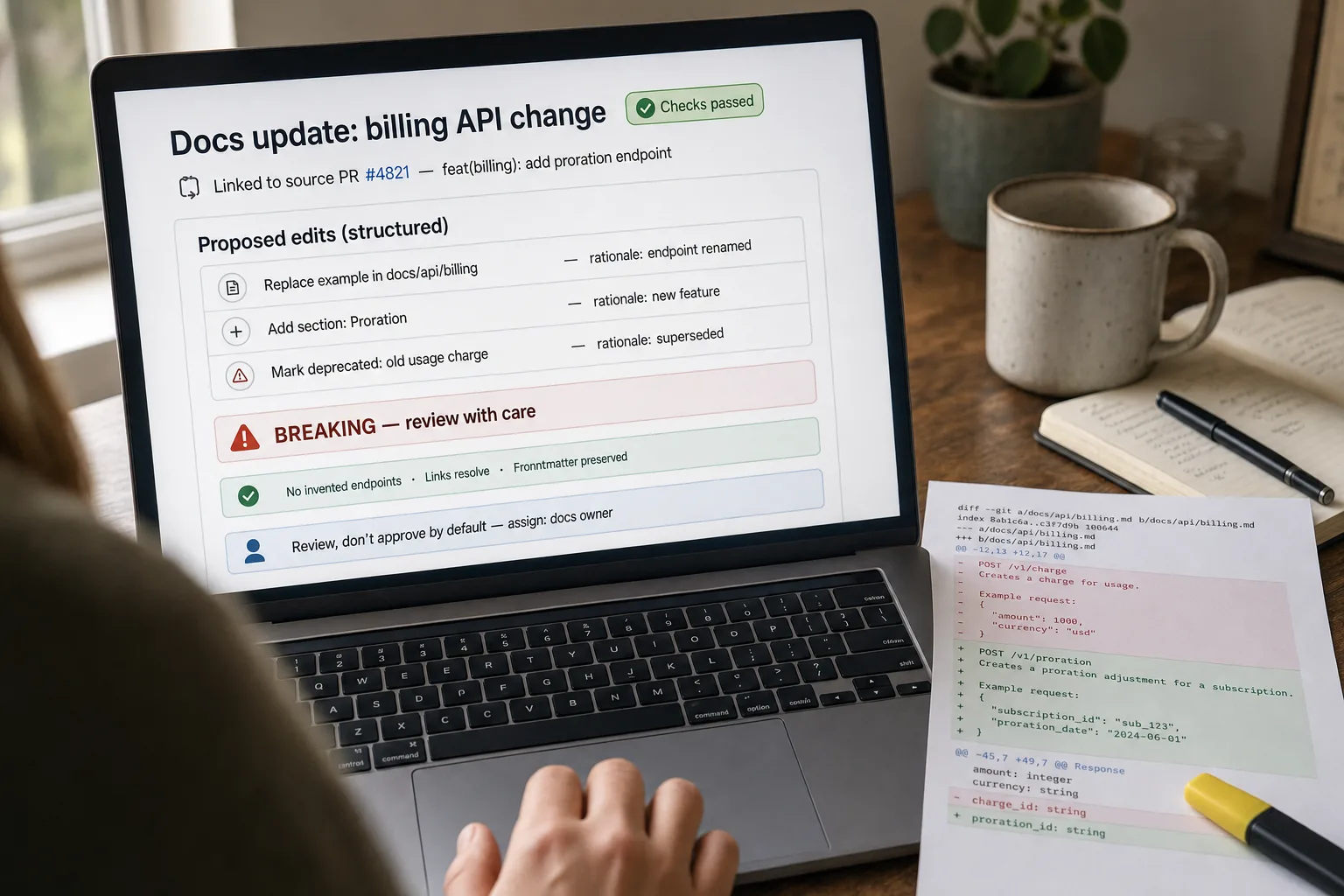
For each candidate doc page, ask the LLM to produce a unified-diff-style update or a structured edit-list (replace this paragraph with that one, add this new section under heading X, mark this example as deprecated). Structured output beats free-form rewrites because it preserves the docs page’s overall structure — you don’t want the AI to rewrite the whole page when only a code example needs updating. Include a one-line rationale per edit; the docs owner reads the rationale to decide quickly.
- Validate the draft — schema consistency, no invented endpoints, no broken links
Run validation before the draft reaches a human: (a) any new code examples should reference functions / endpoints that actually exist in the codebase (cross-check against an exported symbol table); (b) any links should resolve; (c) any code blocks should parse for the indicated language; (d) the draft should preserve the page’s frontmatter and metadata. The model occasionally invents an endpoint name that almost matches a real one; the validation step catches this before the docs owner has to.
- Route as a docs PR with the source PR linked — review, not approval-by-default
Open a docs PR with the validated draft, link it back to the source code PR, and request review from the docs owner. The framing matters: it’s a docs PR they’re reviewing, not an automatic merge. The docs owner reads, edits, approves, or rejects — but doesn’t have to write from scratch. Track the merge rate; if it falls below 70%, the drafts aren’t useful enough and the pipeline needs prompt tuning. Auto-close stale docs PRs after a few weeks to keep the queue clean.
What it costs and what to expect
The cost is small and the time-saved-per-docs-writer is the operational ROI. The docs-lag reduction is the qualitative win — features ship with current docs rather than stale ones.
Other ways to solve this
Docs platforms with built-in code sync (Mintlify, ReadMe, Stoplight). These platforms increasingly bundle Git-integration features — when code changes, the docs platform suggests updates. Right answer for teams that have already committed to a docs platform; the platform owns the sync mechanics. Trade-off: less customisation, vendor lock-in. Strong fit for API-first companies whose docs site is part of the product.
OpenAPI / API-spec-driven generation. For pure API reference docs, generate from a spec file (OpenAPI / Swagger / GraphQL schema) rather than from code diffs. The spec is the source of truth; docs regenerate when the spec changes. Most reliable approach for API references; doesn’t solve the conceptual / guide content side, which is where the AI pipeline above adds value.
Manual docs reviews on every PR. The traditional answer. Slow, but high-quality and human-judged. Works at smaller engineering volumes; doesn’t scale to teams shipping 50+ PRs per week. The AI pipeline accelerates the human reviewer rather than replacing them.
Don’t auto-generate — invest in the docs-writer relationship instead. Sometimes the right move is to embed a docs writer with the engineering team, where they see PRs land in real-time and update docs alongside. Higher headcount cost; produces the highest-quality docs. The AI pipeline is for teams where this embedded approach isn’t operationally feasible.
Related work
For the broader “docs that answer questions” workflow that sits downstream, see Internal Q&A bot over company docs. For the FAQ-from-tickets pattern that surfaces what’s missing in your docs, see Generate FAQ content from existing docs. For the document-classification pattern that helps map PRs to docs sections, see Document classification at scale. For the broader pattern of automation pipelines for ops workflows, see Email-to-task automation.
FAQ
What about generating docs from code comments alone — JSDoc, docstrings, etc.?
That's auto-generation of API reference, not what this pipeline is for. Tools like TypeDoc, Sphinx, JSDoc handle reference generation reliably from well-commented code; pair them with this pipeline for the narrative content (guides, tutorials, conceptual explanations) that lives separately from the API reference. The two compose: comment-based auto-gen for reference, AI-assisted pipeline for everything else.
How does the pipeline handle breaking changes vs additive changes?
PR title and conventional-commit prefix (feat, fix, BREAKING CHANGE) are the primary signals. Pass these to the LLM and instruct it to flag breaking changes in the draft prominently (a callout, a banner). Most teams adopt a separate label ("breaking" on the docs PR) so the docs owner reviews these with extra care. For SDKs, breaking changes also trigger a migration-guide draft, not just a reference update.
What if the PR touches code but doesn't need a docs update?
Two patterns. (1) Allow the pipeline to draft, then the docs owner closes the docs PR with a "not needed" comment — explicit, audit-trail-able, takes 30 seconds. (2) Train the pipeline to recognise no-docs-needed patterns (refactors, internal renames, test additions) and skip drafting for those. Most teams start with (1) and add (2) for the most common no-doc patterns after the first month.
Can this pipeline write changelog entries?
Yes — changelog generation is a simpler case of the same pipeline, and many teams build it first. The structured output is a list of bullet-point entries categorised by type (feature, fix, breaking, deprecation). Tools like Release Drafter handle the mechanics; LLM-augmented versions add better summarisation than purely commit-message-derived entries. The changelog pipeline is a good v0.5 before tackling full docs updates.
How do we prevent the AI from over-promising — describing features as 'fully supported' when they're behind a flag?
Include feature-flag context in the PR context (step 2). If a feature is shipping behind a flag, the LLM should be instructed to caveat the docs entry accordingly ("available in beta", "behind the X feature flag"). The docs validation step (step 5) should check for missing flag callouts on flag-gated features. This is a real failure mode — teams ship docs that describe a feature as available when it's actually in early-access; the prompt and validation need to handle it explicitly.
What about docs in multiple languages?
Run the pipeline per language locale, drafting in each language. Quality varies — English typically holds, other languages drop slightly. For high-stakes content (SDK reference, security guidance), draft in English and pair with a translation workflow for other locales (see AI translation services compared). The translation workflow needs the same review-before-merge pattern; don't auto-publish translated content without a native speaker's review pass.