
Document classification is the practice of assigning each file in an archive a consistent label — what it’s about, which team owns it, how sensitive it is, what type of doc it is. Once the labels are reliable, you can route, search, retain, or restrict documents automatically.
A document archive that has grown organically for five years is a system nobody owns the structure of. Some files are tagged by the last person who touched them. Some sit in folders whose names made sense to one departed colleague. Some are duplicates that should have been deduped a decade ago. The natural reaction is to “just run AI over it.” The natural failure is sending 50,000 documents through a flagship LLM at $0.01 each, watching the bill cross $500, and ending with classifications that are 88% accurate when 95% was needed.
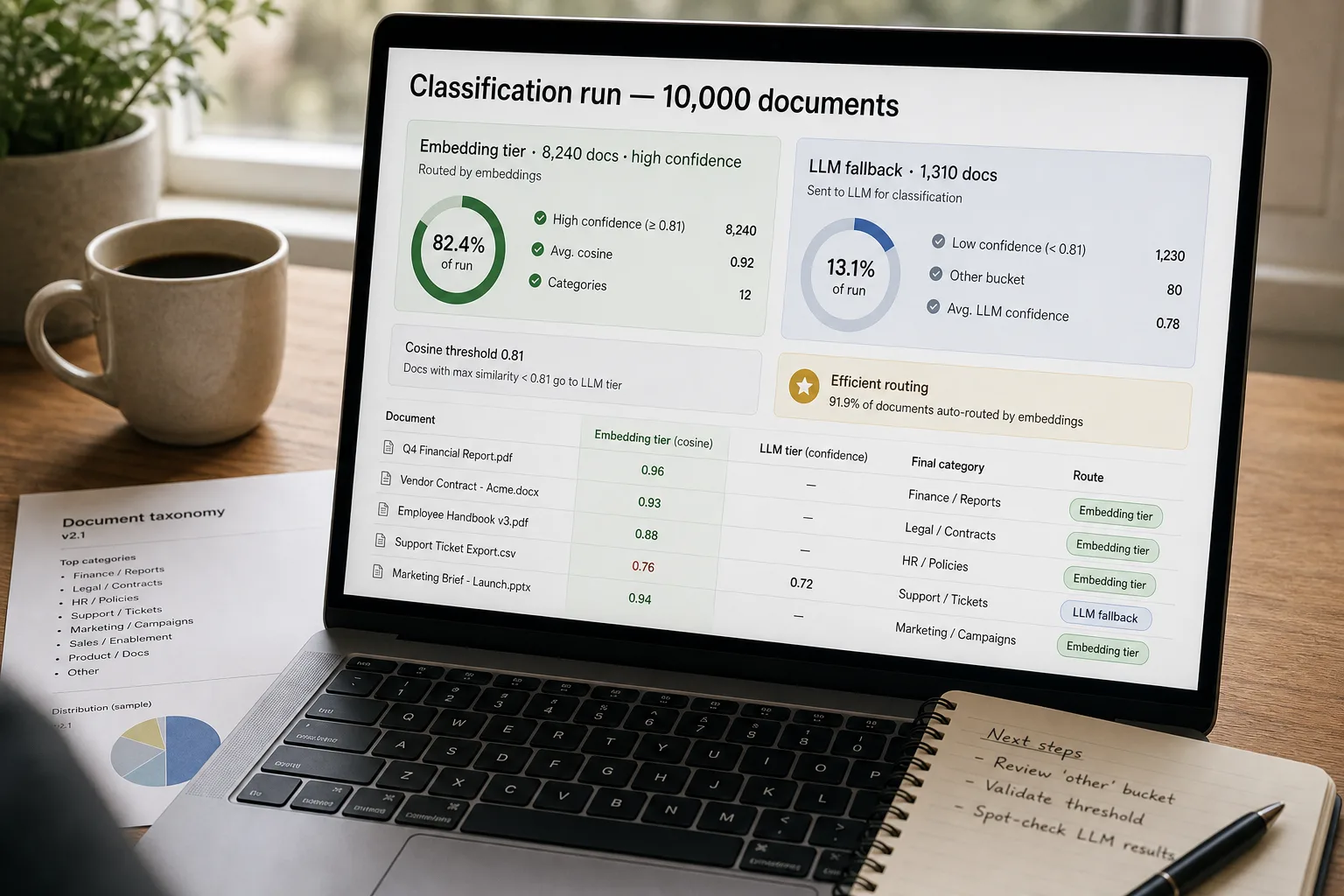
The fix is a two-tier pipeline. An embedding-based classifier — embeddings are the way AI represents meaning as numbers, so similar things can be compared — handles the obvious 70–90% of documents cheaply and confidently. An LLM (the technology behind ChatGPT, Claude, and Gemini) handles only the residual that genuinely needs reasoning. This piece is that pipeline: the taxonomy that doesn’t sprawl, the embedding-first routing, the LLM-fallback rule, and the audit pass that catches the silent failures classifiers are famous for.
Where this fits — and where it doesn't
Use this if you have hundreds to hundreds-of-thousands of documents that need consistent labels, the labels are operational (route to a team, apply a retention policy, surface in a search index), and the archive grows continuously. Common fits: support-doc archives, contract repositories, internal wiki backlogs, regulated-document classification (PII, PCI, GDPR scope), engineering-doc tagging for an internal search index.
Don’t use this if your archive is under 200 documents (manual classification is faster than building the system), your taxonomy is still in flux (build the taxonomy first, then automate — automating an unstable taxonomy produces churn), or the cost of misclassification is so high that 95% accuracy isn’t enough (legal hold, regulated medical records — those need human review on every document, not a classifier).
What you'll need before starting
- A document corpus accessible programmatically — SharePoint API, Google Drive API, S3 bucket, Confluence, Notion, a file folder with read access. Don’t try to classify a corpus you can’t iterate over.
- A locked-down taxonomy — 4–10 categories per axis, with one-sentence rules for each. We’ll build it in step 1; lock it before generating any embeddings.
- An embeddings API — OpenAI embeddings, Cohere, or an open-source sentence-transformers model running locally. Cheap-tier embeddings are good enough for almost all classification work.
- A storage layer for the embeddings — pgvector, Qdrant, Pinecone, or a flat file if the corpus is small. See Vector databases compared for the choice.
- An LLM API for the fallback path — Claude, GPT, or Gemini all classify the residual well; pick the cheap tier at this volume.
- A reviewer queue. The uncertain bucket needs human eyes once a week. If no one will own that, the classifier silently degrades.
Six steps to a classifier you can trust
- Lock the taxonomy first — narrow categories with explicit rules
Before any embedding work, write the taxonomy: 4–10 categories per axis, each defined in one sentence with two example documents and one counter-example. Multi-axis classification (topic × department × sensitivity) is fine, but each axis is its own pipeline. The cardinal mistake is letting the taxonomy expand as new edge cases appear; cap it. Anything that doesn’t fit goes to “other” with a flag for the weekly audit — which is your signal to either expand the taxonomy deliberately or accept the long tail as out of scope.
- Sanitise input — classify on the right fragment, not the whole document
A 200-page contract doesn’t need to be embedded in full to classify. For most documents, the first page + title + filename captures enough signal. For longer technical docs, the introduction and the conclusion together usually beat the body. Test on a sample of 100 documents: classify with full-document input and with sampled-fragment input; if accuracy holds within 1–2 percentage points (it almost always does), use the fragment version and save 80%+ on token cost.
- Classify with embeddings first — high confidence handles the majority
Build a reference embedding per category — the average of 5–20 known-good example documents, embedded together. For each new document, compute the embedding, then find the nearest reference. If the cosine similarity to the top category is above a threshold (start at 0.78 and tune) and at least 0.05 above the second-place category, accept the classification with high confidence. This handles 70–90% of documents cheaply — at a small fraction of the cost of LLM classification per document.
- Fall through to LLM classification only for the uncertain residual
Documents that fail the embedding-confidence check go to the LLM with the taxonomy in the system prompt, the sanitised document fragment, and a structured-output schema asking for: category, confidence, and a one-sentence rationale. The rationale is the audit lever — it lets the weekly review spot patterns (“the model keeps misclassifying contracts as legal-notices because both have similar opening boilerplate”). The LLM tier handles the 10–30% of documents where the embedding wasn’t decisive; it costs more per call but runs on fewer calls, so total cost stays low.
- Route + tag in the source system — deterministic, not heuristic
Once classified, write the tag back to the source system: SharePoint metadata, Google Drive labels, S3 object tags, Confluence tags, Notion database properties. The routing layer is deterministic — category → action — not another LLM call. Common routes: move to a department folder, apply a retention policy, add to a search-index facet, flag for a human reviewer. Skipping the route-back step and keeping the classifications in a separate database is how the system becomes shelfware — the documents in the source remain untagged, and nobody trusts the tags that live elsewhere.
- Audit weekly — the “other” bucket and the LLM-rationale patterns
Once a week, scan two things: the “other” bucket (documents that didn’t fit any category) and the LLM-classified documents with low confidence. Both are signals. If “other” is growing, the taxonomy is missing a category — add it deliberately or accept the long tail. If LLM rationales cluster around a specific failure (“kept misreading X as Y”), update the taxonomy rules or add an example document to the embedding reference for category X. This is the loop that keeps the classifier honest as the corpus grows.
What it costs and what to expect
The cost-asymmetry is the design lever — embedding-first routing makes the difference between a classifier that’s economically viable and one that isn’t. The accuracy ceiling is set by the taxonomy quality, not the model choice.
Other ways to solve this
Managed cloud classifiers (AWS Comprehend custom classification, Azure AI Document Intelligence, Google Document AI). Right answer for teams already in one of those cloud ecosystems, or for highly regulated content where the cloud provider’s compliance certifications matter. Trade-off: more vendor lock-in; less control over taxonomy iteration; higher per-document cost than a custom embedding pipeline.
LLM-only classification (no embedding tier). Simpler architecture; one call per document. Works fine at small scale (under ~1,000 docs/month); breaks the cost model at large scale. If you’re certain your archive won’t grow, the simpler path is fine. If you expect growth, build the two-tier pipeline from day one — retrofitting it later is more work than starting with it.
Pure rule-based classification (regex on filename + keyword in title). Deterministic, predictable, completely auditable. Works for narrow well-defined cases (invoices vs receipts vs purchase orders by document-shape signal). Breaks on content where the meaningful signal isn’t in keywords. Worth a baseline layer underneath the AI pipeline: known patterns go through deterministic routing; the AI handles the rest.
Manual classification by a tagged-document specialist. Still the right answer for highly regulated archives where the per-document review cost is mandatory anyway. AI can pre-classify and present a suggestion; the human accepts or overrides. Doesn’t scale to large archives without growing the team, but produces the highest-fidelity classifications for legal-hold or compliance-bound content.
Related work
For the underlying embedding mechanics behind the high-confidence routing tier, see Embeddings explained without math. For the vector-database choice that stores the embeddings, see Vector databases compared. For the same classification pattern applied to support tickets in a helpdesk, see Auto-categorize support tickets. For extracting structured data from documents after classification — invoices, contracts, forms — see Extract structured data from PDFs.
FAQ
How is this different from manual tagging or folder-based organisation?
Manual tagging is deterministic but doesn't scale — once your archive crosses a few thousand documents, the marginal cost of tagging each new one is bigger than the marginal value. Folder-based organisation forces a single hierarchy, but documents legitimately belong to multiple categories (a contract is also legal, is also vendor-X-specific, is also customer-facing). Multi-axis AI classification preserves that. The trade-off is you're trusting the classifier; the audit step is what makes that trust earned.
What about sensitive document classification — PII, PHI, financial?
Two patterns. (1) Run the classifier in a self-hosted environment if the documents can't leave your infrastructure — open-source sentence-transformers for embeddings, a self-hosted LLM (Llama, Mistral, Qwen) for the fallback tier. See build a private knowledge base for the architecture. (2) For PII detection specifically, the deterministic-regex-first pattern wins — known SSN, credit-card, email patterns get caught by regex, not by AI. AI handles the harder cases (contextual PII, indirect identifiers); regex handles the obvious.
How do I handle documents in multiple languages?
Two options. Single multilingual embedding model (Cohere multilingual embeddings, OpenAI text-embedding-3-large) covers 100+ languages with one classifier. Or, separate per-language pipelines if you need language-specific accuracy tuning. The single-model path is simpler; the per-language path wins on accuracy for low-resource languages where the multilingual model is weaker. Start with the single-model approach and split only if accuracy is unacceptable on a specific language.
Should I retrain or just retune the prompt when the taxonomy changes?
Retune first, retrain rarely. Embedding-based classification doesn't retrain — you update the reference embeddings for the changed categories. LLM classification doesn't retrain in this workflow — you update the system prompt with the new rules. Genuine retraining (fine-tuning an embedding model on your domain) is worth it only when the off-the-shelf models are consistently failing on a specific axis. For 95% of teams, prompt + reference updates handle taxonomy changes without any model training.
What if my documents are mostly tables, charts, or scanned images?
Different pipeline. Embeddings on raw image / OCR output produce noisy classifications; better to extract structured content first (see extract structured data from PDFs), then classify the structured output. For document-image classification specifically (is this an invoice, a receipt, a contract by shape), specialised models — Donut, LayoutLMv3, or managed services like AWS Textract — outperform general-purpose LLMs on the image-first task.
How often should I re-embed the reference categories as the corpus grows?
Reference embeddings drift slower than you'd expect. Re-embed when you add or rename a category (immediate), when the audit shows accuracy dropping below threshold (typically quarterly), or when you've added 20%+ to the corpus since the last refresh (annually for most teams). Re-embedding is cheap; the gain is usually small except after taxonomy changes. Don't over-schedule it.
