
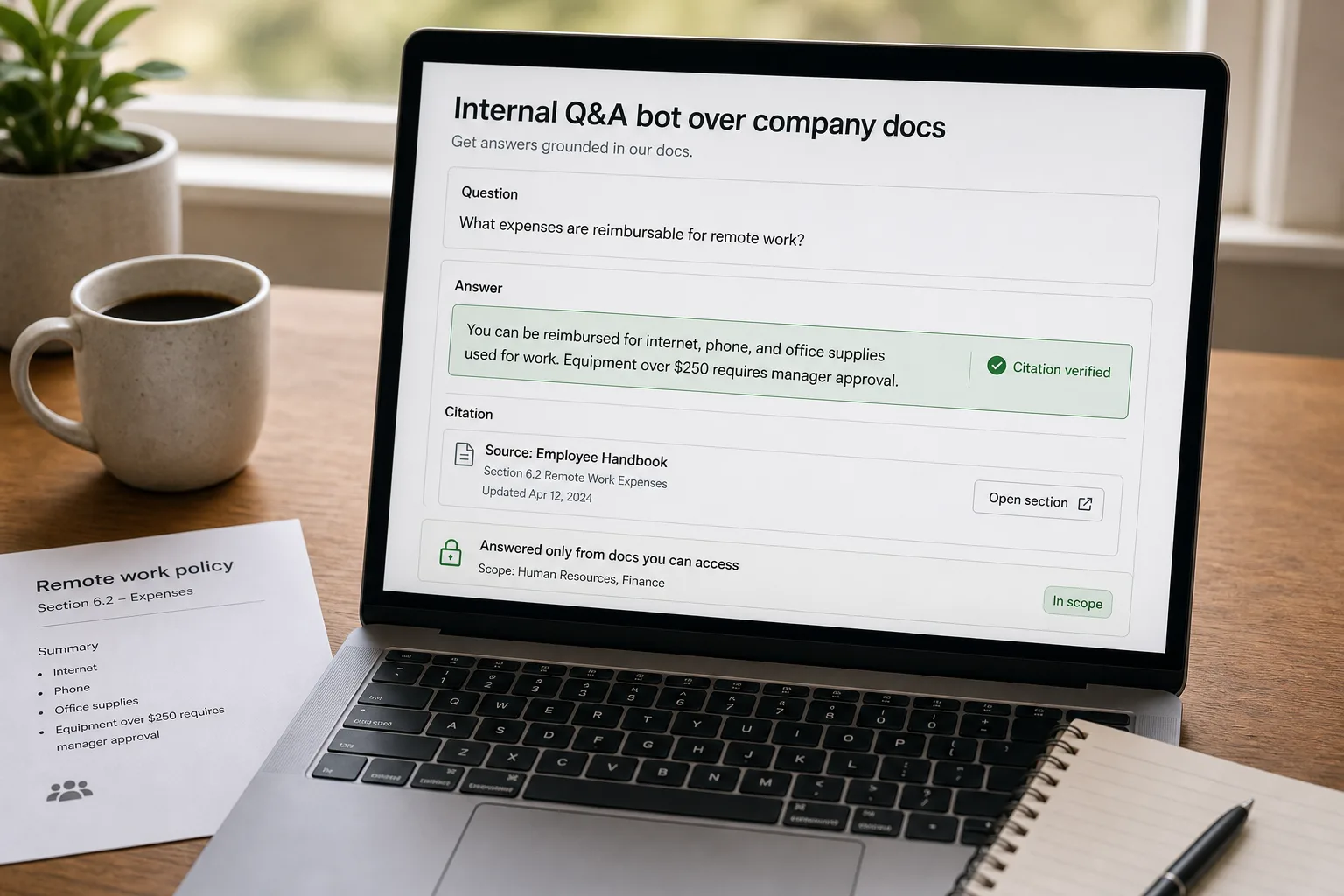
If you run people ops, IT, or internal tools at a 50+ person company, the “ask the wiki” problem is one of the highest-volume, lowest-leverage interactions you handle. Half of the questions in the people-ops Slack channel are the same ones asked last quarter. The IT helpdesk gets the same five questions every month. New hires spend their first week asking colleagues things that are documented in handbooks they don’t know exist.
The intuitive fix is to plug a chatbot into your docs. It works in a demo and fails in production for a specific set of reasons. It invents policy that doesn’t exist (a failure mode called hallucination). It serves stale answers from documents that should have been archived. It leaks information across permission boundaries that the doc system enforced but the bot doesn’t.
The production-grade workflow uses retrieval-augmented generation — giving the AI access to your specific documents — to ground every answer in a real source. Then layer on fact-verification, an access-control layer that respects who can see what, and a freshness mechanism that keeps the bot from confidently citing a policy that was rewritten last year.
Where this fits — and where it doesn't
Use this if your company has at least 50 employees, a doc archive that nobody fully knows, and a meaningful volume of repeat questions hitting human channels (Slack, IT tickets, people-ops email). The leverage is real — a tuned bot deflects 30–60% of routine questions and frees the human channels for the actually-novel ones. Common fits: people ops, IT helpdesk, finance ops, engineering platform teams answering the same DevEx questions on repeat.
Don’t use this if your doc archive is small enough that everyone knows where everything lives (under ~20 employees typically), your docs are out of date or contradictory and nobody owns the cleanup (the bot exposes the mess loudly), or you can’t enforce access controls in your retrieval layer for sensitive docs (HR investigations, executive comp, strategy decks). The last case is the hardest one — if you can’t restrict what the bot sees, you can’t deploy it safely.
What you'll need before starting
- A primary doc corpus — Notion, Confluence, Google Drive, SharePoint, a wiki, an internal docs site. Multiple is fine; one source is simpler for v1.
- Embeddings access and a vector store — pgvector, Qdrant, Pinecone, or whatever your platform uses. See Vector databases compared for the choice.
- An LLM API for the generation step — Claude, GPT, or Gemini all work; pick the small or mid-tier model for cost.
- A clear policy on access controls — which docs are open to all employees vs department-restricted vs role-restricted. The bot needs to honour these; deploying without is a leak waiting to happen.
- A doc owner per major doc group — someone who’s accountable for keeping each handbook section current. Without this, freshness decays and the bot serves stale answers confidently.
Six steps to a bot the team will actually trust
- Chunk and embed the corpus — section-level, with metadata
Split each doc into semantic chunks (sections or paragraphs of 200–800 tokens) rather than fixed-size splits. Embed each chunk with metadata: source doc URL, section heading, last-modified date, owner, and access-control labels. Section-level chunking is what makes citation work — the bot can point at the exact paragraph, not just the doc — and metadata is what makes access controls and freshness work. Skip metadata at this step and you’ll have to re-embed the whole corpus later.
- Retrieve with hybrid search — semantic plus keyword, then rerank
For each question, run semantic search (embedding similarity) and keyword search (BM25 or similar) in parallel, then rerank the combined top results with a dedicated rerank model (Cohere Rerank or similar). Hybrid plus rerank consistently outperforms pure semantic search on internal docs — semantic catches the rephrased questions, keyword catches the exact-jargon hits, rerank picks the best across both. Retrieve 20–30 chunks; rerank to the top 5–8 for the generation step.
- Generate with grounding and verbatim citation
Pass the top-ranked chunks to the LLM with two strict instructions: (1) every factual claim in the answer must be supported by one of the retrieved chunks, with the chunk ID cited inline; (2) if the question can’t be answered from the retrieved chunks, say so explicitly rather than guessing. The model will sometimes ignore the instructions; the verification step in the next item catches that. The grounding rule is the difference between a bot that’s useful and one that confidently invents policy.
- Verify citations programmatically — not by trust
For every cited chunk in the answer, run a deterministic check that the cited claim actually appears in the chunk. The model occasionally invents a citation ID, or paraphrases a claim that’s adjacent to but not exactly in the cited chunk. The fact-verification step rejects answers that fail and either re-runs generation or surfaces a “can’t confidently answer” response. This step is what makes the bot trustworthy at scale; teams that skip it find a hallucinated answer eventually ships to an employee and the bot loses the room.
- Respect access controls at retrieval time, not generation time
Filter the candidate chunks by the asking user’s access permissions before they reach the LLM. If a doc is restricted to the HR team, an engineer asking about it should get a “no relevant docs found” response rather than a redacted answer that hints something exists. Doing access control at retrieval time prevents leakage through generation — the model can’t summarise what it never sees. The metadata captured in step 1 is what makes this enforceable.
- Surface freshness explicitly — “last verified” badges and stale-doc flags
Every answer should include the source doc’s last-modified date. Add a stale threshold (typically 6 months for policies, 3 for fast-moving topics like engineering tools); flagged docs prompt the bot to add a caveat (“This is the latest doc, but it was last updated 14 months ago — verify with the owner”). The freshness signal is what prevents the slow-rot failure mode: docs drift, the bot confidently cites a year-old version, and nobody notices until the policy has changed. Tie this back to a notification to the doc owner when their doc gets flagged repeatedly — that’s the feedback loop that keeps the corpus current.
What it costs and what to expect
The cost is small for the value. The deflection rate is the operational metric — that’s what determines whether the bot is paying off in freed human-channel time.
Other ways to solve this
Managed workplace AI (Glean, Microsoft Copilot for 365, Notion AI Enterprise, Atlassian Rovo). Turnkey workplace search and Q&A across multiple corpora. Right answer for teams that want a working system without building the retrieval + generation stack. Trade-off: higher per-seat cost, less control over retrieval logic, and dependency on the vendor’s integrations. Strong fit for larger orgs where the engineering cost of building outweighs the licensing cost.
Doc-platform AI built-in (Notion AI Q&A, Confluence AI, SharePoint Copilot). Single-corpus Q&A built into the doc platform itself. Right for teams whose docs live primarily in one tool. Limited cross-corpus search; modest customisation. Cheapest path to “ask our wiki” Q&A; ceiling is lower than a custom build or a federated platform.
Improved doc search — without generative answers. Sometimes the right answer is better search rather than Q&A. Algolia for an internal docs site, Pagefind, or doc-platform-native search with synonym mapping. Cheaper, more predictable, no hallucination risk. The trade-off is the user still has to read the doc to find the answer; for repeat questions, the Q&A bot’s deflection is the lift.
Better doc curation, no AI. The under-rated alternative. Many “ask the wiki” failures are documentation failures — outdated, contradictory, scattered. A quarterly doc cleanup pass often produces more deflection than a chatbot does. The two compose well: clean docs make the bot accurate; the bot’s no-answer log tells you which docs need cleaning next.
Related work
For the underlying RAG architecture pattern this builds on, see Build a private knowledge base your team can search. For the broader RAG concept in plain language, see RAG explained without acronyms. For the embeddings mechanics that drive retrieval quality, see Embeddings explained without math. For the vector-database choice, see Vector databases compared. For the broader pattern of letting AI confidently invent things, see AI hallucinations explained.
FAQ
How is this different from just using Notion AI or Confluence's built-in Q&A?
Built-in platform Q&A is good for single-corpus questions where everything you need is in one tool. The custom-build approach wins when you have docs scattered across multiple tools (Notion + Drive + Confluence + an internal docs site), when access controls are non-trivial, when you need the bot integrated into Slack or a custom helpdesk, or when you want explicit citation and fact-verification beyond what the platform offers. Start with the built-in option; move to a custom build when you've outgrown it.
What about sensitive docs — HR investigations, comp, strategy decks?
Two options. (1) Exclude them entirely from the bot's corpus — simplest, safest, what most teams do. (2) Build per-user access control into retrieval (described in step 5) and gate sensitive corpora behind role-based permissions. Option 1 is the default unless you have a clear reason to include sensitive docs. The risk of access-control bugs is high; the value of bot-answered sensitive questions is low for most teams.
How do we handle conflicting docs — two policies that contradict each other?
The bot will retrieve both and the generation step will either pick one (with citation) or surface the conflict explicitly ("these two docs disagree — see [link A] and [link B]"). Configure the prompt for the explicit-conflict path; it's more honest and routes the disambiguation to a human. The deeper fix is upstream: the bot's conflict-log is the cleanup queue for the docs team. Every conflict it surfaces is a doc-owner decision waiting to happen.
Can the bot remember previous conversations or answer follow-ups?
Yes — pass the conversation history along with the new question to the LLM, plus re-run retrieval on the latest question with context. Multi-turn conversations work well for clarifying questions ("what about for contractors?") but degrade for genuinely new topics in the same session. Reset the conversation per topic; the latency and cost of long histories isn't worth it.
What about Slack integration — should the bot live in Slack or in a separate app?
Slack is usually where the questions live, so put the bot there. Most workplace-AI platforms ship Slack apps; for custom builds, the Slack Bot API is well-documented. Two patterns work: (1) DM-based for personal questions; (2) @-mention in public channels for team-visible answers. The team-visible mode produces a useful byproduct — answered questions become part of the channel history and help the next person without re-asking the bot.
How do we measure if the bot is actually helping?
Three signals. (1) Deflection rate — questions answered by the bot that didn't escalate to humans (measured by comparing question volume in human channels before and after launch). (2) Thumbs-up / thumbs-down rate per answer — the explicit-feedback signal; aim for above 85% thumbs-up on routine questions. (3) Doc-owner notifications triggered by repeated retrieval misses — the proxy for documentation health. The third is the long-term-value signal; the first two are the daily-operational ones.