
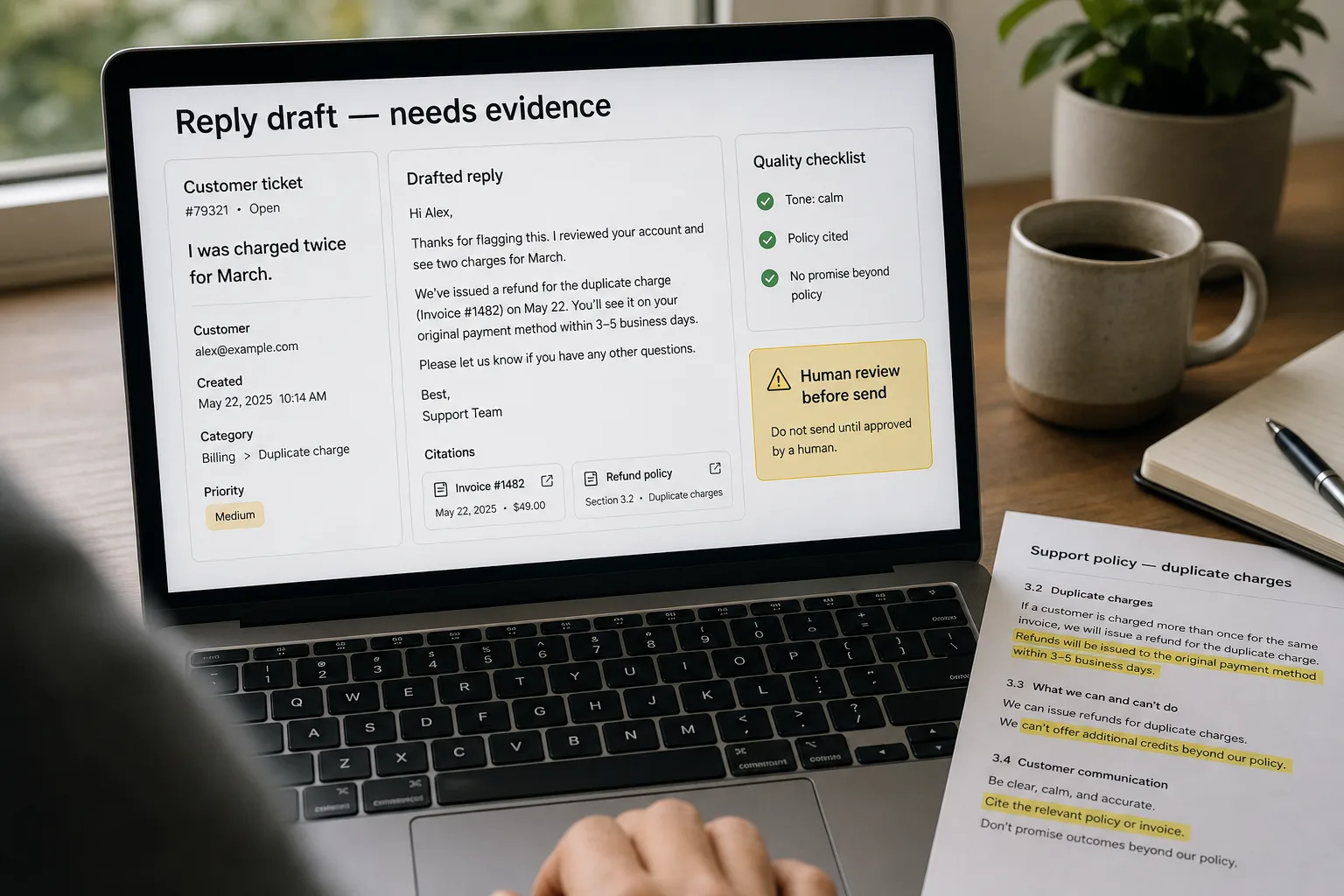
AI-assisted reply drafting means the AI writes the first version of each support response, grounded in your knowledge base, and a human agent reviews it before it goes out. Used well, it lets a support team handle more tickets per person without dropping quality.
Used badly, it fails in one of two ways. The reply sounds right but says something subtly wrong about your product — a confident hallucination (an AI’s confident-sounding wrong answer) gets noticed three replies later, by which point the customer has lost some trust. Or the reply is so obviously generated — the tricolons, the over-helpful sign-off, the “I understand how frustrating this can be” — that the customer can tell on first read, and the trust loss is immediate.
The fix is not a smarter model. It’s a workflow that grounds drafts in retrieved facts, calibrates tone against your team’s actual past replies, and routes anything high-stakes to a human before it goes out. This piece is that workflow — the prompt shape, the confidence threshold, the escalation criteria, and the weekly audit loop that keeps the system honest as your product changes underneath it.
Where this fits — and where it doesn't
Use this if your support team has more inbound than capacity, your knowledge base is reasonably current, and the bulk of replies are recognisable patterns (“how do I cancel”, “I was charged twice”, “can you walk me through X”). The workflow works because most support tickets are not novel — they are variations of the same fifty questions, and AI assistance with grounding can produce a usable first draft for 60–75% of them, leaving humans to spend their attention on the harder 25–40%.
Don’t use this if the customer is in a flagged state — angry, mentioning cancellation, asking about a refund, threatening legal action, dealing with a security or privacy incident, or in any conversation where attribution will matter later (compliance, regulatory complaints, formal disputes). Don’t use it on tickets where the answer is not already in your knowledge base — a confident-sounding draft about a feature that doesn’t exist is worse than a slow human reply. And don’t use it on the long tail of customer-specific tickets (“you broke our integration, here’s the error”) that need a human to read context and reproduce the problem.
What you'll need before starting
- A helpdesk with API access — Zendesk, Intercom, Front, Help Scout, Freshdesk, or HubSpot Service all expose what you need.
- A reasonably current knowledge base — articles, internal docs, recent ticket resolutions. The system can only ground in what you can retrieve; stale or thin KB is the hard limiter.
- Twenty to fifty of your team’s best past replies — these become the voice reference. Pick from different categories (refunds, how-to, troubleshooting) and from different reps if voice varies by person.
- A written escalation policy — which categories never get AI drafts, what confidence threshold triggers human review, who reviews. Write it once, share it with the team, revisit quarterly.
- Model API access with usage caps — Claude or GPT for the drafting layer, with a daily budget so a misconfigured loop doesn’t run up a five-figure bill before anyone notices.
Seven steps to AI-drafted replies that hold up
- Build the context pack for each ticket — the grounding is the whole game
For every inbound ticket, retrieve a context pack before any drafting happens. Include: the relevant KB articles (top 3–5 by semantic similarity to the ticket subject and body), the last 5 tickets from the same customer (account history shapes the right tone), any active subscription or billing facts (current plan, renewal date, payment status), and 2–3 of your team’s past replies on similar tickets (voice anchor). Cap the total context at 6–8k tokens — long context degrades retrieval quality and inflates per-ticket cost. The model only knows what’s in this pack; everything else is invention risk.
- Pick the model and lock in a system prompt
Claude Sonnet 5 and GPT-5.6 Terra are the right defaults — fast enough for interactive use, smart enough to follow constraints, cheap enough at typical context-pack sizes. The system prompt should cover four things explicitly: the company voice (3–5 sentences referencing the past-reply samples in the context pack), banned phrases (“I understand how frustrating this can be”, “as an AI”, anything else your editor has flagged), the grounding rule (“every product claim must appear in the retrieved KB articles; if a claim is not retrievable, respond with a request for clarification or escalate”), and the output format (the structured fields the next step expects). Version the system prompt in git — revisions happen, and the audit log matters.
- Generate the draft with explicit confidence and fact-citations
Ask the model to return the reply along with two metadata fields: a confidence score (0–1) and a list of citations — which retrieved KB chunks support each factual claim in the reply. Drafts without citations are drafts without grounding. The model will sometimes fabricate citation IDs; the next step verifies them. The confidence score is self-reported and imperfect, but it correlates with actual accuracy enough to be useful as a routing signal — set the bar around 0.7 to start and re-tune from real audit data after a month.
- Fact-verify the draft against the context pack — programmatically, not by eye
For every factual claim in the draft (prices, dates, feature availability, policy statements), verify that the cited KB chunk actually contains that fact. This is a deterministic check, not an AI judgement — extract the claim, look up the citation, compare. Mismatches mean the draft hallucinated; reject the draft and either retry or escalate. The fact-verification step is the single largest accuracy lever in this workflow; teams that skip it because “the confidence score is high enough” find out the hard way that confident hallucinations are the most expensive kind.
- Tone-calibrate against your past-reply anchors
After grounding passes, re-read the draft against the 2–3 past-reply samples in the context pack. The model has already been told to match voice in the system prompt; this step catches the drifts it produces anyway — slightly over-formal openings, over-hedged middles, sign-offs that are warmer than your team usually goes. If the calibration step rewrites more than a quarter of the draft, treat that as a signal to revise the system prompt rather than accept the rewrites.
- Route by confidence and customer state — humans review the rest
Three routing outcomes per ticket: (a) confidence above threshold and customer not in a flagged state → draft posts as a “suggested reply” the agent accepts with one click; (b) confidence below threshold or factual mismatch in step 4 → draft routes to a human-review queue with the original ticket and the failed checks attached; (c) customer in a flagged state (cancellation, refund, anger sentiment, security keyword) → draft is suppressed entirely and the ticket routes to a senior agent. The flagged-state detection is keyword + sentiment, not an LLM judgement — keep it deterministic to avoid second-order failures.
- Track every accepted, edited, and rejected draft — then audit weekly
Log four fields per ticket: was a draft generated, was it accepted as-is, was it edited (and how much), was it rejected entirely. Once a week, sample 20 tickets — read the original, the draft, and the final reply. Look for patterns: which categories are accepted most, where edits cluster, what the rejected drafts have in common. Adjust the system prompt, the retrieval thresholds, or the escalation rules accordingly. The audit loop is what makes this a system rather than a gadget. Teams that skip the weekly review find quality drifts within two months — model behaviour changes, your product changes, the KB drifts, customer language shifts, and a workflow that worked in week one stops working by week ten.
What it costs and what to expect
The acceptance-rate numbers move with KB quality, ticket diversity, and how disciplined the audit loop is. Teams with thin KBs cap out below 50% no matter what model they pick.
Other ways to solve this
Full helpdesk AI (Intercom Fin, Zendesk AI agents). If you are already on one of these platforms, the built-in AI agent is the path of least integration work — they bundle retrieval, drafting, and tooling into the helpdesk itself. The trade-off is per-ticket pricing (Fin is around $0.99/resolution at the time of writing, Zendesk AI agents land $1.50–$2/automated resolution), opacity in the audit data, and lock-in to one vendor’s prompt design. Good fit for teams that need a fast pilot and accept the cost premium; weaker fit for teams that want to own the prompt and the audit log.
Manual reply templates (no AI). Still the right answer for teams under a thousand tickets a month or with very narrow product surface area. Templates compose well, are perfectly auditable, and never hallucinate. They scale badly past a few hundred templates because the cost of choosing the right one rises faster than the cost of writing replies from scratch.
Hybrid: AI for the draft, templates for the structure. For categories with high stakes (billing, account changes, security) and clear answer shape, generate the variable bits with AI (account-specific phrasing, customer-context paraphrasing) but hold the structural skeleton in templates. Lower flexibility; much lower hallucination risk on the categories where it matters most.
Self-built RAG pipeline. For privacy-sensitive teams who cannot send ticket bodies to a model vendor, build a private RAG over your KB and run a local LLM for drafting. Significantly more engineering work; complete data control. Right answer when no vendor’s compliance posture is acceptable.
FAQ
How do I keep voice consistent across drafts when different reps' past replies look different?
Pick a single source of truth — usually the two or three best agents on your team — and use only their past replies as the voice anchor in the system prompt. Mixing voice samples produces a flat, averaged tone that sounds neither like any of your team nor like a deliberate house voice. Document the choice so the team understands why the AI drafts sound like the seniors.
When does an AI draft actively damage trust with the customer?
Three situations consistently: when the draft is confidently wrong about a product fact (the customer notices, escalates, and now distrusts every reply); when the draft uses canned empathy phrases the customer can spot as AI ("I understand how frustrating this can be" is the canonical example); and when the draft answers a different question than the customer asked because retrieval pattern-matched on surface keywords. The fact-verification step catches the first; the system-prompt banned-phrases list catches the second; the escalation routing catches the third.
Should we tell customers their reply was AI-drafted?
There is no consensus and the right answer depends on your brand. Some teams disclose proactively (a footer line, a tone of voice that doesn't pretend the rep wrote every word); some don't and treat the AI as a tool the rep used, no different from a knowledge-base search. The legal landscape is shifting — some jurisdictions now require disclosure for fully automated customer interactions. If you are letting AI drafts post directly with no human review, lean towards disclosure; if a human is the one-click approver, the case is weaker.
How do I handle PII in the context pack without leaking it to the model vendor?
Two patterns. First, use a vendor with an enterprise / API agreement that excludes your data from training and has a documented data-retention policy (Anthropic and OpenAI both offer these tiers). Second, redact obviously sensitive fields before they enter the context pack — payment details, government IDs, anything HIPAA-relevant. Don't rely on the model to keep PII in its head and not mention it back to the customer; deterministic redaction at the input boundary is more reliable than any model-side instruction. See AI privacy — what to watch for for the broader vendor evaluation.
What if the customer's question is in a language my team doesn't speak?
Two options that work; one that doesn't. Option A: route to a vendor who supports the language natively (Intercom Fin, Zendesk AI agents both handle 40+ languages reasonably). Option B: maintain a language-specific KB and a language-specific reviewer (slow but high-quality). What doesn't work: drafting in English, machine-translating to the target language, sending. The voice calibration breaks, the cultural context breaks, the hallucination rate goes up — and you have no one on the team who can audit what went out.