
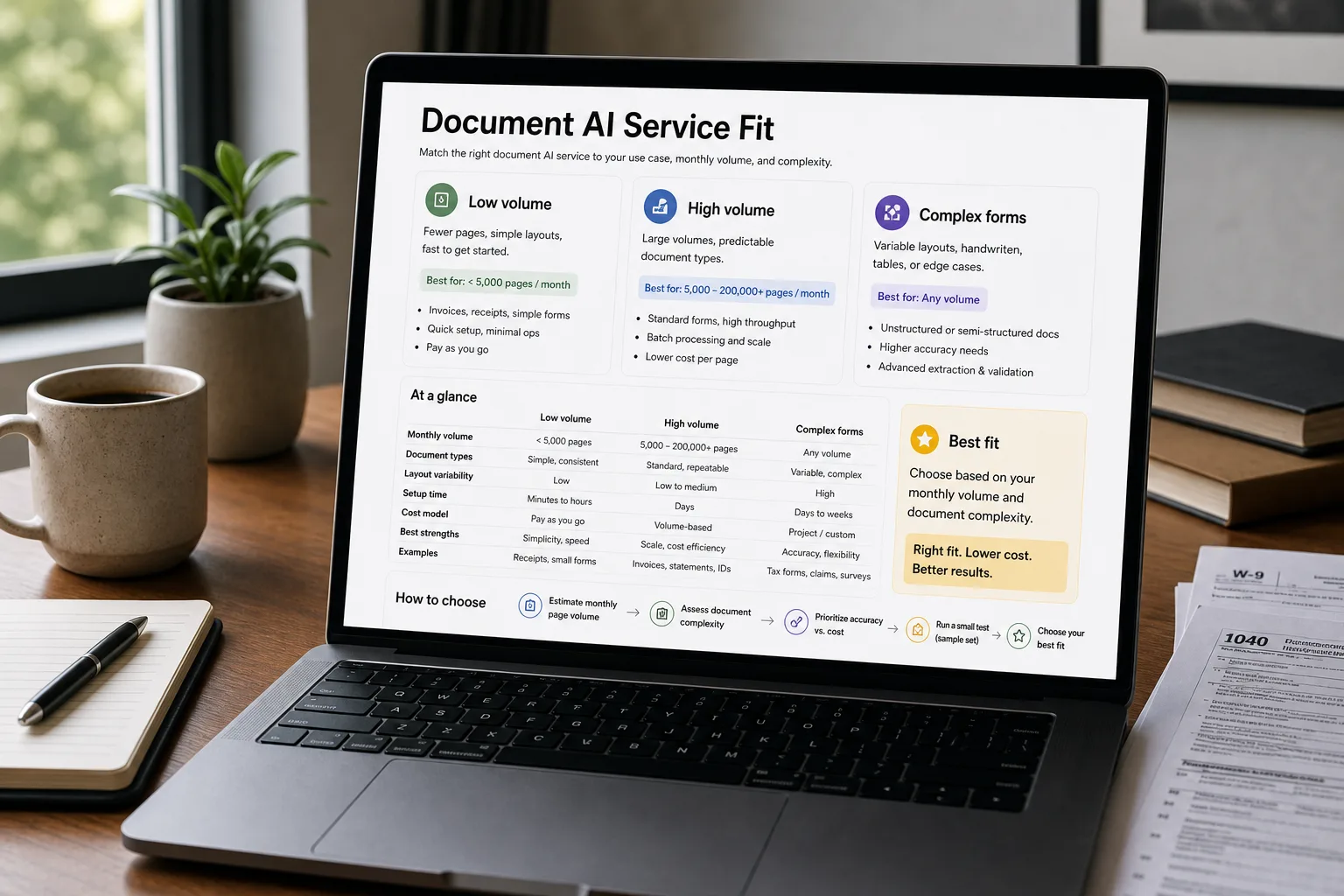
A document AI service reads PDFs, scans, and images — pulling fields out of invoices, forms, contracts, and receipts — so the data can be written into a database without anyone typing. The pieces that do this break into two families.
Specialist OCR services (AWS Textract, Google Document AI, Azure Document Intelligence) are purpose-built for documents. They include features like key-value detection, table extraction, and signature detection. General-purpose vision LLMs (OpenAI Vision, Claude Vision, Gemini Vision) are the same large language models you use for chat, given the ability to see images. They handle novel layouts well; they’re less specialised for high-volume back-office work. Underneath both sits an open-weights DIY tier (Donut, LayoutLMv3, the Qwen 2.5 VL family) — software you run yourself on your own hardware.
The extract-structured-data-from-PDFs piece covers the model-level question. This piece is one layer up: when you need a service — queued processing, batch APIs, schema-aware extraction, audit logs, an SLA — how do the offerings compare, and at what volume does it become cheaper to build the DIY pipeline yourself? Each is the right answer for a specific workload. The decision rule depends on volume, document type, and how much engineering capacity you have to spend.
The comparison matrix
| AWS Textract | Google Document AI | OpenAI Vision | Azure AI Document Intelligence | Donut (DIY) | |
|---|---|---|---|---|---|
| Architecture | Specialist OCR + structured extraction | Specialist OCR + processor library + Custom Extractor (auto-ML) | General-purpose vision LLM with prompt-driven extraction | Specialist OCR + prebuilt + custom models | Open-weights end-to-end document understanding (no separate OCR) |
| Best at — printed text on standard forms | Excellent — the canonical strength | Excellent | Strong; occasionally over-interprets | Excellent | Strong on documents similar to training data |
| Best at — handwriting | Strong (English); weaker on other scripts | Strong; multi-language handwriting improving | Good for clear handwriting; fails on messy | Strong | Variable — depends entirely on training data |
| Best at — tables | Strong — table extraction is a featured product | Strongest — Document AI table extraction is the market leader | Variable — prompt engineering matters; can hallucinate rows | Strong — prebuilt table model is reliable | Limited unless specifically trained on tabular documents |
| Best at — signatures, checkboxes, key-value pairs | Strong — built-in detection | Strong — built-in detection | Variable — depends on prompt; less reliable than specialist | Strong — built-in | Requires custom training |
| Multilingual coverage | 80+ languages (basic OCR); fewer for full structured extraction | 200+ languages OCR; structured-extraction support narrower | Strong across all major languages | ~25 languages with full feature support; OCR broader | Depends on the model variant; multilingual open-weights variants exist |
| Custom-model training | Yes — Textract Adapters | Yes — Document AI Custom Extractor (Vertex AutoML) | Yes — vision fine-tuning available (rolled out 2024); ecosystem and tooling less mature than text fine-tuning | Yes — Custom Neural / Template models | Yes — full fine-tuning on your own data (significant engineering work) |
| Output format | JSON (text, tables, key-value, signatures) | JSON (entities, key-value, tables, normalized values) | Whatever you prompt for (markdown, JSON, structured) | JSON with confidence scores | Whatever your pipeline produces; full control |
| Batch / async processing | Yes — StartDocumentAnalysis for large batches | Yes — Document AI processors handle batches | No native async; build your own queue | Yes — async analysis API | Yes — runs in your own batch system |
| Pricing — typical document | $1.50 / 1,000 pages (text); $50 / 1,000 (forms + tables) | $10 / 1,000 pages (basic); $25–$65 / 1,000 (enterprise processors) | ~$5 / 1,000 images at typical resolution | $1.50 / 1,000 pages (read); $10 / 1,000 (prebuilt / general); $50 / 1,000 (custom) | ~$0 incremental at scale (hardware amortised) |
| Data residency / regional support | Multi-region AWS; explicit residency | Multi-region Google; explicit residency | US-based; EU compliance via Enterprise | Multi-region Azure; explicit residency | Wherever you host it |
| Where it lives in your stack | AWS-native; tight integration with S3 / Lambda | Google-Cloud-native; integrates with BigQuery / Vertex | API-only; integrates anywhere with HTTP | Azure-native; integrates with Logic Apps / Power Automate | Your servers, your kubernetes, your responsibility |
What to actually use
For under ~10,000 pages/month with mostly standard layouts — OpenAI Vision or Google Document AI. OpenAI Vision wins on flexibility (prompt-driven extraction handles novel layouts without setup); Document AI wins on accuracy for tabular and form-heavy documents. The choice often comes down to which cloud your stack already lives in.
For high-volume invoice or form processing at scale — AWS Textract or Azure Document Intelligence. The per-page pricing on specialist OCR is meaningfully cheaper than vision LLMs at volume, and the structured outputs (key-value pairs, confidence scores, signature detection) are more reliable for back-office automation. Custom adapters / templates earn their keep on your specific document types.
Over 100,000 pages/month, or for sensitive documents — DIY with Donut (or LayoutLMv3, or a fine-tuned Qwen 2.5 VL). The hardware + engineering investment pays back at this volume, the data never leaves your network, and the accuracy on your specific document types can exceed any general-purpose service after fine-tuning. Not the right answer at low volume — the ops burden dominates the savings.
For documents with novel layouts that don’t recur — OpenAI Vision or Claude Vision. The general-purpose vision LLMs handle “I have one weird PDF” better than specialist services because they don’t need a model trained for the specific layout. Cost per page is higher; setup time is zero.
What you'll actually pay
The pricing comparison is asymmetric: specialist OCR services are cheaper per page at high volume; vision LLMs are cheaper to set up and more flexible at low volume. The decision often hinges on whether your documents recur (specialist wins) or vary (LLMs win).
The volume + sensitivity threshold
The DIY path with Donut, LayoutLMv3, or a fine-tuned vision model is the right answer when one or more of these triggers fire:
- Very high volume. Above ~100,000 pages/month sustained, the hosted-service bill is a real line item ($1,500–$5,000/month at $15–$50/1,000 pages), and a single engineer with one A100 can match or beat that cost.
- Data sensitivity. Health records, legal documents, classified materials — the same constraints that justify a private RAG setup apply here. No vendor’s compliance posture is acceptable.
- Very specific document types. Invoices from your top three vendors that always have the same layout; forms your specific industry uses that aren’t in any general-purpose model’s training data. Fine-tuning on your own data produces accuracy ceilings the general services can’t match.
- Regulatory requirements that exclude vendor processing. Some jurisdictions and contracts simply forbid sending documents to a third-party cloud. The DIY path is the only path.
If none of these triggers fire, the hosted services are the right answer. The engineering investment of DIY is real — two engineers spending two quarters on it is not unusual — and the maintenance burden is permanent.
The honest failure modes
Textract. US-centric in language quality and document conventions. Tables in non-Latin scripts are weaker. Handwriting outside English drops accuracy noticeably.
Google Document AI. Enterprise-priced relative to AWS for similar capability; the Custom Extractor is powerful but requires more setup than the comparable Textract Adapter or Azure custom model.
OpenAI Vision. Can hallucinate. It is a general-purpose LLM with image input — when asked to extract a table with seven rows, it will sometimes return six rows or eight rows that look plausible. The fact-verification step is essential for any production use; this is not a service to trust blindly on numbers.
Azure AI Document Intelligence. Narrower set of fully-supported languages than the others (currently ~25 with full feature support, more with OCR only); breadth is improving but lags Google.
DIY pipeline. All the ops burden you’d expect — model serving, GPU monitoring, retraining cadence, eval infrastructure. Not the right tool for a small team without dedicated engineering support; perfectly fine for a larger team that has those capabilities anyway.
Related work
For the model-level question (which model handles which document type), see Extract structured data from PDFs. For the DIY pipeline architecture beyond document AI specifically, see Build a private RAG with no third-party calls. For the vector-store side of the post-extraction pipeline, see Vector databases compared.
FAQ
What about LayoutLMv3 and other open-source models?
LayoutLMv3 (Microsoft) is the canonical open-source baseline for document understanding alongside Donut. It's a strong foundation for fine-tuning on specific document types but doesn't ship as a turnkey service — you build the inference pipeline, the post-processing, and the eval loop yourself. For teams committed to the DIY path, LayoutLMv3 and Donut are the two most-used starting points; the choice between them is workload-specific (LayoutLM excels on structured forms, Donut on end-to-end extraction).
Can I use Claude or Gemini Vision for this?
Yes — and increasingly people do. Claude Vision (Sonnet 5, Opus 5) and Gemini Vision (3.1 Pro) handle most document-AI workloads OpenAI Vision can. The matrix shows OpenAI Vision because it's the most-deployed vision LLM in this category, but the architectural and pricing story applies to all three frontier vision LLMs. Pick the one whose pricing and integration match your stack.
How do these handle forms with checkboxes and signatures?
Specialist services (Textract, Document AI, Azure) have built-in detection for checkboxes and signatures — return structured fields like "signature_present: true" alongside the text content. Vision LLMs (OpenAI, Claude, Gemini) can detect these but rely on prompt engineering to surface them reliably. For high-volume signature verification or compliance-grade checkbox extraction, specialist services are the right tool; for one-off or low-volume needs, vision LLMs work.
What's the multilingual quality drop?
All hosted services support OCR in 50+ languages but full structured extraction (tables, forms, key-value pairs) is typically supported in a narrower subset — usually 10–25 languages with full feature support. Vision LLMs handle multilingual content more uniformly because the multilinguality lives in the underlying LLM. For non-English structured extraction, benchmark on your specific language and document type before committing.
Does fine-tuning help, and on which of these?
Textract Adapters, Google's Document AI Custom Extractor, and Azure's Custom Models are all fine-tuning paths on hosted services — each adds 10–20% accuracy on your specific document types with ~50–500 labelled examples. OpenAI Vision supports fine-tuning (introduced in 2024), but the tooling around it is less mature than for text fine-tuning, so most teams still adapt vision workflows via prompt engineering and post-processing rather than full fine-tunes. DIY pipelines support full fine-tuning at the highest accuracy ceiling but require the most engineering work. For most teams, hosted-service adapters / custom models are the right balance of effort and accuracy gain.
