
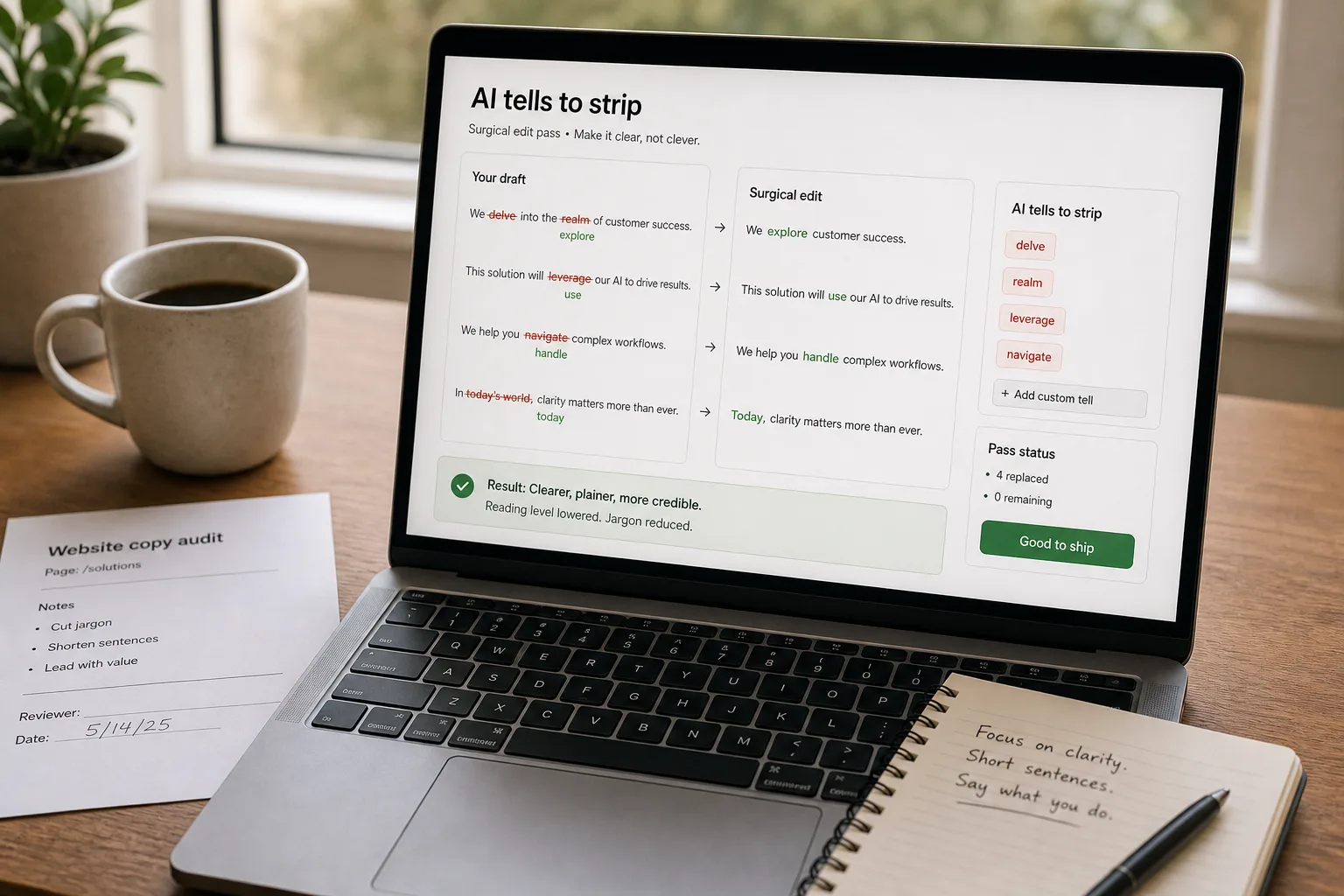
If you’re producing marketing copy with AI, you already know the complaint. It isn’t usually that the output is wrong — it’s that it sounds exactly like every other piece of AI-written marketing copy. Same em-dashes, same “in today’s fast-paced world,” same earnest tricolons, same words (“delve,” “realm,” “landscape,” “leverage,” “navigate,” “embark”) in roughly the same places.
The fix isn’t to stop using AI. It’s to use it the way a competent editor would use a junior copywriter: brief them well, let them produce a draft, then edit hard. This piece is the workflow.
Where this fits — and where it doesn't
Use this if you’re producing volume marketing copy where the quality bar is “clearly written and on-brand” and the bottleneck is the empty page — landing-page sections, product descriptions, email subject lines, social posts, ad variants, blog drafts. The AI gets you past the blank screen; the editing pass earns the byline.
Don’t use this if the piece needs to land on a specific insight, story, or relationship — founder posts, narrative case studies, opinionated thought pieces. AI can help you outline these but should not draft them. The quality of those pieces is their voice; outsourcing the voice defeats the point.
What you'll need before starting
- A consumer AI subscription (Claude Pro, ChatGPT Plus, or Google AI Pro — any of them work; choose the one whose default voice you find easiest to override).
- 8–12 short paragraphs of your own writing — past blog posts, emails to customers, product copy you’ve shipped that you’re proud of. These become your voice sample.
- A reusable brief template (we’ll build one in step 1).
- A willingness to actually edit. The system fails if you skip this.
Five steps to drafts that don't read as AI-written
- Capture your voice in samples, not adjectives
”Make it sound conversational and authoritative” is useless instruction — every brief says that. Instead, paste 4–6 paragraphs of writing you’ve already shipped that you’d be happy to see again. The model will pattern-match to those samples better than to any list of adjectives. Save the samples in a reusable system prompt or a Claude Project / Custom GPT so you don’t repeat yourself.
- Brief in shape, not just topic
A weak brief: “Write a landing page section about our analytics product.” A strong brief: “Write a 120-word landing page section. Audience: heads of finance at companies with $5–50M revenue. Single most important point: our reports are ready before the Monday meeting. Include one specific number. Don’t use the words ‘powerful,’ ‘seamless,’ ‘leverage,’ or ‘unlock.’ Match the voice in the samples above.” Specificity in the brief reduces the editing load by half.
- Generate three variants, not one
Ask for three variants with explicit constraints — different opening sentences, different lengths, different angles. The first option is rarely the best, but reading three forces you to pick the strongest framing rather than rationalising whatever came out first. Tell the model: “Don’t make the variants similar — try genuinely different angles.”
- Strip the AI tells on every pass — keep a standing list
Run every output through the standing list below. This is mechanical, takes two minutes, and makes the bigger improvement to “doesn’t sound AI” than any other single step.
- Word-level deletes: delve, realm, landscape, navigate (metaphorically), leverage, harness, embark, pivotal, intricate, tapestry, testament, vibrant, meticulous, garner, interplay, underscore, additionally, ever-evolving. Replace with plainer words or delete the sentence.
- Phrase-level deletes: “in today’s fast-paced world,” “ever-evolving landscape,” “embark on a journey,” “at its core,” “it’s worth noting that,” “not just X, but Y” (overused tricolon framing), “in the world of [industry]”.
- Punctuation: cut em-dashes by half. AI overuses them; the cadence is the giveaway. Replace with periods, commas, or parentheses.
- Hedging: cut “perhaps,” “arguably,” “it could be argued that,” “many experts believe.” Either commit to the claim or remove it.
- Generic transitions: cut “Furthermore,” “Moreover,” “It is important to note that,” “In conclusion.” These read as filler.
- Read aloud — fix what doesn’t sound like you
The single highest-leverage editing step is reading the draft aloud. Sentences you wouldn’t actually say out loud are sentences your reader won’t believe. Cut them, rephrase them, or replace them with how you’d say it in conversation. This is the step that makes the piece sound like you wrote it — because, by the end of the pass, you essentially did.
What this actually costs and saves
The “save half the time” claim isn’t a fixed number — it’s a function of how heavily you edit. Heavy editing = less time saved on this piece, but you’ll still beat starting from a blank page on the next twenty.
Other ways to solve this
Hire a copywriter. Still the right answer for hero copy, narrative pieces, and anything where voice is the product. AI is a force-multiplier for a good copywriter, not a replacement.
Use a writing-specific AI tool (Jasper, Copy.ai, Writer). Pre-built templates and brand-voice features can beat raw GPT/Claude for teams without a writer to do the editing pass. Cost is higher ($40–$200/seat/month) and lock-in is real. Worth it for marketing teams of 5+ producing high volume; overkill for solo founders.
AI-detector + rewrite loop (Grammarly, GPTZero). Run your output through an AI detector and rewrite anything flagged. Useful as a sanity check; not a substitute for the editing pass. Detectors miss as much as they catch.
Don’t generate — generate variations only. A useful pattern: write the first 80% yourself, then use AI for headline variants, social pull-quotes, or paragraph rewrites of sentences that aren’t landing. Lower volume saved, higher quality output.
FAQ
Which model should I use for this?
Any of the three flagship consumer plans (Claude Pro, ChatGPT Plus, Google AI Pro) work. Anecdotally, writers tend to find Claude's default voice closest to natural prose and ChatGPT's the easiest to steer with explicit constraints. Try one for two weeks; if you're constantly fighting the defaults, try another. The model matters less than the brief and the editing pass.
How do I keep my standing voice prompt useful as it gets longer?
Cap it at ~1,500 words total: 4–6 voice samples, your top-10 banned-words list, your brand's 3–5 must-include phrases, and any structural constraints (no em-dashes, no opening with a question, etc.). Beyond that, you're paying tokens for diminishing returns. Use a Claude Project / Custom GPT / Gemini Gem to store it once instead of pasting every time.
Will AI detectors flag my edited copy?
Modern detectors flag pure AI output at 90–97% accuracy on clean text. With modest human editing — substituting words from the standing list, cutting half the em-dashes, restructuring opening sentences — flag rates drop sharply. Heavy editing (the workflow above) usually clears detectors. That said: don't optimise for detector scores. Optimise for the piece reading well to a human; the detector score takes care of itself.
Doesn't editing this much defeat the point of using AI?
Some, yes — but a 50% time saving on first drafting compounds across hundreds of pieces. The wrong mental model is "AI replaces writing." The right one is "AI replaces the empty page." The editing was always part of writing; the time saved was always going to be in the drafting phase.
What's the single most overused word I should always cut?
Delve. If a draft contains "delve," cut it. There is almost always a better, plainer verb. The same goes for "navigate" used as a metaphor ("navigating challenges," "navigating the landscape") — these are the two most reliable single-word giveaways across all current models.