
CRM data hygiene is the ongoing work of keeping the records in your sales database accurate. It covers four jobs: removing duplicates (de-dup), filling in missing fields from public sources (enrichment), making inconsistent inputs match (normalisation — turning “Co.”, “Corp”, “Corporation”, “Inc.”, and “Inc” into the same entity), and validating that emails and phone numbers still work.
The CRM that was clean two years ago isn’t clean now. Sales reps create accounts with slight spelling variations. Marketing imports lead lists that overlap with existing records. The email-bounce job hasn’t run in eight months. The result: a database that drives revenue motion while containing 15–30% duplicate accounts, contacts with stale titles, and a steady stream of new dirty records arriving daily.
The traditional fix is a six-month cleanup project. It produces a clean snapshot that decays within a year, because nothing changed about the inflow. The better fix is a continuous pipeline rather than a periodic project. This piece is that pipeline: embeddings (the way AI represents meaning as numbers, so it can compare similar things) for fuzzy matches, plain rules for normalisation, enrichment from public sources, and an LLM — the technology behind ChatGPT, Claude, and Gemini — for the ambiguous edge cases.
Where this fits — and where it doesn't
Use this if your CRM has 10,000+ records, multiple people / systems write to it, and the data quality affects revenue motion (segmentation, scoring, outbound, reporting). Common fits: mid-market B2B SaaS with multiple inbound and outbound motions, marketing ops running ABM, RevOps teams whose dashboards are derived from CRM data, sales ops teams whose forecasting depends on account accuracy.
Don’t use this if your CRM is small enough that occasional manual cleanup works (under 2,000 records), you’re on a platform with strong built-in dedupe that you’ve configured well (Salesforce + Duplicate Management rules, HubSpot’s duplicate management — use what’s bundled if it works), or your data hygiene problems are upstream (a website form that doesn’t validate — fix the form, the CRM cleanup is downstream symptom).
What you'll need before starting
- API access to your CRM — Salesforce, HubSpot, Pipedrive, Zoho, or whatever you use. Without API access, the pipeline reduces to manual or platform-native tooling.
- An honest assessment of the inflow: where do new records come from (form fills, sales rep manual entry, list imports, integration syncs)? The pipeline runs continuously; without understanding inflow, you fix the existing problem but not the future ones.
- A model API key for entity-matching and edge cases. Cheap-tier embeddings and small/mid-tier models suffice for this complexity.
- A data-enrichment source if you want to fill gaps — Clay, Clearbit, ZoomInfo, Apollo, Lusha. Each has different coverage and pricing; pick based on your ICP geographic and industry concentration.
- A data steward or RevOps operator who owns the pipeline’s outputs. The pipeline produces merge proposals and normalisation suggestions; someone has to approve the ambiguous ones and tune the rules over time.
Six steps to a CRM that stays clean
- Audit the current state — duplicate rate, field-completion rate, normalisation gaps
Before building, measure. Run quick queries: how many companies have multiple records with similar names? How many contacts share an email address? What percentage of accounts have an industry filled in? What percentage of contacts have a current title? The audit produces the baseline against which you’ll measure the pipeline’s impact, and it surfaces the priority order — most teams find dedupe is the biggest win, normalisation is second, enrichment is third.
- Build the entity-matching layer — embeddings for fuzzy match, rules for exact
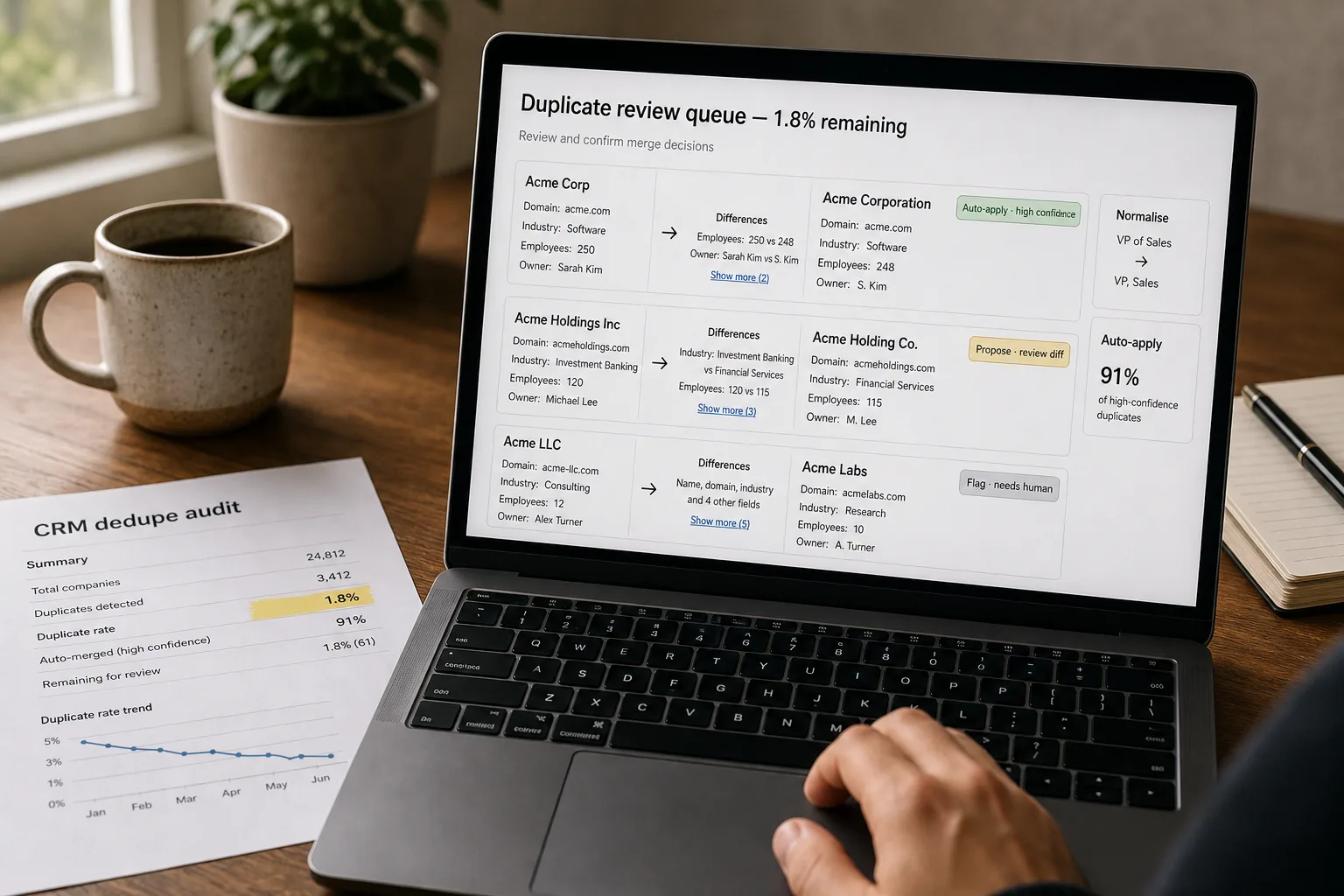
For each new or existing record, generate an embedding from its meaningful fields (company name + domain + address for accounts; first/last name + email + phone for contacts). Use cosine similarity against existing records to find candidates. Combine with deterministic rules: same email = same contact; same domain + similar company name = candidate match; same phone number = candidate match. The embedding catches the fuzzy cases (Acme Corp vs Acme Corporation); the rules catch the obvious ones cheaply.
- Apply normalisation rules — country names, company suffixes, phone formats, titles
Deterministic normalisation handles the bulk of cleanup: country names to ISO codes, company suffixes to a canonical form (“Co.” / “Corp.” / “Corporation” → standardise per policy), phone numbers to E.164 format, titles mapped to a controlled vocabulary (“VP of Sales” / “Vice President, Sales” / “Sales VP” → “VP, Sales”). For ambiguous normalisation (titles especially), LLM-assisted mapping handles the edge cases — but log every LLM-applied normalisation so you can review and tune the rule set.
- Enrich missing fields from public-data sources
For accounts, enrich industry, employee count, revenue range, technology stack, headquarters location, and website-confirmed domain. For contacts, enrich current title, LinkedIn URL, and employer-validation. Use a vendor (Clay, Clearbit, ZoomInfo, Apollo) for the bulk; an LLM with web-search capability can fill specific gaps for the records the vendor missed. Confidence-score every enrichment; low-confidence enrichments get a “needs verification” flag rather than being silently applied.
- Route merges and changes by confidence — auto-apply, propose, or review
Three routes per detected duplicate or normalisation change: (a) high-confidence + safe merge (clearly the same entity, no conflicting field values) → auto-apply; (b) medium-confidence (probably the same entity, some conflicting values) → propose to a reviewer with a side-by-side diff; (c) low-confidence (might be the same, might not) → flag and require explicit review. For enrichment, similar tiers: high-confidence enrichment auto-applies, lower-confidence becomes a “suggested” field that gets reviewed in batch. The routing makes the pipeline tolerable; auto-applying everything is risky, reviewing everything defeats the purpose.
- Run continuously on new records, plus quarterly portfolio sweeps
The pipeline runs on every CRM write — new lead, edited account, sync from another system. New records get the full dedupe + normalisation + enrichment treatment before they land. Once a quarter, run a full portfolio sweep that catches the records that have drifted since the last pass (title changes, company moves, domain changes, contact-employer changes). The continuous-plus-periodic pattern keeps the database clean indefinitely; either alone is insufficient.
What it costs and what to expect
The duplicate-rate reduction is the headline number; the time-saved-per-operator is the operational ROI. The downstream impact (better segmentation, cleaner reporting, more effective outbound) is the strategic win, harder to quantify but consistently mentioned by teams that get the pipeline running.
Other ways to solve this
Native CRM dedupe and enrichment (Salesforce Data Cloud, HubSpot Insights, Pipedrive’s data enrichment). Built-in tooling at varying levels of sophistication. Right answer if your CRM’s bundled features handle your volume and complexity. Trade-off: less customisation, sometimes weaker fuzzy-matching, dependency on the platform’s data partners. Strong fit for teams that want a working solution without engineering investment.
Specialised data-quality platforms (Openprise, Validity, RingLead, LeanData). Mid-market platforms that handle CRM dedupe + enrichment + routing. More configurable than native; less customisable than a built pipeline. Strong fit for RevOps teams that want a dedicated tool but don’t want to engineer the pipeline.
Outbound-focused platforms (Clay, Apollo, Cognism). Often used as the enrichment side rather than full dedupe. Increasingly bundle outbound automation alongside data hygiene. Good for teams whose primary use case is outbound enablement.
Hire a contractor for a one-time cleanup. Still common, still works, still decays. Useful for the initial cleanup pass; insufficient for ongoing maintenance. The pattern that survives is contractor for the one-time + pipeline for the continuous; each alone is incomplete.
Related work
For the embedding mechanics behind fuzzy entity matching, see Embeddings explained without math. For the vector-store choice that powers similarity lookup at scale, see Vector databases compared. For the broader classification pattern when records need categorisation alongside dedupe, see Document classification at scale. For pulling signal from CRM activity into downstream scoring, see Customer health scoring from product and support signals.
FAQ
What about merging accounts that have conflicting historical values?
Most CRMs preserve audit history on merge — you don't lose data, you just consolidate the current state. For conflicting field values (two accounts with different industries, two contacts with different titles), the merge prompt should display the conflicts and let the reviewer choose. Auto-merge should be reserved for cases with no field-level conflicts. For the cases with conflicts, the LLM can suggest the most likely correct value with rationale, but the final pick stays human.
How do we handle the parent-child / corporate-hierarchy problem?
Salesforce-style parent-child account relationships need explicit handling. Don't merge parent and subsidiary accounts (they're different entities); do recognise the relationship for reporting and segmentation. Enrichment vendors (Clay, Clearbit, ZoomInfo) increasingly provide corporate-hierarchy data; use it to populate parent-child relationships explicitly. The pipeline treats hierarchy as a separate enrichment layer, not as a dedupe candidate.
What about contact dedupe when people change jobs?
The same person at a new company is a new contact in most CRMs (associated with a different account). The pipeline should recognise the pattern — same name + same personal phone or email, different employer — and create the new contact while preserving the historical one with a "former employee" status. This is a meaningful expansion signal (your champion now works elsewhere) and a meaningful at-risk signal (the account just lost its champion); the relationship between the records matters.
How do we keep enrichment vendors from over-writing intentional manual values?
Field-level enrichment rules. Some fields should never be auto-overwritten (sales-rep-entered notes, custom-segmentation tags, manually-verified data). Other fields can be safely refreshed (employee count, technology stack, public phone numbers). Configure per-field policies; default to "propose, don't auto-apply" for any field with manual-entry history. The vendor's confidence score should be one input to the decision, not the only one.
What if our CRM data is so messy that a clean start is faster than cleanup?
Sometimes that's right, but rarely. The "clean start" approach loses the relationship history (who-talked-to-whom-when), the open-deal pipeline, and the historical activity that downstream systems depend on. Cleanup is almost always cheaper than rebuild for established CRMs. The exception is when you're migrating CRM platforms anyway — that's the rare moment to consider selective re-import. Even then, migrate the cleaned data, don't start from scratch.
How do we measure ROI on this kind of project?
Three signals. (1) Duplicate-rate reduction, measured before and after — the cleanest signal. (2) Marketing-ops efficiency: how many leads route to the wrong account / segment / rep before vs after. (3) Sales-rep time recovered: rep time spent investigating data discrepancies before vs after. The first is the simplest measurement; the third is the biggest dollar number but hardest to attribute. Most teams justify the investment on the qualitative second-order effects — segmentation works, reporting is trusted, outbound lands better — as much as on direct savings.