
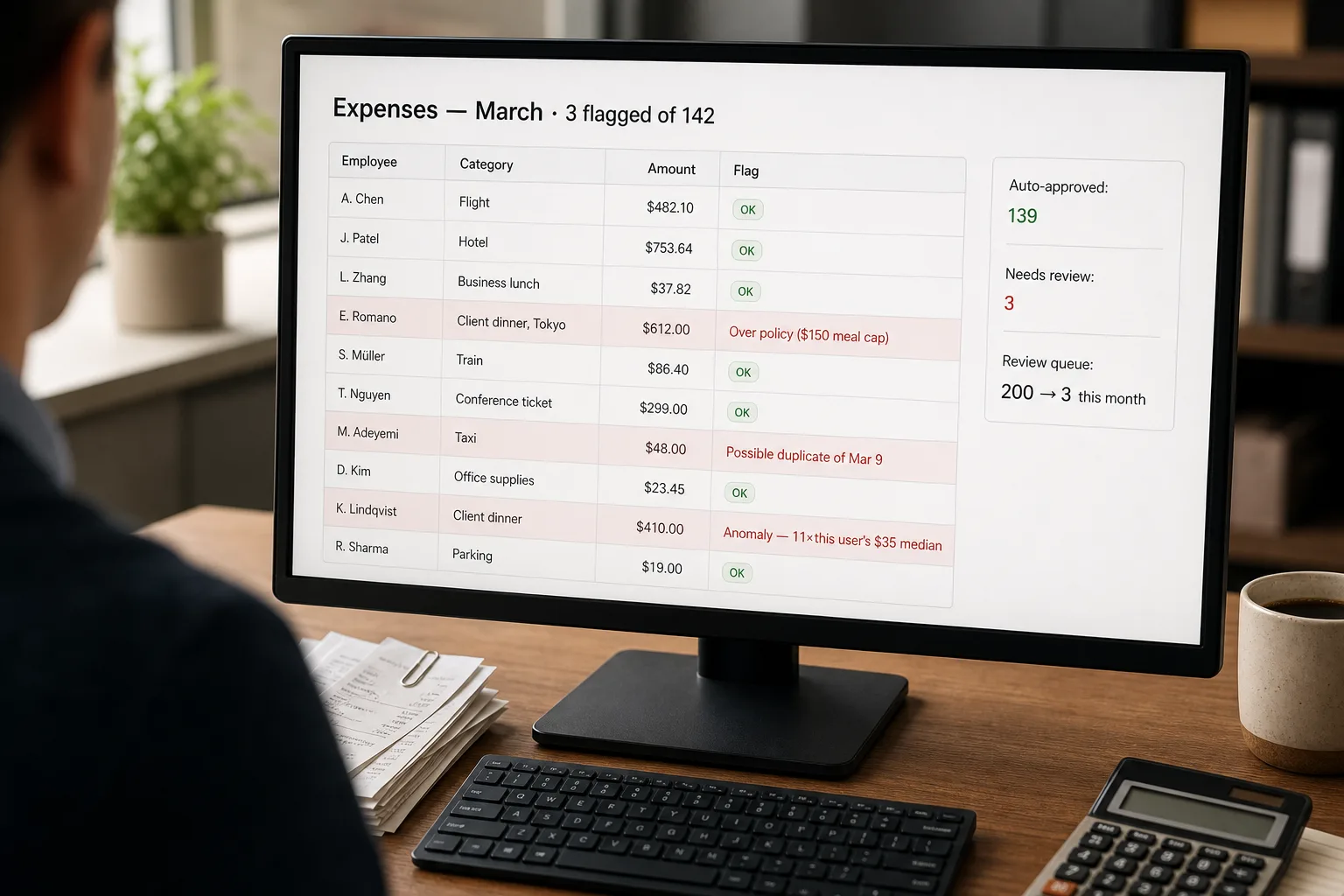
Expense anomaly detection is the practice of letting software auto-categorise every receipt to the right general-ledger account, flag the ones that break your policy, and surface the ones that look statistically unusual — so finance only reviews the cases that matter.
Today, the finance team’s review of expense submissions is mostly theatre. Two hundred receipts come in per week. One finance operator opens each one, glances at it, confirms the category looks right, and approves. The bulk pass through fine. The few that matter — the duplicate submission, the personal charge on the corporate card, the policy violation by mistake, the genuine fraud — are buried in the noise and easy to miss. The reviewer’s attention is the limiting resource; spending it on every receipt means most of it is spent on receipts that don’t need it.
The fix is to stop reviewing everything and start reviewing the right ones. A classifier auto-categorises by GL account. A policy engine flags violations. A statistical anomaly detector surfaces outliers. The finance team’s review queue shrinks from 200 to 8, and the 8 are the ones worth investigating. This piece is that pipeline — the classification, the policy rules, the anomaly signals, and the framing that keeps the violation flags from reading as accusations when they fire on the CEO’s Tokyo dinner.
Where this fits — and where it doesn't
Use this if your team submits 50+ expense reports per week, your finance team is currently reviewing each one manually, and you have a written expense policy that defines what’s acceptable. Common fits: companies past 25 employees, professional services firms with billable travel, sales-heavy orgs with high T&E volumes, finance teams trying to close the books faster.
Don’t use this if you’re already on Ramp / Brex / Expensify with their built-in AI features doing the work (use what’s bundled), your expense volume is too low to justify the build (under ~50/week), or your expense policy isn’t written down (write it first — the AI is useless without it). For the last case, the AI can’t enforce a policy that lives in someone’s head.
What you'll need before starting
- Expense submissions in a structured-enough format — typically receipt images plus user-entered fields (amount, merchant, date, category guess). Ramp / Brex / Expensify exports work; raw email submissions need more pre-processing.
- A written expense policy: per-category limits (meals under $X, hotels under $Y), allowed merchants and categories, banned items, approval thresholds. The policy is the rule book.
- Your chart of accounts (GL codes) with 5–15 example expenses per code as classification anchors.
- A model API key (Claude, GPT, or Gemini cheap tier). Plus a vision-capable model for receipt OCR if your tool doesn’t already provide extracted data.
- An understanding from finance and leadership of how flags will be framed — “this needs a quick check, not a fraud accusation.” Flags fire on real anomalies; many of those will be legitimate; the response tone matters.
Six steps to a queue that's worth reviewing
- Normalise the input — extract amount, merchant, date, category-guess
If your expense tool already provides structured data, use it. If submissions are raw receipt images, run them through a vision-capable LLM or OCR service to extract the standard fields (see Automated invoice and receipt processing for the pattern). Standardise merchant names where possible — “Starbucks #4523” and “STARBUCKS COFFEE” should normalise to the same entity. The classifier’s accuracy depends heavily on input cleanliness.
- Classify to GL codes with embedding-first routing
For each expense, compute its embedding (from merchant + category guess + line items if available) and match against reference embeddings for each GL code. High-confidence matches auto-classify; low-confidence ones fall through to LLM-based classification with the chart of accounts in the prompt and a structured-output response. This two-tier approach handles the bulk cheaply and reserves LLM cost for the ambiguous cases. See Document classification at scale for the broader pattern.
- Run policy rules — deterministic, not AI judgement
The policy engine is rules, not model calls. Per-category limits, allowed merchants, banned items, approval thresholds — all deterministic checks against the extracted data. Flag any expense that violates a rule with the specific rule cited. Don’t let the model judge “is this within policy?” — the policy is precise, the model isn’t; deterministic rules produce defensible audit trails and consistent enforcement. The model handles the classification; rules handle the enforcement.
- Detect statistical anomalies — outliers from the user’s own pattern
For each submitting user, build a pattern: typical merchant types, typical amounts, typical categories. Flag submissions that deviate sharply — a $400 dinner from someone whose median dinner is $35, a hotel charge from someone who never travels, a merchant category never seen before from this user. Anomaly detection catches the cases policy rules miss: legitimate within policy but unusual enough to deserve a look. Don’t overweight these — anomalies are signals, not evidence. Pattern-based outlier detection works best with at least 50 historical submissions per user.
- Route by flag type — duplicates urgent, policy violations to manager, anomalies to finance
Three routes for flagged expenses: (a) duplicates / suspected fraud → immediate finance review, hold from reimbursement; (b) policy violations → manager review with the rule cited (the manager confirms the exception or asks for resubmission); (c) statistical anomalies → finance review with the comparison to the user’s pattern. Non-flagged expenses auto-post for reimbursement on the normal cadence. The routing is what makes the system tolerable — managers see only their team’s policy questions, finance sees only the unusual cases, the bulk flows without anyone touching it.
- Track flag outcomes weekly — the patterns drive policy updates
Log every flag and the eventual outcome: approved as exception, resubmitted with correction, denied, escalated. Once a week, sample the flags. Patterns surface: a recurring policy violation across many users (the policy is unclear — clarify it), a category where the anomaly threshold is too tight (relax it), a user whose anomalies keep being legitimate (update their pattern model). The audit loop is the difference between a flag system that gets tighter over time and one that the team starts ignoring.
What it costs and what to expect
The flag rate is the metric to tune — too high and reviewers fatigue and start auto-approving; too low and you miss things. The auto-pass rate is the operational ROI; that’s the bulk of expenses flowing without human touch.
Other ways to solve this
Bundled expense-management AI (Ramp, Brex, Expensify, Concur). All four ship AI-assisted categorisation and varying levels of anomaly detection. Right answer if you’re already on one of these platforms — the bundled AI is usually good enough and the per-seat cost is acceptable. Trade-off: limited customisation of policy rules and anomaly thresholds.
Bookkeeping-tool integrations (QuickBooks AI categorisation, Xero’s AI bank rules). For smaller teams not yet on a dedicated expense platform, bookkeeping-tool AI handles the categorisation side adequately. Doesn’t include anomaly detection or per-user pattern analysis; works fine for the auto-categorisation use case.
Manual review with sampling. Statistical sampling of expense submissions — review 10% rather than 100%. Conventional internal-audit approach; works at very small or very large organisations (audit-grade tools). The AI pipeline is the middle-tier answer for orgs that have outgrown manual sampling but aren’t large enough for a formal audit function.
Don’t review at all, trust + verify quarterly. Genuine answer for some small teams with strong trust culture and low fraud risk. Quarterly external audit catches anything material. Becomes untenable as headcount grows past ~50 or as travel/T&E volume grows.
Related work
For the receipt-extraction pattern that feeds the classifier, see Automated invoice and receipt processing. For the broader document-classification pattern, see Document classification at scale. For the pipeline that catches anomalies in customer-facing data rather than internal spend, see Find patterns in customer feedback. For the underlying embedding mechanics behind the high-confidence categorisation tier, see Embeddings explained without math.
FAQ
How is this different from using Ramp's or Brex's built-in AI?
If you're on Ramp or Brex, the built-in AI is probably good enough. Build a custom pipeline when you need policy enforcement the platform doesn't support, when you want anomaly detection tuned to your specific patterns, when you're integrating expense data with other internal systems, or when you want to apply the pattern to non-card spend (vendor invoices, reimbursements, contractor expenses). For most SMBs on these platforms, the platform's built-in features are sufficient.
What about cross-card or cross-vendor fraud — same person submitting to two accounts?
Duplicate detection within a single account is straightforward (same merchant + same amount + same date). Cross-account duplicate detection requires a federated view across your spend systems, which is harder operationally. Bundled platforms (Ramp, Brex) handle within-platform duplicates; cross-platform requires custom integration or periodic audit. For most teams, the within-platform detection catches the majority; the cross-platform case is rare enough to leave for periodic audit.
How do we handle expenses in foreign currencies?
Convert at the rate on the transaction date and store both the original and converted amounts. The policy engine should apply limits in the company's primary currency (converted) but display the original on flags so the user understands the context. Travel-heavy teams should ensure their classifier handles currency-context cues (a hotel charge in Tokyo is different from one in Phoenix even at the same dollar amount).
Can the AI auto-approve all expenses below a threshold without review?
Yes, with confidence and policy constraints. Common pattern: expenses under $X, in known categories, from users with clean history, that pass all policy rules, with high classification confidence — auto-approve and post. Configure the threshold with finance leadership; start conservative ($100, then expand). Auto-approval is what produces the time savings; without it, the pipeline is a classifier-plus-flagger that still routes everything to a human.
What about expenses that the AI can't classify confidently?
Route to the submitter with the top 3 candidate categories — "is this client entertainment, meals, or team events?" — and let the user pick. User-corrected classifications feed back into the reference embeddings for next time. The pattern beats either auto-classifying-with-confidence-confusion or routing every uncertain case to finance; the submitter usually knows the correct context that the AI doesn't.
How does this interact with audit and compliance requirements?
Well, if the audit trail is preserved. Every classification decision should log: the original submission, the classification chosen, the confidence score, any flag fired, the eventual approval. Auditors increasingly accept AI-assisted classification provided the audit trail is intact and the policy rules are documented. Talk to your auditors early; for SOX-compliant or regulated-industry teams, you may need additional controls (sign-off thresholds, periodic sampling of AI decisions, explicit human approval on high-value items).