
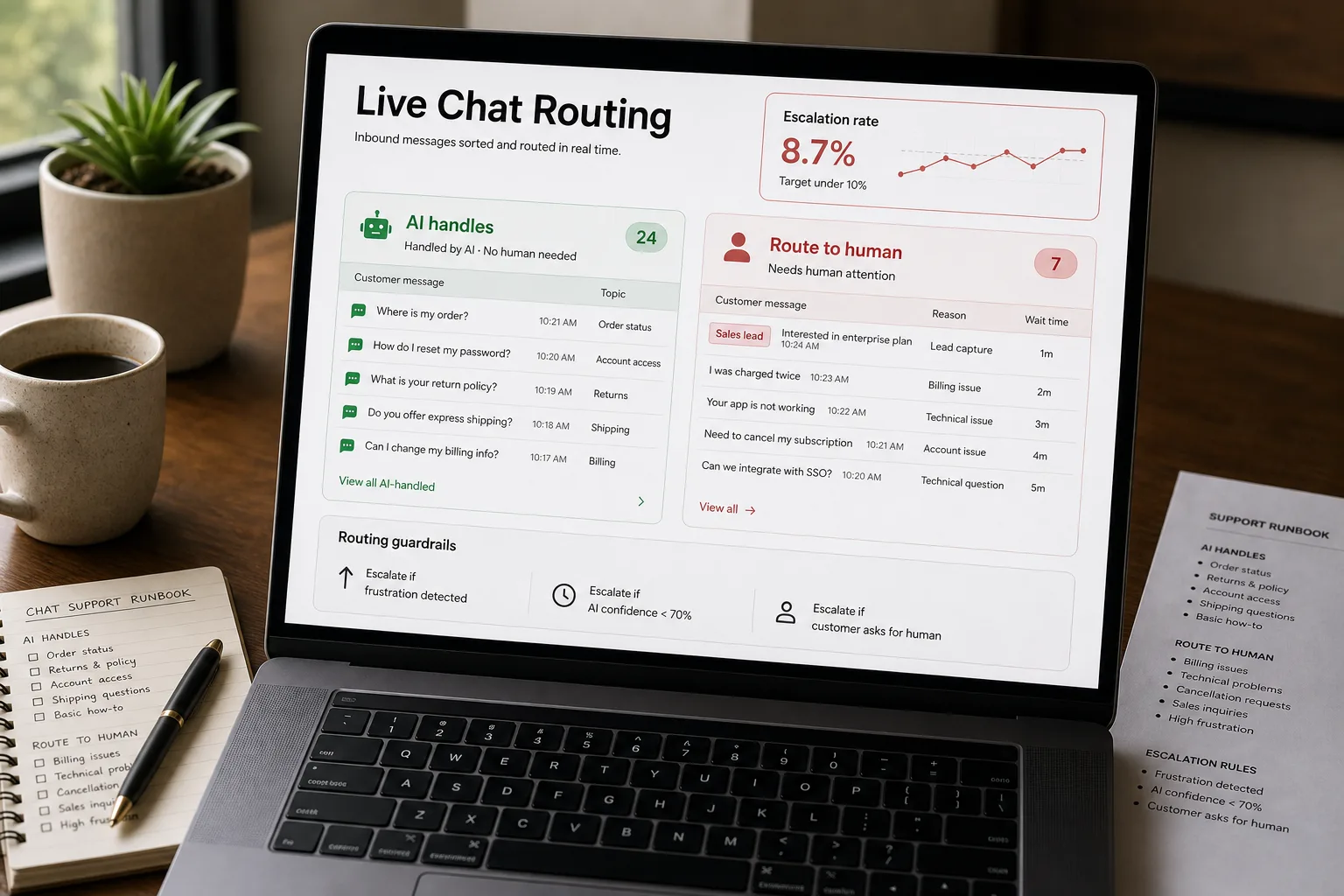
If you’re evaluating live-chat AI for your support team, you’ve seen the vendor pitch: deflect 70% of support volume, available 24/7, never sick, scales with usage. The reality is shaped. Deflection numbers often include cases where the customer gave up rather than cases where the AI resolved their issue. The 24/7 availability matters more for some customer segments than others. And the cases the AI handles badly damage trust in ways that don’t show up in any dashboard until churn rates start moving.
The right question isn’t “should we deploy live-chat AI?” It’s “which conversations should the AI handle, which should it route to humans, and which should it never see?”
This piece maps conversation types against where AI deployment helps versus hurts, plus the operational pattern that keeps the AI on the helpful side. Not a vendor comparison — see Customer support AI tools compared for that. A decision framework.
What live-chat AI actually does well
The AI live-chat agent is good at three things: (1) routing — figuring out who or what the customer needs and getting them there; (2) answering questions that have answers in your knowledge base; (3) handling routine transactions (password reset, plan check, basic account changes). The three together cover a meaningful percentage of inbound volume for most products — sometimes 50%, sometimes 80%, depending on product complexity and customer segment.
It’s bad at three things, and the badness compounds: (1) handling emotional moments — frustration, anger, anxiety — where empathy is the value and the AI’s empathy phrasing reads as performative; (2) handling novel issues that aren’t in the knowledge base — the AI confidently invents an answer, the customer believes it, the wrong action follows; (3) handling high-stakes moments — cancellation conversations, billing disputes, security incidents — where the customer needs reassurance the AI structurally can’t provide and where the cost of a wrong answer is high.
Conversation types worth deploying on
The deployment is worth doing for these conversation types:
-
Routine product questions. “How do I export my data?” / “Where do I find my invoices?” / “What plans do you offer?” These have stable answers in your KB. The AI handles them faster than a human would, the customer gets the answer faster, and human agents get freed for harder cases.
-
Triage and routing. Even when the AI can’t resolve the issue, it can identify the right team and the right priority and route appropriately. The customer answers a few questions; the AI gathers context; the human agent who picks up the conversation has the context already. This is meaningful time savings even on conversations where the AI doesn’t deflect.
-
Account self-service. Password reset, plan checks, basic settings, payment method updates. Customers prefer the AI for these — they’re transactional, fast, and impersonal in a way that benefits from automation.
-
After-hours coverage. When the alternative is “we’ll respond tomorrow,” AI handling routine questions overnight is a clear win. The customer gets help; the human agent gets a clean inbox in the morning rather than 50 routine questions that backed up.
-
Sales qualification. Inbound lead conversations on marketing-site chat. Most leads need qualification (size, role, use case) before they’re worth a human sales rep’s time; the AI handles qualification well and hands warm leads to humans.
Conversation types to route to humans
The deployment damages trust on these conversation types:
-
Emotional or frustrated customers. When the customer’s first message contains anger, disappointment, or distress, AI empathy phrases (“I understand how frustrating that must be”) read as condescending. The customer wants to be heard by a human; the AI’s attempt at acknowledgement makes the situation worse. Detect emotional signal at message-1 and route to humans immediately.
-
Cancellation conversations. The customer who arrives wanting to cancel doesn’t want to walk through AI retention prompts. They want to talk to a human who can either fix the issue that’s driving cancellation or process the cancellation respectfully. AI cancellation flows produce worse retention numbers than human-handled ones, and they make the customers who do leave more vocal about the experience.
-
Billing disputes and refund requests. Money issues need humans. The AI can collect context; it shouldn’t make the decision. Customers experiencing a billing dispute are already disposed to mistrust; the AI’s structured “I understand your concern, let me help” lands wrong.
-
Security and privacy incidents. “My account was hacked”, “I think there’s been a data breach”, “Someone’s using my credit card.” These need immediate human attention regardless of AI capability. The reputational risk of bot-handled security incidents is high; the operational risk of slow response is higher.
-
Health, safety, and legal issues. Anything that touches medical, legal, or safety contexts. The AI shouldn’t be in the conversation.
-
High-value account first-touch. Enterprise accounts, key partnerships, executive contacts. The conversation should feel like the relationship the customer paid for; AI greeting reads as a downgrade.
How to operationalise the decision
The framework isn’t “deploy AI or don’t” — it’s a routing layer that decides per conversation. The right architecture:
- Intent detection at message 1. Classify the inbound message’s intent (routine question, emotional state, cancellation, security, billing dispute) before any AI engagement.
- Customer-tier check. Some customer tiers always route to humans (enterprise, named accounts); the rest go through the AI-first flow.
- Confidence-gated AI handling. The AI handles routine questions where it has high-confidence answers; low-confidence cases escalate.
- Customer-initiated escalation. A clear “talk to a human” path that doesn’t make the customer prove they deserve it.
- Continuous review. Sample AI conversations weekly; identify cases where the AI should have escalated but didn’t. Tune the routing rules.
What the deployment actually produces
The cost-per-conversation savings are real; the customer-experience trade-offs are the part vendor pitches understate. The escalation-rate ceiling is the operational guardrail — if you’re forcing more than 35% of customers to argue with the AI before reaching a human, you’re saving money by transferring effort to the customer.
Where this deployment typically goes wrong
Deploying AI in front of every conversation. The right architecture lets humans handle the conversations where humans should handle them; deploying AI as the gate to all conversations means cancellation, security, and emotional cases all start with bots. Some products do this; the customer-experience cost is significant.
Optimising for deflection rate as the primary metric. The deflection rate measures cost savings, not customer satisfaction. Teams that optimise only for deflection ship deployments that save money and lose customers. The right metric is composite — deflection rate AND post-conversation CSAT AND no-immediate-escalation.
Hiding the “talk to a human” option. Forcing customers through multiple AI prompts before allowing escalation is a friction tax that customers notice. The clear path to a human should be visible from the first message; trust the AI to handle the routine cases voluntarily, not to win arguments with customers who want a human.
Skipping the knowledge-base investment. AI live-chat without a strong KB confidently invents answers. The deployment quality is bounded by the KB quality; if the KB is thin, the AI’s confident-wrong answers damage trust faster than no AI would have.
Not reviewing the conversations. Weekly review of AI-handled conversations catches the systematic failures — categories where the AI should have escalated, KB gaps where the AI invented an answer, tone patterns where the AI’s phrasing misses. Without review, drift compounds silently.
Related work
For the broader support-reply pattern that operates alongside live chat, see Draft customer support replies that hold up to scrutiny. For the upstream triage that classifies inbound for routing, see Triage inbound email at scale. For the framework on AI hallucinations that drives many of the “confidently wrong” failures, see AI hallucinations explained. For the churn-signal pipeline that detects customer dissatisfaction earlier, see Detect churn signal from support patterns.
FAQ
What's the right metric to evaluate a live-chat AI deployment?
A composite: real deflection rate (resolved + satisfied + no immediate escalation), CSAT segmented by conversation type (routine vs emotional vs cancellation), and escalation rate. The vendor's headline deflection number is misleading because it includes customers who gave up. Track all three and trust the segmented CSAT most.
Should we deploy AI on cancellation flows?
No, with rare exceptions. AI-handled cancellation flows produce worse retention numbers than human-handled ones, and they damage brand perception in ways that surface in social media and review sites. The exception is some very-low-touch consumer products where the cancellation friction is itself the retention strategy; in B2B and in any product where relationship matters, route cancellations to humans.
How do we tell when the AI should escalate vs handle?
Two heuristics. (1) Emotional signal at message 1 — anger, frustration, distress detected by sentiment analysis — escalates immediately. (2) Confidence below threshold on the AI's answer to the customer's question — also escalates. The first is harder than it sounds because customer venting overlaps with normal complaint phrasing; calibrate conservatively at first.
What if customers prefer the AI for some conversations?
Some do, especially for transactional self-service (password reset, plan changes). Let customer preference drive routing where possible — "would you like to handle this yourself or talk to someone?" — rather than forcing one path. The ideal architecture lets customers choose the channel they want; AI for some, humans for others.
How is this different from just a chatbot?
Modern live-chat AI (Intercom Fin, Zendesk AI Agents, Ada) uses LLMs grounded in your knowledge base; the older chatbot was rule-based or flow-based. The capability difference is substantial — LLM-based agents handle ambiguous phrasing, multi-turn conversations, and context-shifting better than rule-based bots. The decision framework is the same in both cases; what changes is the percentage of conversations the AI tier can credibly handle.