
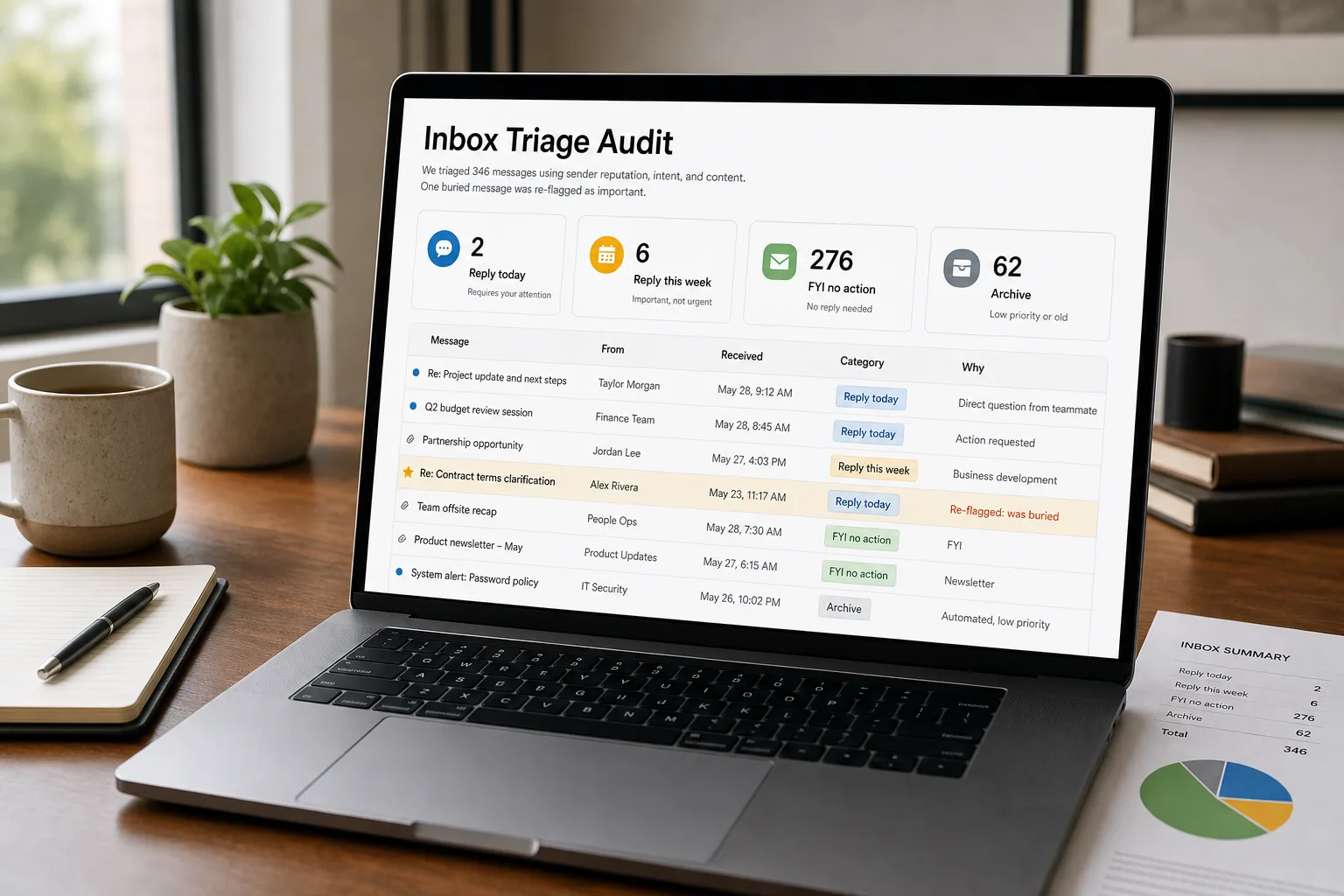
A 200-message-a-day inbox is not a productivity problem — it’s a routing problem. The cost is not “I have to read all of these.” The cost is that the real signal — the customer ready to buy, the contract about to expire, the partner waiting on a question for three days — is sitting between an internal newsletter and a recruiting cold pitch, and the eye that’s already glazed over isn’t going to spot it.
The triage stops being about speed and becomes about the false negative: which important message did the classifier bury today, and how would you know? This piece is the workflow that classifies inbound at volume, routes by urgency and topic, and instruments the daily audit that’s the difference between a triage system that works and one that quietly damages trust in your own inbox.
Where this fits — and where it doesn't
Use this if your inbox volume crosses ~80–100 messages on a typical workday, the cost of missing an important message is real (a lost deal, a late customer reply, a contract drift), and you’re willing to spend one daily attention pass reviewing what the classifier set aside. The workflow works because the bulk of inbox volume — newsletters, automated alerts, recruiting cold-outs, social notifications, internal FYI threads — is genuinely low-priority and the model can route it confidently. The high-priority residual is small enough to read end-to-end.
Don’t use this if your daily volume is under 50 messages (manual triage is faster than the system you’d build), your role is one where every email could be the important one (board chair, M&A counsel, sole on-call for a critical system, family-only inbox), or your data-handling rules don’t allow inbound email content to leave your machine. For the last case, the pattern below is right; the implementation needs to be self-hosted — see Build a private knowledge base for the architecture pattern.
What you'll need before starting
- An email account with API access — Gmail (free-tier API works), Microsoft 365 with Graph API access, or any IMAP-accessible mailbox.
- A model API key — Claude, GPT, or Gemini all classify well at this task. The differentiator at this volume is cost-per-message, not capability; pick the cheapest tier that handles short-context classification.
- An honest list of the 5–10 topics that account for ~90% of your inbox. Most people overestimate the diversity. Skim two weeks of inbox and you’ll see the same buckets repeat: customer support, sales inbound, partnerships, internal team, automated alerts, newsletters, recruiting, social/networking, personal.
- An urgency taxonomy that maps to actions, not adjectives. “High / medium / low” is meaningless; “reply today / reply this week / FYI no action / archive” is operable. Pick 3–4 buckets, write them down, and stick with them.
- A daily review window — 10–15 minutes — to scan what the classifier marked “FYI no action” and confirm nothing important is in there. This is the false-negative audit, and skipping it is how the system silently fails.
Six steps to a triage you can trust
- Sanitise the input — keep only the parts the model needs
For each inbound message, pass: subject line, sender (name + domain), the first 300–500 characters of the body, whether you’ve previously replied to this sender, and whether this is a fresh send or a reply in an existing thread. Do not pass: signatures, footers, deeply-quoted prior replies, image attachments, message IDs, or full conversation history. Per-classification cost is dominated by input tokens, and most of an email is repeat material. The “have I replied to this sender before” signal is the strongest single feature for sales/partnerships triage; if you skip nothing else, include that.
- Lock the taxonomy — 4 urgency buckets, 6–8 topic buckets, no more
The most common failure of email-triage systems is taxonomy sprawl — every new edge case spawns a new category, and after three months the classifier is choosing between 25 labels and getting most of them wrong. Cap urgency at 4 buckets (“reply today”, “reply this week”, “FYI no action”, “archive — pure noise”). Cap topic at 6–8 buckets, with one explicit “other” rather than letting the model invent new categories. Write the rules for each bucket in one sentence; if you can’t, the bucket isn’t clean enough yet.
- Classify with structured output — JSON, not prose
Ask the model to return a JSON object with four fields:
urgency,topic,confidence(0–1), andone_line_summary. Use the structured-output / function-calling features of your chosen vendor so the output is parse-guaranteed; free-text classification produces drift you’ll spend more time normalising than you’d save. The one-line summary is the field you’ll thank yourself for later — it becomes the surfaceable preview in your daily audit pass, and it stays useful long after the per-message classification is forgotten. - Route deterministically — the classifier decides labels, not actions
Once the JSON is in hand, the routing is a rules layer, not another LLM call. reply-today → leave in inbox, star, optionally push a notification. reply-this-week → move to a “this week” folder/label with a Friday review. FYI no action → move to a “review” folder for the daily audit pass. archive — pure noise → archive directly. The routing layer should also handle per-sender overrides (specific addresses that bypass classification — your CEO, your three most important customers, your accountant), which keeps the obvious cases deterministic and the model focused on the rest.
- Run the daily false-negative audit — ten minutes on the FYI bucket
Once a day, open the “FYI no action” folder and scan subjects + senders + the one-line summaries from step 3. The job is not to read each email — it’s to spot the ones that shouldn’t be there. The audit pass is fast because the summaries make 95% of the bucket scannable at a glance; the 5% that need a closer look are exactly the audit’s job. Expect to find 1–3 misclassifications per day in the first month and roughly zero by month three, once the prompt has been tuned to your patterns.
- Loop audit findings back into the prompt — weekly retune
Every time the audit catches a false negative, note the sender pattern and the reason (“vendor renewal notice from a domain we have a real contract with — should be ‘reply-this-week’, not ‘FYI’”). Once a week, add the top 3–5 patterns as explicit clauses in the classification prompt. The system gets noticeably better in the first six weeks then plateaus. Without the weekly retune, accuracy drifts: senders change, your role shifts, your priorities shift. Teams that set the prompt once and never revisit watch quality degrade visibly within a quarter.
What it costs and what to expect
The cost number tells you this is approachable for any team. The accuracy and false-negative numbers tell you the daily audit and weekly retune are not optional — they’re what makes the system trustworthy rather than just statistically OK.
Other ways to solve this
Built-in email-client triage (Gmail Priority Inbox, Outlook Focused Inbox, Apple Mail Categories). Zero setup, modest quality, no customisation. Right answer for low-volume inboxes where the cost of building anything exceeds the cost of occasional misclassification. The hidden trade-off: you can’t audit the decisions because the system is opaque, and you can’t retune because the model is the vendor’s, not yours.
Hosted AI triage services (SaneBox, Superhuman, Hey, Inbox Zero). Pre-built workflows, decent quality, monthly per-seat cost. Right answer for non-technical users who want a working solution without writing code. Trade-off: less prompt control and an opaque taxonomy. Good for individual productivity; weaker fit for organisations that want a consistent shape across many inboxes.
Manual sender rules (Gmail filters, Outlook rules). Brittle, hard to maintain, but completely deterministic. Worth building as a baseline layer underneath any AI triage — known automated senders (calendar invites, monitoring alerts, newsletters you subscribed to) go straight to a label and the AI never sees them. Reduces classifier load and gives you the auditable backbone.
Don’t triage at all. Some roles work better with a flat inbox read end-to-end. If your daily volume is under 50 messages and you read every one anyway, the triage overhead is bigger than the saving. Honest answer for many smaller teams; harder to admit but often correct.
Related work
For the workflow that summarises the long threads triage surfaces as “reply this week,” see Summarize long email threads. For drafting replies to the customer-support subset once triage has routed them, see Draft customer support replies that hold up to scrutiny. For the same classification pattern applied to tickets in a helpdesk rather than raw email, see Auto-categorize support tickets. For why the model’s confidently-wrong classifications hurt more than its confidently-uncertain ones, see AI hallucinations explained.
FAQ
How do I handle confidential or privileged email?
Don't run it through a vendor without an enterprise data-exclusion tier. Practical patterns: redact specific labels client-side before classification, self-host the classifier for any mailbox covered by legal hold, or exclude flagged threads from the pipeline entirely. Legal-privileged, HR-related, and security-incident threads should be on a deny-list at the input boundary, not relying on the model to behave responsibly with content it has already received. See AI privacy — what to watch for for the vendor-evaluation framework.
What if a sender is important sometimes but noise other times?
Use a per-sender override list, but classify on content rather than blocking the sender entirely. The override layer handles the obvious cases (this person always gets through; that newsletter always archives). The model handles the messy middle: a partner who sends quarterly business updates (FYI) and occasional contract renewals (reply this week) needs content-based classification, not sender-based routing. Build both layers; let them do different jobs.
Can I use this for shared team inboxes (support@, sales@)?
Yes, with the routing step expanded to include a teammate-assignment field. The classification pattern is identical; the routing rules add 'which person owns this category' on top. The helpdesk version of this is well-trodden territory — see auto-categorize support tickets for the pattern. For email-side shared inboxes, the implementation is the same idea with Gmail labels or Outlook categories carrying the assignment.
How is this different from Gmail's Priority Inbox?
Priority Inbox is one model with one taxonomy and no transparency. You can't see why a message landed where it did, you can't write the rules, and you can't retune when your role shifts. The workflow here lets you own the taxonomy, audit the decisions, and adjust the prompt as patterns change. For most personal inboxes Priority Inbox is fine; for inboxes where misses are expensive and your role evolves, you want the rules to be yours.
What about email threads that change priority over time?
Re-classify on each new message in the thread, not just the first. A thread that started as 'FYI no action' can become 'reply today' two messages later when the sender adds a deadline. The cost of re-classification is small — a few hundred tokens — and the failure mode of not doing it (stale priority on an active thread) is exactly the kind of false negative the daily audit is supposed to catch and you're tired of catching.
Does this work for non-English inboxes?
All three flagship small-tier models classify in 30+ languages comfortably. Quality holds in English / Spanish / French / German / Mandarin / Japanese; drops in lower-resource languages. The taxonomy itself should stay in English for consistency in your routing rules, even when the input is in another language — the model handles the translation implicitly.