
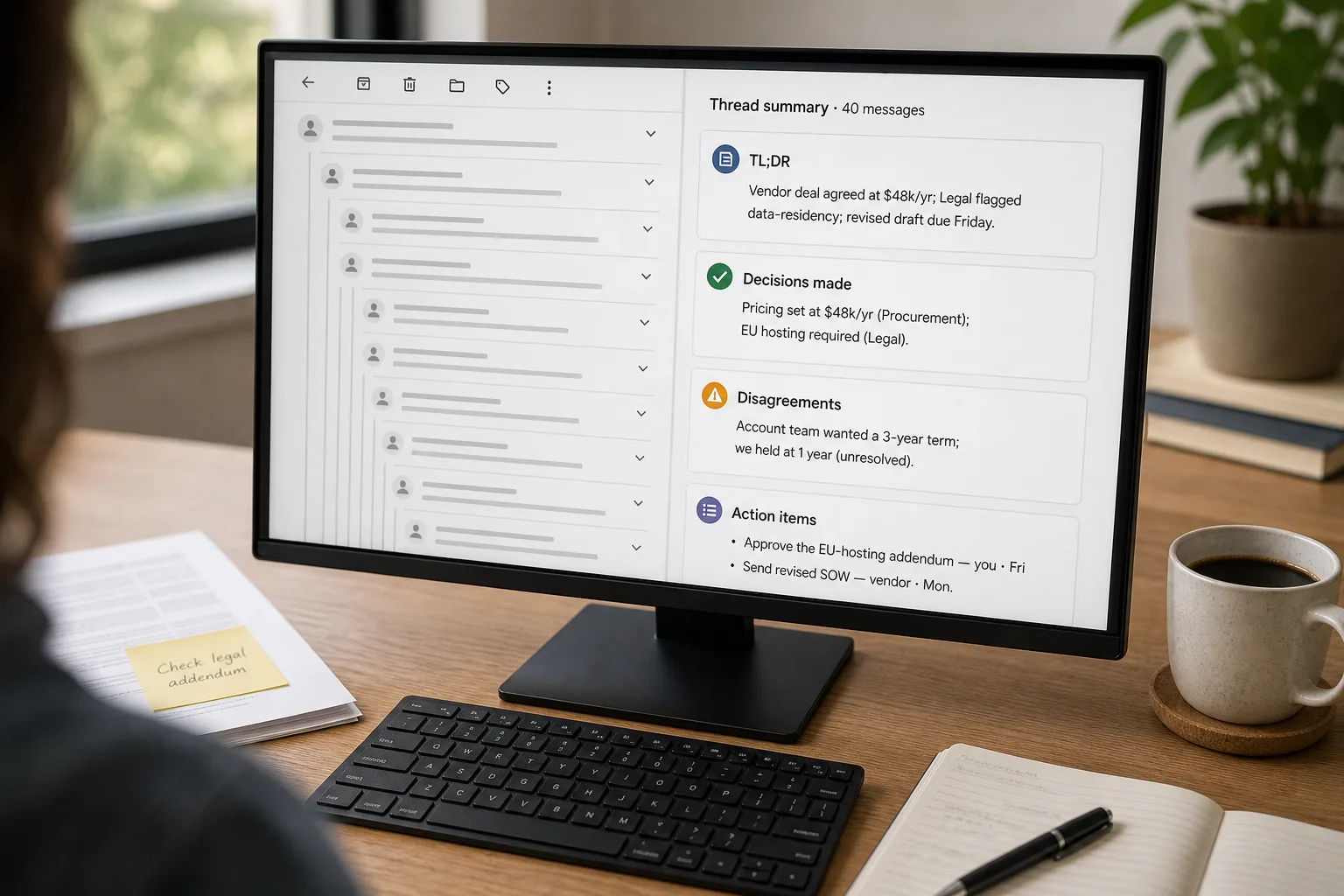
A 40-message email thread is one of the most reliable ways to lose a decision. The decision is in there somewhere — probably between the third and fourth reply, before the side-tangent about scheduling, after the bit where someone said “let’s circle back.” Anyone joining mid-thread is lost. Anyone returning from vacation is lost. Anyone trying to write the follow-up two months later is definitely lost.
AI summaries promise to fix this. Most of them produce wallpaper — a polite narrative paragraph that mentions everyone, attributes nothing precisely, and leaves the action items implied. This piece is the workflow that produces summaries people actually use: structured, attributed, surfacing the dissent rather than smoothing over it, with action items that have owners and dates.
Where this fits — and where it doesn't
Use this if the thread is informational or coordinative — project updates, vendor discussions, internal planning, scheduling tangles, post-mortems. Anywhere the value of the thread is “what did we decide and who’s doing what” rather than the specific phrasing of the conversation, AI summarisation works. Best applied to threads with 10+ messages where the cost of re-reading is non-trivial.
Don’t use this if the thread is contentious, legally sensitive, or contains decisions that will be cited verbatim later (HR matters, customer-facing commitments, regulatory or compliance discussions). Don’t use it on threads with confidentiality classifications that exceed your AI vendor’s data terms. And don’t use it on threads where the original phrasing is the point — disputes about wording, drafts being negotiated, lawyer-reviewed text. A summary in those cases loses the thing you actually need.
What you'll need before starting
- Access to an AI tool with sufficient context window — Claude (1M on any paid plan when chatting with Opus 5, Sonnet 5 or Fable 5.1), ChatGPT (~1.05M on GPT-5.6 and GPT-6 models), or Gemini (1M+) all handle typical email threads comfortably.
- The thread in a copyable form — Outlook, Gmail, or your client’s “view raw” / “view source” output works.
- A standing summarisation prompt — we’ll build it in step 2. Save it somewhere reusable (Claude Project, Custom GPT, or a note-taking app).
- Awareness of your team’s data-handling rules — internal threads, client confidential threads, and threads under privilege may not be acceptable inputs to your AI tool. Check before establishing the habit.
Six steps to summaries you can actually trust
- Sanitise the input — strip signatures, footers, quoted replies, and noise
Email threads carry roughly 30–60% of their bytes in repeat material: signatures, legal disclaimers, deeply-quoted prior replies, “sent from my iPhone” footers. None of it improves the summary; all of it costs tokens. Strip aggressively before pasting. Preserve sender attribution lines (“From: Alex Chen, 14 March 09:42”) and the unique content of each message. Most email clients have a “view source” or plain-text mode that makes this easier than copying from the rendered view.
- Use a structured summarisation prompt — not “summarise this”
The default summary is too narrative. Override with explicit sections. A version that works across Claude, ChatGPT, and Gemini:
- TL;DR: 2 sentences max — what was decided, what changes.
- Decisions made: bullet list. Each line names what was decided and who proposed/agreed.
- Open questions: bullets — what is still unresolved.
- Disagreements: bullets — where participants disagreed, even if a decision was reached. Do not smooth these over.
- Action items: bullets with owner and due date on each line. Flag any item without an owner or date.
- Skip: scheduling tangents, social pleasantries, attribution of who-said-what unless it shapes a decision.
Save this prompt as the standing template. Edit it once a quarter as the thread types you’re summarising shift.
- Check the token budget before sending — the model is not magic
A typical 40-message email thread runs 8,000–15,000 tokens after sanitisation. All three major models handle that comfortably. A 200-message thread (rare but real — long sales cycles, multi-month projects) can exceed 100,000 tokens; at that length, attention degradation starts mattering and quality drops on the parts of the thread that landed near the start. For very long threads, summarise in batches (first 50 messages, next 50, then combine the batch summaries) rather than relying on raw long-context handling.
- Verify attribution before trusting the summary
The most reliable failure mode of AI thread summaries is misattribution — Alex’s quote attributed to Sam, the decision Sam pushed back on attributed as Sam’s idea, the action item the engineer agreed to attributed to the project manager. Spot-check three claims per summary against the original thread, especially anything that names a person. The model’s attribution is right most of the time and confidently wrong sometimes; the cost of confidently-wrong attribution is high enough to justify the spot-check.
- Preserve disagreements deliberately — most summarisers smooth them over
Default summarisation collapses dissent into consensus (“the team discussed pricing and aligned on $X”). This is the second-most-common failure mode, behind misattribution. The structured prompt asks for disagreements explicitly; verify the section is populated when the original thread contained real disagreement. If the disagreement section reads as empty when the thread had clear pushback, the summary is hiding something — rewrite or re-run the prompt with an explicit instruction to surface the disagreement.
- Distribute the summary where the reader already lives — not in a new folder
The number-one reason summaries go unread is that they land somewhere readers don’t already check. For internal threads, paste the summary into the team’s existing channel (the project Slack, the Notion doc, the Linear ticket) rather than creating a new “Email Summaries” folder. For customer threads, attach to the deal or account in the CRM. Distribution is the workflow step that determines whether the summary is useful or just another piece of generated content nobody opens.
What it costs and what to expect
The numbers favour doing this in your existing AI subscription rather than buying a dedicated email-AI tool, unless the email tool also handles triage and prioritisation. For thread summarisation alone, the consumer-plan path is more flexible and roughly free.
Other ways to solve this
Built-in email-tool AI (Superhuman, SaneBox, Outlook Copilot). Right answer if you want the summarisation inside the email client itself rather than copy-pasting into Claude or ChatGPT. The trade-off is less prompt control — you get the tool’s default summary structure, not your standing template. Good for individual productivity; weaker for teams that want a consistent summary shape across the company.
Slack-channel summarisation (Slack AI, Glean, and similar workplace-AI add-ons). Same pattern, different medium — if your team’s discussion has moved to Slack rather than email, the channel summarisation tools are the right surface. The structured-prompt pattern from step 2 transfers directly.
Manual notes by a designated thread owner. Still the right answer for legally sensitive, HR-related, or board-level threads where misattribution is unacceptable. Higher cost in attention; zero risk of AI-introduced error.
Don’t summarise — restructure the conversation. Many threads that “need a summary” are signals the conversation was in the wrong tool. If a thread regularly produces decisions and action items that need extracting, move the next instance to a shared doc, a Linear ticket, or a project channel with structure built in. The best summary is the conversation that didn’t need one.
Related work
For the meeting-summary equivalent of this workflow, see Meeting summaries people actually read. For the broader unit-economics of LLM context windows that shapes pricing at long-thread sizes, see Tokens, context windows, and what they cost. For pattern-detection across many summarised threads — the workflow this enables — see Find patterns in customer feedback.
FAQ
Can I do this directly in my email client?
Yes — most major email clients now have built-in summarisation. Outlook Copilot, Gmail with Gemini, Superhuman's native feature, SaneBox add-ons. They use the same underlying LLM technology with the client's default prompt. Quality is fine for personal use; for team-wide consistency, the standing-prompt workflow (paste into Claude or ChatGPT) wins because you control the structure.
What about confidential threads — does the model see them?
Yes, the model sees them. For sensitive content, three options: (1) use a paid tier with explicit data exclusion from training (Claude Team / Enterprise, ChatGPT Team / Enterprise, Gemini Business); (2) use a self-hosted setup — see build a private knowledge base for the architecture; (3) don't summarise that thread with AI. Picking option 3 for legal-privileged, HR-related, and customer-PII-heavy threads is the responsible default.
How do I handle threads with attachments?
Extract the attachment content separately and include the most-relevant excerpts as part of the context, not the whole attachment. A 50-page PDF as the attachment is its own summarisation problem; summarising the thread that mentions it should reference the attachment ('Alex shared the budget spreadsheet') rather than try to summarise the spreadsheet inline. See extract structured data from PDFs for the document-handling side.
What about multilingual threads where participants reply in different languages?
All three major models handle code-switching within a thread reasonably well — typically returning the summary in whichever language dominates or in English by default. Specify the summary language explicitly in the prompt ("summarise in English" or "summarise in French") to avoid surprises. Attribution quality may drop slightly on code-switched content; spot-check more carefully.
Can I summarise weekly Slack channels the same way?
Yes — same pattern, same structured prompt, with a small adjustment to handle Slack's threaded-reply structure. Most teams find Slack channel summarisation more useful than email-thread summarisation because the channels are continuous and the catch-up problem is recurring. Tools like Slack AI offer this natively; the standing-prompt approach gives more control for teams that already have a summarisation library.