
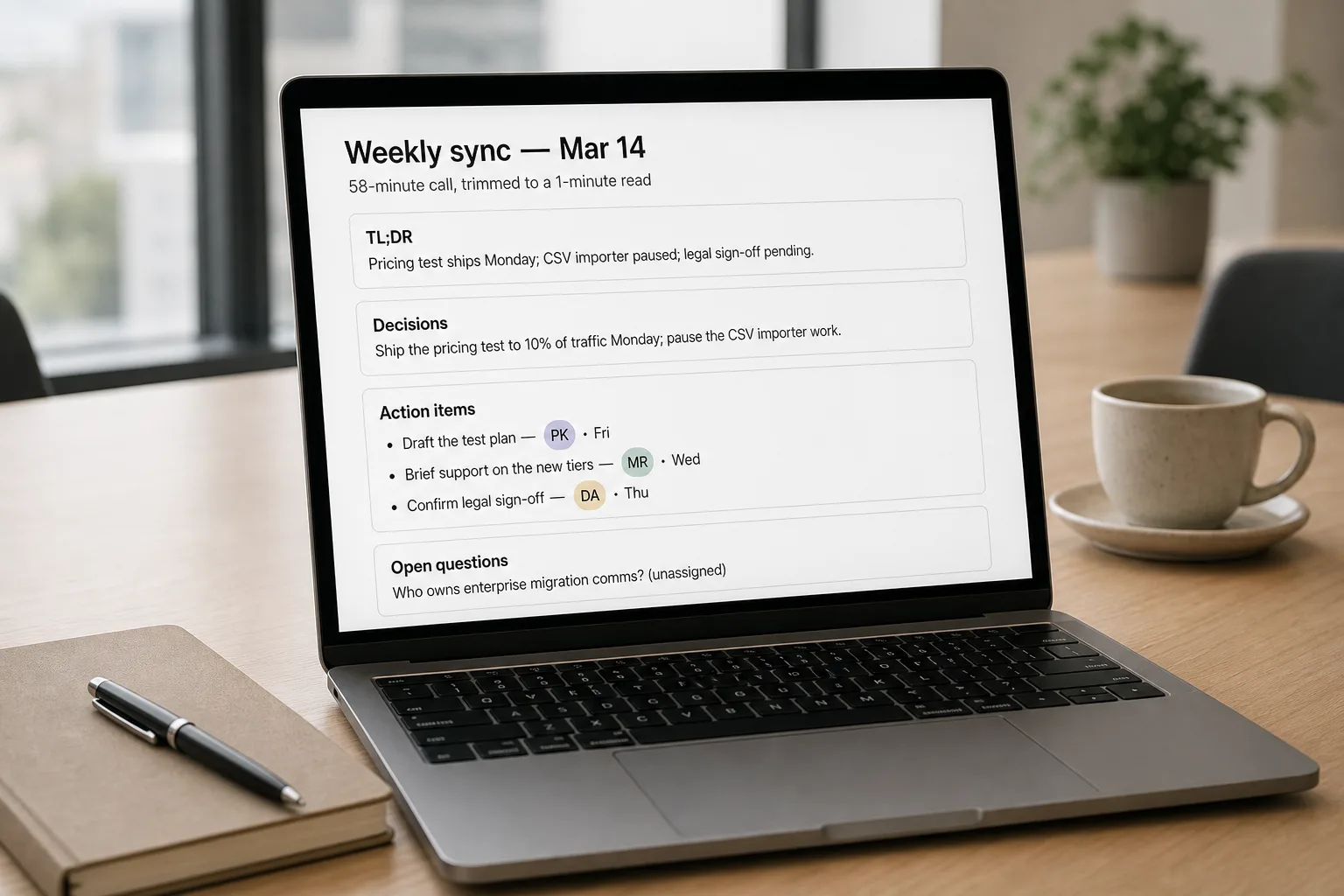
If you’ve tried AI meeting summaries and watched no one read them, you’ve seen one of two failure modes. They’re too long — paragraphs of “the team discussed” narration that no one reads past line three. Or they land in the wrong place — buried in a folder, attached to a calendar event, sent to a Slack channel nobody monitors. The transcription is rarely the problem. The summary shape and the distribution path are.
A three-part workflow fixes both at once: pick the right tool for your context, set a summary prompt that produces decisions and actions instead of narration, and route the output to where the reader already is.
Where this fits — and where it doesn't
Use this if your team runs enough meetings that “remember what we agreed” has become a real cost — async distributed teams, customer-call-heavy roles, founders running too many vendor calls, ops handling weekly updates from many parties. The win is that decisions and follow-ups become searchable, attribution-able, and shareable without a human writing notes.
Don’t use this if your meetings are small, in-person, single-team, and well-attended — minutes from a five-person standup don’t need AI. Don’t use it for sensitive 1:1s (performance reviews, terminations, M&A discussions, anything legally privileged) — the recording itself is the liability, not the summary. Some platforms now require explicit consent and disclosure when bots join; check your jurisdiction’s rules before turning bots on by default.
What you'll need before starting
- A clear-enough audio source — headset audio or a well-set-up conference room. Phone-on-table audio across a 12-person meeting will degrade summary quality regardless of tool.
- Consent from participants — both ethically and, in many jurisdictions, legally. Most tools surface a notice when joining; bot-free tools (Granola) push the disclosure responsibility onto you.
- A standing destination for the summaries — the channel/document/system where the reader actually lives. We’ll wire this in step 4.
- Five minutes to write the standing summary prompt that fits your team’s needs. We’ll do this in step 3.
Five steps to a summary system that gets used
- Pick the tool that matches your meeting culture, not the one with the longest feature list
Three honest decision factors. If your meetings happen entirely in one platform (e.g. all-Zoom, all-Teams) — the built-in option (Zoom AI Companion, Teams Intelligent Recap) is the path of least friction and likely covered by an existing licence. If your meetings span multiple platforms — Otter, Fireflies, or Zoom AI Companion (which now joins Teams and Meet) make sense. If discretion matters and a visible bot in the call is awkward — Granola captures audio from your device without joining as a participant; no recording announcement. Try one for a week before paying for two.
- Set up bot consent and behaviour once
Configure your tool so it’s predictable: which meetings it joins (calendar-tag-based or manual), how it announces itself, who gets the summary by default, and whether the audio file is retained or deleted after summarisation. Make the policy explicit in writing and share it with your team — “We use [tool] for internal meetings; if you don’t want it on a particular call, drop the [#nobot] tag in the calendar.” Predictability matters more than the specific policy.
- Write the standing summary prompt — this is where most teams lose readers
Default summaries are too narrative. Override them with a structured prompt. A version that consistently outperforms defaults across tools:
- TL;DR: 2 sentences max — what was decided, what changes as a result.
- Decisions made: bullet list, no narrative.
- Action items: bullet list with owner and due date in each line — flag any item without an owner.
- Open questions: bullets — what we couldn’t resolve and who needs to.
- Skip: small talk, tangents, who-said-what attribution unless materially important.
Most modern tools let you set a custom summary template. If yours doesn’t, paste the transcript into Claude or ChatGPT with this prompt and use that output instead of the tool’s default summary.
- Route the summary to where readers already are
The number-one reason summaries go unread is that they’re delivered somewhere the reader doesn’t already check. Wire the tool’s output to the team’s existing surface: a Slack channel for the relevant project, an email thread for the customer account, a Notion/Confluence doc that’s already in someone’s tabs. Don’t create a new “Meeting Summaries” folder — nobody opens it. The right destination is one click from where work is happening.
- Audit weekly for the first month — kill what isn’t read
For the first four weeks, look at the summaries that landed in your destination channel: were they opened? Did action items get picked up? Were they accurate enough to trust? Cull the meetings that don’t produce useful summaries (small standups, recurring check-ins where the same three things are discussed). The system works because it’s selective. If it summarises every meeting, no summary is special and the readers stop opening them.
What it costs and what to expect
The accuracy numbers are why audio quality matters more than tool choice. Pay for a good headset before you pay for the premium tier of any of these tools.
Other ways to solve this
Manual notes from a designated note-taker. Still the right answer for sensitive meetings, small in-person sessions, and any context where the act of note-taking shapes the conversation usefully. Higher cost in attention; zero compliance risk.
Self-hosted transcription + LLM summary. For privacy-sensitive teams who can’t send audio to a SaaS tool, run local Whisper transcription and pipe the transcript into Claude or a local LLM with the standing prompt. More setup; complete control over data.
Hybrid: transcription tool + your own summarisation. Use Otter or Fireflies for the transcript (they’re best at speaker-separated audio), then use a separate AI assistant for the summary using your standing prompt. Higher friction; sometimes higher quality if the tool’s default summary keeps disappointing you.
Structured meeting templates instead of summaries. A shared agenda doc that the team fills in during the meeting (decisions, actions, blockers) often beats any post-meeting summary. AI tooling complements this, doesn’t replace it.
FAQ
Should we use the bot-free tool (Granola) or a tool that joins as a visible bot?
Bot-free is more discreet and removes the awkwardness of a third-party participant on every call — but it shifts the disclosure responsibility onto you. In many jurisdictions (most of the EU, two-party-consent US states like California), recording requires consent from all parties; an invisible recorder doesn't get you out of that. Default rule: be explicit with participants regardless of which tool you pick.
Will the tool transcribe meetings in languages other than English?
Yes — Fireflies, Otter, and Zoom AI Companion now support 30–60+ languages with varying accuracy. English, Spanish, French, German, and Mandarin are excellent across all leading tools. Other languages range from good to weak; test on your specific language with a representative meeting before committing.
What about confidentiality and where the audio is stored?
Most SaaS tools store recordings and transcripts on their cloud, often in the US, often used (with opt-out) to improve their models. For sensitive meetings, three options: turn the bot off; use the enterprise plan that excludes your data from training; or self-host a transcription pipeline (see the local Whisper how-to linked above). Don't assume the default settings are safe — check what each tool retains and for how long.
How accurate are the action items?
Action items are the area where summaries most often go wrong — the model picks up phrases like "someone should follow up on this" and elevates them to action items without an owner, or misses commitments made in passing. Before relying on action-item extraction, spot-check a few meetings against your own memory. Add a 30-second human edit pass before the summary is shared if accuracy matters; many teams find this less effort than they expected.
Can the AI distinguish between speakers reliably?
Speaker diarisation ("who said what") is now standard but quality varies. Tools like Otter and Fireflies are strong here when each participant has their own audio channel (i.e. each on a different device). On a shared conference-room mic with multiple voices, diarisation degrades sharply — sometimes to the point of being misleading. Don't rely on the speaker-attribution for anything contentious without verifying against the original audio.