
If you run people ops at a growing company, the new hire’s first week reveals everything about how your function is staffed. At small companies, the manager writes a custom plan over the weekend before the hire starts — specific, warm, slightly disorganised. At mid-size companies, the manager forgets. The new hire spends their first morning waiting for laptop access and their second reading a generic “welcome to the company” deck that hasn’t been updated since the last reorg. At large companies, there’s a beautifully-designed onboarding portal that doesn’t reflect the current org or current systems because keeping it current is nobody’s job.
The pattern that works at scale is generated per-hire, not handcrafted, and pulls from operational documents that already exist. Org chart for “who you’ll work with.” System inventory for “what you’ll need access to.” Role-specific SOPs for “what you’ll do in your first month.” Team-specific docs for the cultural context.
This piece is the pipeline that produces those plans on demand. When the offer letter goes out, the onboarding plan is ready before the hire’s start date, tailored to their role, manager, and team.
Where this fits — and where it doesn't
Use this if you hire 20+ people per year, your role catalogue has at least 5 meaningfully different role types, and your existing docs (SOPs, system inventories, org chart) are decent enough to draw from. Common fits: growing tech companies, services firms with structured role definitions, ops teams supporting cross-functional hiring.
Don’t use this if your hiring is one-off (under ~5 hires per year), every onboarding is essentially identical (single-role companies), or your existing docs are too thin to pull from. For the last case, fix the docs first — onboarding generation is a downstream system that depends on operational documentation existing.
What you'll need before starting
- A role catalogue with at least basic differentiation — engineering vs sales vs ops vs customer success, ideally further broken down by level and specialisation.
- Existing SOPs and reference docs in a known location. The SOP extraction pipeline is the most natural feeder if you don’t yet have SOPs.
- An org chart that’s reasonably current — knowing who reports to whom and who the new hire will collaborate with.
- A system / access inventory: for each role, which tools and systems they’ll need access to on day one, week one, month one.
- HR system integration — Workday, BambooHR, Lattice, Sapling, or whatever you use. The pipeline triggers when a hire is confirmed; the integration is the trigger source.
- A model API key. Cheap-tier models handle this synthesis work well.
Six steps to onboarding plans that don't need rewriting
- Build the role-template catalogue — generic per role family, customised per role
For each role family (engineer, account executive, customer success manager, operations associate), define a generic onboarding template: typical first-week priorities, typical first-month milestones, baseline system access, baseline reading list. The generic templates are the skeleton; the per-hire generation customises them with manager, team, project, and specific tools. Avoid the trap of one template per exact role; aim for ~10–15 role family templates covering the bulk of hires, plus a generic fallback.
- Pull per-hire context — manager, team, start date, location, level
When a hire is confirmed in the HR system, pull the context: assigned manager (and their manager), team they’re joining, start date, work location (remote / in-office / hybrid + specific office), seniority level, role family. The HR-system fields populate this; the pipeline reads them on hire-confirmation. Missing context defaults to the generic template; the more context the system can pull, the more tailored the plan.
- Generate the plan with structured output — week 1, week 2, month 1, month 3 milestones
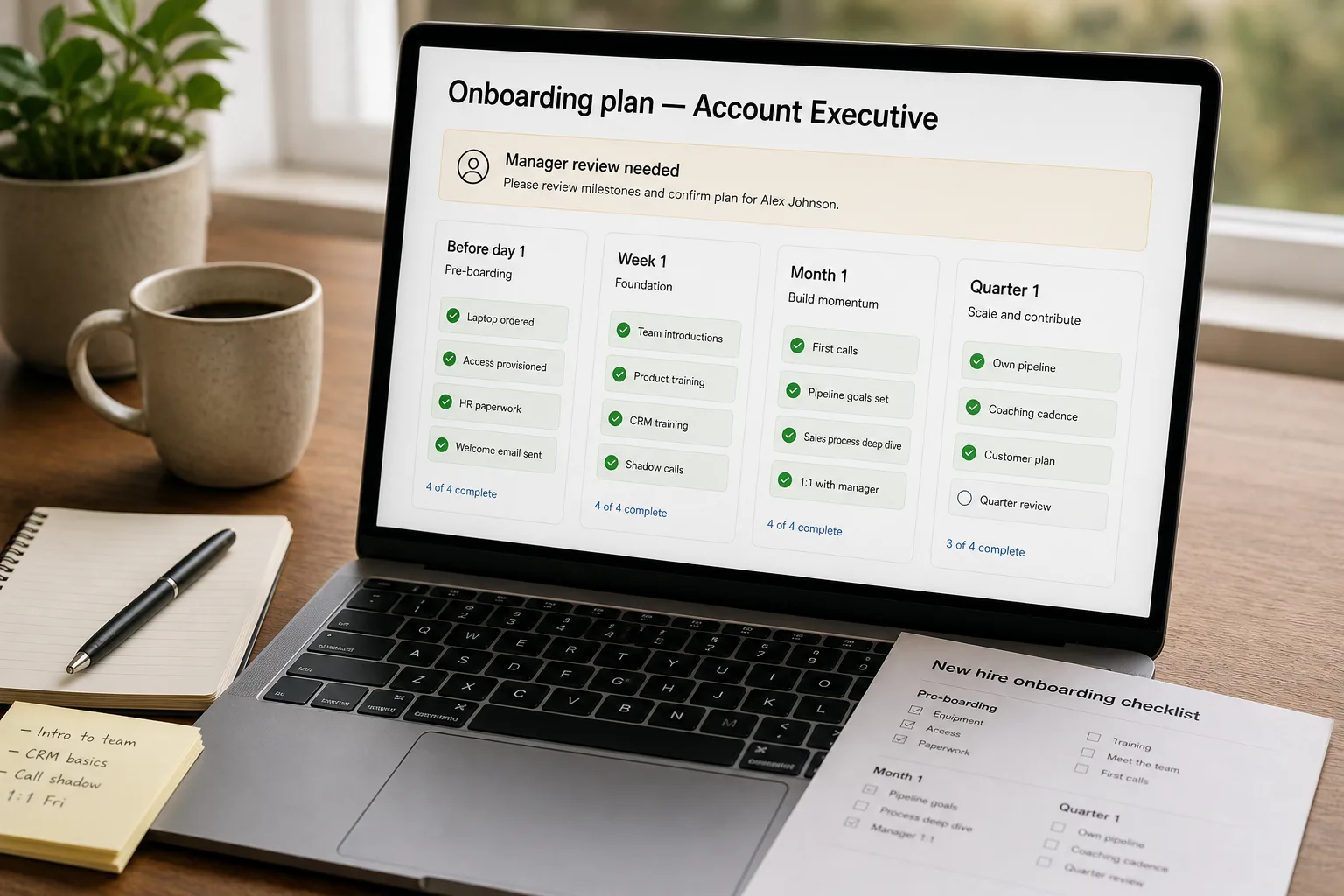
For each new hire, the pipeline drafts: a “before day 1” checklist (laptop ordered, access provisioned, welcome email sent), a week-1 plan (orientation meetings, system tours, first SOPs to read, named key collaborators), a month-1 plan (first project, first independent work, first review checkpoint), a quarter-1 milestone (first independent deliverable, first peer review). Structured output beats a single narrative document — the plan is operational, not inspirational.
- Personalise with manager and team-specific context
Pull the manager’s previous onboarding plans (where they exist) for similar hires; pull the team’s current quarter goals and active projects; pull recent team-specific cultural docs. Include these in the prompt so the generated plan reflects what’s actually happening in that team this quarter — not a generic role description from a year ago. The manager-specific personalisation is where the plan stops feeling generic; this is the differentiator from boilerplate HR docs.
- Route to the manager for review before sending to the new hire
The generated plan goes to the assigned manager first, not directly to the new hire. The manager has 2–3 days to add specifics: “you’ll partner with X on project Y,” “your first 1:1 with me is on day 3,” “we just shipped Z so here’s what changed since the SOP was written.” The manager review is fast (10–15 minutes typically) and adds the team-specific knowledge the AI can’t pull from documents. Without this step, plans feel generic; with it, they feel manager-led.
- Update plans as the org changes — quarterly template refresh
Each quarter, refresh the role templates: new systems added, deprecated systems removed, new SOPs incorporated, org-chart updates reflected. The refresh is mechanical — re-pull from the source docs, regenerate the templates, ship the updated versions. Without the refresh, plans drift toward staleness over the year; with it, every new-hire plan reflects current operational reality. Tie the refresh to the SOP-update cadence; if SOPs are updated quarterly, the onboarding generation pipeline picks up the changes automatically.
What it costs and what to expect
The manager-time-saved is the operational ROI; the new-hire experience improvement is the strategic one but harder to quantify. The template-acceptance rate is the system-tuning metric.
Other ways to solve this
HR-platform bundled onboarding (Lattice, Sapling, BambooHR, Rippling, Workday). Built-in onboarding workflows with checklists, automations, and templates. Right answer for teams that want a working system without building. Trade-off: less customisation per-hire, dependency on the platform’s flexibility, sometimes generic-feeling output.
Manual manager-written plans, supported by templates. The traditional approach with light tooling. Works at small scale; quality is highly variable by manager. The AI pipeline standardises the floor while letting the ceiling stay as high as the most engaged manager’s effort.
Generic company-wide onboarding portal. Common at larger companies — a portal with universal first-week content. Works for company-level context (benefits, culture, policies); fails for role-specific operational onboarding. The AI pipeline complements the portal; portal handles company-wide, AI handles role-specific.
Outsource to a vendor. Several services offer onboarding-content creation. Useful for one-time content development; doesn’t address the per-hire customisation problem.
Related work
For the SOP extraction that often feeds the onboarding template content, see SOP extraction from interviews. For the internal Q&A bot that the new hire will use throughout onboarding, see Internal Q&A bot over company docs. For the federated search that helps new hires find information across tools, see Federated search across your tools. For the resume-screening pipeline that precedes hiring, see Resume screening with anti-bias guardrails.
FAQ
How is this different from what Lattice / Sapling / Rippling already provide?
Functionally overlapping. The HR platforms ship onboarding workflows with checklists and templates; the difference is in per-hire AI customisation depth and the integration with your existing operational documentation (SOPs, federated search, internal docs). Many teams use both — the HR platform for the workflow mechanics (task assignment, e-sign, compliance), the AI pipeline for the personalised plan content. For smaller teams, the platform alone is often sufficient.
What about confidential information — compensation details, performance plans?
Don't include in the AI-generated plan. The plan is operational onboarding; compensation and performance live in HR system records with appropriate access controls. The plan can reference "discuss with your manager in your first 1:1" without naming numbers. Keep the AI pipeline's input to non-confidential operational content; it's a guardrail that simplifies access control.
How do we handle remote vs in-office onboarding?
Location-aware templates. Remote-specific: emphasis on async-communication norms, virtual coffee schedule, distributed-team tools (video, Slack, etc.). In-office-specific: building tour, badge access, in-person rituals. Hybrid: explicit mix. The location field from the HR system drives the template variant; the rest of the personalisation works the same way.
What about international hires with country-specific requirements?
Country-specific plan variants for the mandatory pieces (work-permit checks, local benefits, country-specific HR onboarding). The role-specific operational onboarding is mostly country-agnostic; the compliance and admin layer is where country variation lives. Most HR platforms handle the compliance side; layer the AI-generated operational plan on top.
How do we measure if the onboarding is actually working?
Three signals. (1) Time-to-productivity — when does the new hire complete their first independent deliverable? Track before and after pipeline rollout. (2) 30-day and 90-day feedback survey: rate the onboarding experience. (3) Manager-reported readiness at the 30-day mark. The first is the hardest to attribute (other factors affect ramp time); the second and third are direct signals. Most teams see meaningful improvement in manager-reported readiness within a quarter of rolling out the pipeline.