
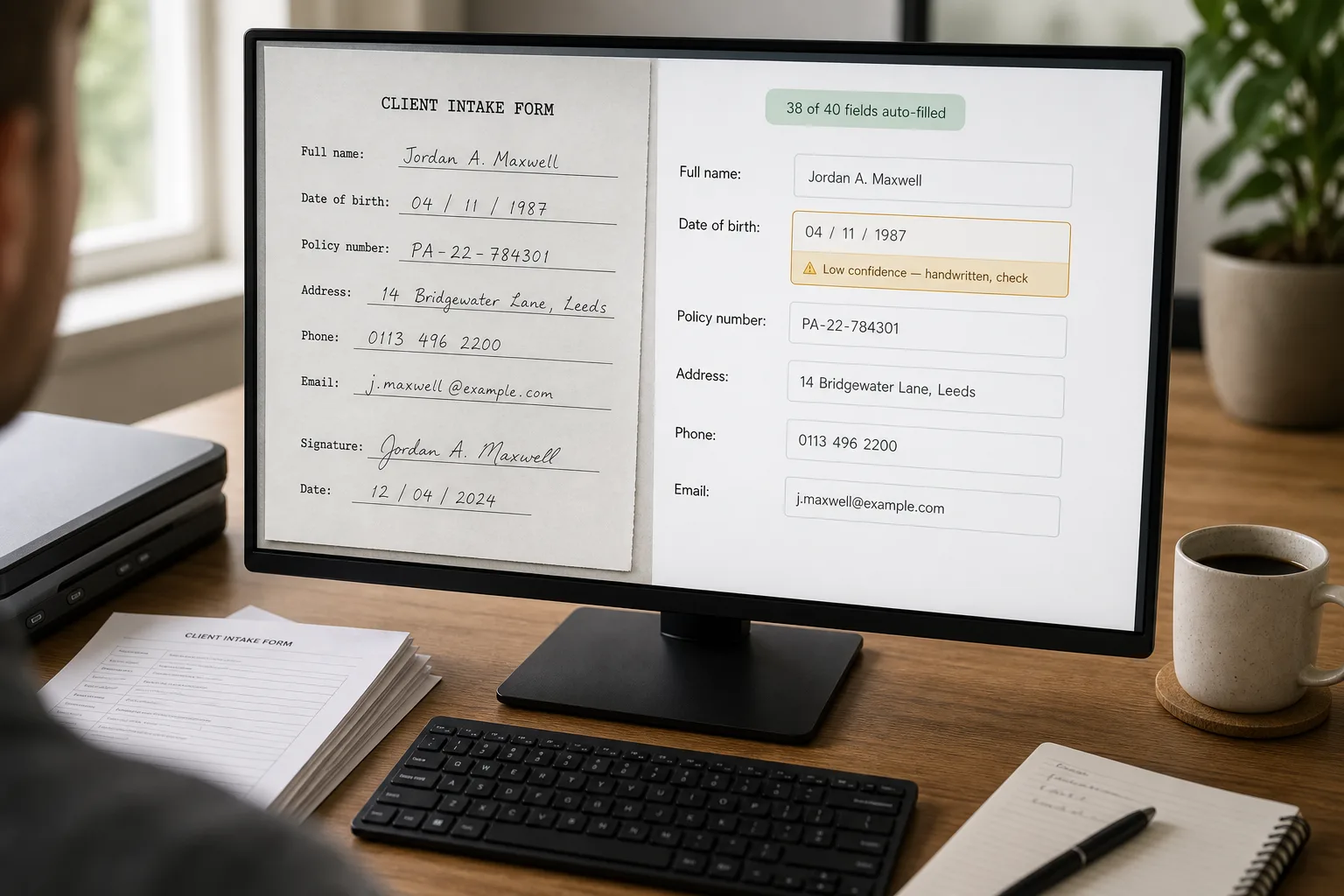
OCR — short for optical character recognition — is software that reads text from images and scans. Pair it with an LLM, the technology behind ChatGPT, Claude, and Gemini, and you have a system that can take a paper form, read every field on it, and write the result into a database.
There’s a category of business that runs on paper forms — patient intake at a clinic, applications at a community college, claims at a small insurer, registration at a sports league, surveys at a research firm — and the back office knows the cost. At least two people are keying field values from PDFs and scans, with a quality-check pass that runs at 30% of input speed. The 2020s version of the same workflow uses AI extraction for the bulk of the work and leaves humans for the genuinely ambiguous handwriting, the unusual layouts, and the validation rules that catch the systematic misreads.
What follows is that pipeline: the OCR-plus-LLM combination that handles printed and handwritten content, the form-shape mapping that beats one-size-fits-all extraction, the validation that catches silent errors, and the route-to-CRM step that turns a pile of scans into searchable, structured records.
Where this fits — and where it doesn't
Use this if you process hundreds to thousands of paper-or-scan forms per month, the data ends up in a structured system (CRM, EHR, SIS, claims system, database), and the manual entry is currently costing meaningful hours of staff time. Common fits: clinic patient intake, education enrolment, insurance claim intake, government services applications, registration desks at sports leagues / camps / events.
Don’t use this if your form volume is under 100/month (the cost of building exceeds the cost of typing), forms are arriving digitally already (you don’t need OCR at all — see Extract structured data from PDFs), or the data quality requirements are so strict that 100% human review is mandatory anyway (some clinical, legal, and regulated-industry forms have this constraint). For the last case, AI can still pre-fill and accelerate review, but it won’t reduce headcount.
What you'll need before starting
- Sample forms of every type you process — at least 20–30 per form type, in the actual condition you receive them (photographed, scanned, fax, originals). The system you build is calibrated to real-world quality, not pristine PDFs.
- A target system to write to — CRM (Salesforce, HubSpot), EHR (Epic, Athenahealth), SIS, claims management, or a database. Without the route-back, the extraction produces clean data that helps no one.
- API access to the target system. Most modern systems support REST or webhook ingestion; older systems may need a CSV-import or RPA bridge.
- A specialised OCR option as a baseline — AWS Textract, Google Document AI, Azure Form Recognizer, Mindee. These services handle the OCR cleanup; LLMs handle the structured-extraction layer on top.
- A vision-capable LLM for the long tail — Claude, GPT-4o, Gemini. The LLM tier catches what specialised OCR misses (handwriting, weird layouts, cross-field references).
- A reviewer queue. The exceptions need human eyes; “10–15 minutes a day to clear the queue” is the realistic ongoing commitment.
Six steps to forms that flow without keying
- Map your form shapes — printed templates, handwritten fields, checkboxes
Audit the forms you receive and group them: (a) printed forms with typed responses, (b) printed forms with handwritten responses, (c) printed forms with checkbox / radio selections, (d) free-form attachments. Each group has different extraction characteristics. Most teams process 3–8 form types, not 50; the mapping pass clarifies the scope of the project and surfaces the high-volume types worth automating first.
- Pick the OCR tier per form shape
For printed forms with consistent layouts, specialised OCR services (Textract Forms, Document AI Form Parser, Azure Form Recognizer) hit 95%+ accuracy at low cost. For forms with handwriting, modern vision-capable LLMs increasingly match or beat specialised services, with the trade-off of higher per-form cost. For checkbox layouts, specialised services are reliable; LLMs are sometimes confused by faint marks. Run both on a sample of your real forms before committing; the right tier varies by form quality, not by marketing claims.
- Extract with structured output, field-by-field
Define the schema for each form type — what fields exist, what type each is (string, date, number, enum), what the validation expectations are. Pass the extracted OCR output (or the raw image, for vision-LLM extraction) along with the schema, and request a JSON object matching it. Field-by-field extraction beats free-form parsing — the model knows what’s expected, and missing fields are explicitly null rather than silently absent. For handwriting specifically, ask the model to return both its best guess and a confidence score per field.
- Validate against business rules — type, range, and cross-field consistency
Run rules: (a) types match (a date field contains a parseable date, a phone field is digits, an email is well-formed); (b) values are in expected ranges (a birth year between 1900 and the current year); (c) cross-field consistency (state matches ZIP, end date is after start date, totals sum). The validation layer is where most silent failures get caught. A handwritten “1” misread as “7” passes single-field validation but fails cross-field sanity checks; that’s how you catch it before it reaches the CRM.
- Route by confidence and validation status — auto-post or queue
Three routes per form: (a) all fields high-confidence + all validations pass → auto-post to the target system with the source scan attached; (b) any field medium-confidence OR a soft validation flag → route to a quick-review queue (a reviewer confirms or corrects in seconds); (c) low confidence OR hard validation failure → full review queue with the original scan side-by-side with extracted fields for line-by-line review. Tune the thresholds from real audit data after a month.
- Audit weekly — the exception queue is the system’s improvement loop
Once a week, sample 20 forms from the exception queue and 10 from the auto-posted bucket. The exception sample tells you which forms are systematically failing (one form type, one field, one handwriting style); the auto-posted sample catches what made it through without review and shouldn’t have. The audit feedback updates the extraction prompts, the validation rules, and the confidence thresholds. Skipping the audit lets the silent failures accumulate; running it weekly catches the patterns before they become quality incidents.
What it costs and what to expect
The cost-per-form is much smaller than the labour it replaces; the auto-post rate is the operational metric — what percentage of intake skips the human queue entirely.
Other ways to solve this
Managed form-data services (Mindee, Hyperscience, Rossum, Docsumo, Veryfi). Turnkey form-extraction with workflow UI, exception queue, and integration adapters. Right answer for ops teams that want a working system without building. Trade-offs: higher per-month cost, less customisation, vendor lock-in. Strong fit for regulated industries where the platform’s compliance certifications matter.
Specialised OCR APIs only (AWS Textract Forms, Google Document AI Form Parser, Azure Form Recognizer). Lower cost than managed platforms; you build the schema, validation, routing, and queue. Good middle path for engineering-capable teams. Best fit when your form types are well-defined and your engineering team can own the integration layer.
Form-redesign first, OCR later. Often the right first move. If you control the form (you sent it to the customer), redesign it for clean data: convert to a digital intake form (web form, mobile app, fillable PDF), use structured fields rather than free-text where possible, eliminate handwriting where you can. A redesigned digital form makes OCR unnecessary for that intake stream entirely; a hybrid (digital for the majority, OCR for the long tail of paper holdouts) is often the right operational target.
Outsourced human entry — onshore or offshore. Still the right answer for low-volume operations or very high accuracy requirements. BPO services for data entry are mature, with strong quality controls. The cost is higher than AI but predictable; the quality on tricky forms (medical records, legal forms, multilingual handwriting) is currently better than fully automated extraction. Many teams run a hybrid: AI for the bulk, BPO for the genuinely hard cases.
Related work
For the broader document-extraction pattern this fits inside, see Extract structured data from PDFs. For the specific case of invoices and receipts, see Automated invoice and receipt processing. For the comparison of specialised document AI services that often handle the OCR tier, see Document AI services compared. For classifying scanned forms by type before extraction, see Document classification at scale.
FAQ
How well does AI handle handwriting?
Mixed — varies sharply by handwriting quality. Modern vision LLMs (Claude vision, GPT-4o, Gemini vision) handle reasonably clear printed handwriting at 80–92% per-field accuracy. They struggle with cursive, with poor scan quality, with single-character fields (single letter handwriting is the hardest case), and with checkbox-versus-text ambiguity. For high-volume handwritten intake, run pilots on real samples before committing; the published benchmarks are optimistic compared to production.
What about HIPAA / regulated industry compliance?
Use a vendor with the appropriate BAA / compliance certifications. AWS, Google, Microsoft, and the major OCR specialists all offer HIPAA-compliant deployment paths. For Anthropic and OpenAI, enterprise tiers offer HIPAA-eligible deployment under signed agreements; check the specific compliance posture before processing PHI. Many regulated-industry teams self-host an open-source vision model (LayoutLMv3, Donut) to keep data entirely on-prem; the trade-off is engineering investment versus compliance simplicity.
How do I handle multi-page forms or forms with attachments?
Pre-classify each page (is this page 1 of a form, page 2, an attachment, an unrelated insertion). Specialised document classifiers (covered in document classification at scale) handle this; for simple cases, a header-detection rule on each page suffices. Once classified, extract per-page with the appropriate schema and merge into one record. Attachments (driving licences, insurance cards) often need their own extraction pipeline rather than being treated as form pages.
What about forms in multiple languages?
Modern vision LLMs handle 30+ languages for printed text; handwriting in non-Latin scripts is harder. For multilingual intake (clinics serving Spanish-speaking patients, ESL programs at colleges), maintain a language-aware schema and route to a language-specific reviewer for exceptions. Specialised OCR services have variable language support; Google Document AI and Azure Form Recognizer have the broadest coverage.
How do I integrate with our CRM / EHR / database?
Most modern systems have a REST API for record creation; the route-back step writes the extracted fields directly. For older systems without an API, a CSV import on a schedule or an RPA bridge (UiPath, Automation Anywhere) is the fallback. Don't underestimate the integration work — the API layer is often where projects stall after extraction is working, because the target system has validation rules and required fields the extraction didn't capture.
Will my data entry staff lose their jobs?
Usually they get repositioned to higher-value work: exception review, data quality auditing, customer-intake quality (chasing down customers whose submissions are unclear), training the model with corrections. The volume of paper-form intake at most businesses is large enough that automation reduces the per-form labour, not the total headcount needed — at least initially. Be honest with the team early about how roles will evolve; teams that handle the change transparently retain the institutional knowledge that makes the system better over time.
