
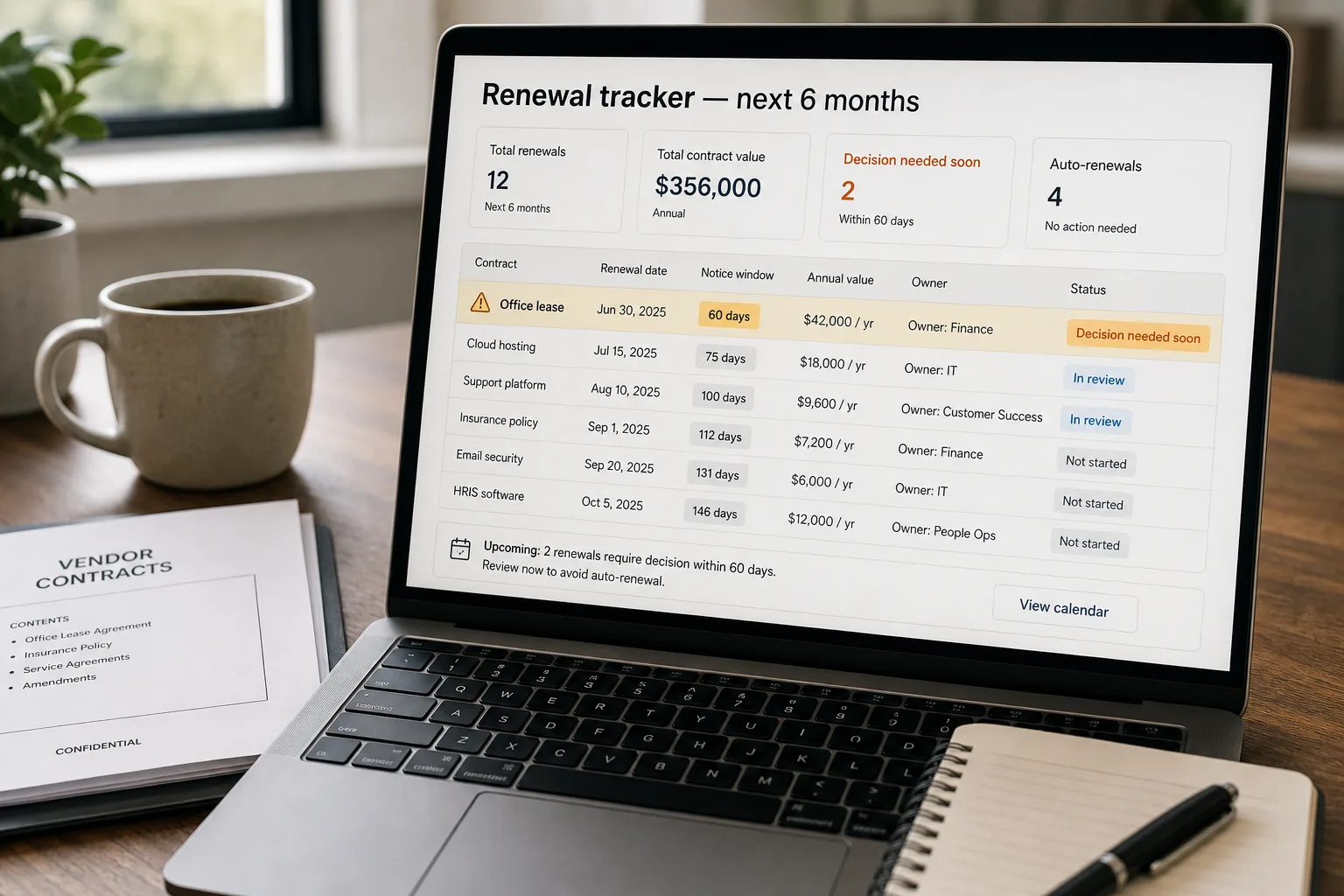
If you have 20+ active vendor or lease contracts, the phone call eventually arrives: “Hi, we noticed your subscription auto-renewed last week for another twelve months at $42,000. The 60-day cancellation window closed in March.” Most growing companies have a contract portfolio that quietly outgrew the spreadsheet someone set up two CFOs ago.
The cost of the gap shows up as renewals that nobody decided to do — software the team stopped using six months ago, a vendor whose service is now bundled in another tool, a lease that needed renegotiating before the option-to-renew triggered.
The fix is operational. Extract renewal dates and notice windows from every contract once. Run the alerts on a schedule. Route each upcoming renewal to the owner who can actually decide it.
This piece walks through the pipeline: the one-time portfolio scan, the date-and-notice extraction with cross-validation, the calendar of upcoming windows, and the routing that reaches finance, legal, and department heads in time to make a decision.
Where this fits — and where it doesn't
Use this if you have 20+ active vendor or lease contracts, your portfolio is growing, and the current process for tracking renewals is “someone’s spreadsheet that nobody fully trusts.” Common fits: growing companies past series A, agencies with many vendor subscriptions, professional services firms with software-and-tools sprawl, anyone whose vendor stack now spans 30+ active contracts.
Don’t use this if your contracts portfolio is under 15 contracts (manual tracking is faster than building), you’ve already deployed a CLM (contract lifecycle management) platform with renewal tracking built in (use it), or your contracts are mostly month-to-month (the renewal-window concept doesn’t apply the same way). For SaaS portfolios specifically, also check if your finance system or expense-management tool (Ramp, Brex, Vendr) is already surfacing this data — many do.
What you'll need before starting
- The contract portfolio in a known location — a contracts folder in Drive / SharePoint / Notion, or your CLM if you have one. The pipeline needs to access every contract.
- A list of contract owners — who’s responsible for each contract type (finance for software, ops for office leases, marketing for ad-platform contracts, legal for major vendor agreements).
- A model API key — Claude, GPT, or Gemini for the extraction. Cheap-tier models handle this work reliably at this complexity.
- A notification mechanism — email, Slack, or your task system. The pipeline produces alerts; somewhere they have to land where they get acted on.
- A calendar or sheet to centralise the renewal view. The alerts handle the time-sensitive routing; the calendar gives finance and leadership visibility into the next 6 months at a glance.
Six steps to a portfolio that doesn't auto-renew by surprise
- Inventory the portfolio — every active contract, every storage location
The first job is finding the contracts. Most companies discover they’re spread across a Drive folder (some), a CLM (recent), the founder’s email (historical), the legal team’s local files, and a few in someone’s personal Notion. Consolidate to a single location for the extraction pipeline. This step is often the hardest part of the whole project — not because it’s technically difficult, but because the contracts genuinely have no single home. Plan for a few days of organisational archaeology.
- Extract dates and notice windows with structured output
For each contract, pass it to the LLM with a strict schema: counterparty name, contract type, effective date, term length (months/years), renewal type (auto-renew / manual / fixed-term), renewal date, notice window in days, payment cadence, total annual value, and the verbatim source quote for each date / notice field. The verbatim quote is the audit trail — when someone asks “are you sure?” three months later, the quote is the citation. Skipping it produces extracted data nobody fully trusts, and the pipeline gets second-guessed every time it surfaces something.
- Cross-validate dates — flag anything ambiguous
Run sanity checks: effective date is in the past, renewal date is after effective date by the term length, notice window is between 1 and 365 days. Flag any contract where the model couldn’t extract a date (returned null) or where the cross-check fails. Don’t try to guess; route these to a human reviewer. The validation pass typically flags 5–15% of contracts on the first run — usually because the actual contract has an unusual structure (multi-year with escalating terms, opt-out at any time, vendor-specific clauses). These are the ones worth a human eye anyway.
- Build the renewal calendar — and the 60/30/14-day alerts
From the extracted data, build a forward calendar: next 6 months of upcoming renewals, grouped by month, with notice-window deadlines highlighted. Add tiered alerts: 60 days before the notice window closes (planning alert — “decision needed soon”), 30 days (action alert — “decide and notify counterparty”), 14 days (urgent alert — “this is your last chance before auto-renew”). The 60-day alert is the most operationally valuable — it’s the window where renegotiation is actually possible.
- Route alerts to the right owner — not a generic mailing list
Each contract has an owner; each alert routes to that owner. Finance gets software-renewal alerts; ops gets lease alerts; department heads get team-specific tool alerts. Generic finance@ or alerts@ inboxes are where renewal notifications go to die. Owner-routed alerts get acted on. Include with each alert: the contract attached, the renewal date and notice window highlighted, the annual value, and a one-click “renew” / “negotiate” / “cancel” link to a decision workflow (or a Slack thread for discussion).
- Run the pipeline on a schedule — weekly portfolio scan, daily alert generation
Re-extract from any new contracts added to the portfolio weekly; generate alerts for upcoming windows daily. Closed contracts (cancelled, expired) get archived but stay searchable. The recurring rhythm is what makes the pipeline pay off — the one-time scan catches the existing portfolio, but new contracts arrive constantly, and a one-time snapshot becomes stale within months. Tie the scan into your contract-storage system’s webhook (Drive file added, Notion page created) for near-real-time pickup.
What it costs and what to expect
The avoided-cost number is what justifies the project. Most teams capture more in avoided unwanted renewals in the first quarter than the pipeline costs to build and run for a year.
Other ways to solve this
Contract lifecycle management platforms (Ironclad, LinkSquares, Evisort, Docusign CLM). Full CLM with renewal tracking, repository, approvals, and reporting. Right answer for legal teams that want a complete system. Trade-off: higher cost, longer implementation, more rigid workflow. Strong fit for larger orgs with formal contracting processes; overbuilt for SMBs whose primary need is just renewal awareness.
Expense-management tools with vendor tracking (Ramp, Brex, Vendr, Tropic). These platforms increasingly track recurring vendor spend, sometimes including contract storage and renewal alerts. Right answer if you already use one of these for spend management; the renewal-tracking is a bundled feature. Limitations: they see what hits the corporate card, not necessarily every contract.
Manual spreadsheet, well-maintained. Honest answer for small portfolios (under 15–20 contracts). The threshold to automate is when the spreadsheet stops being trustworthy — usually around 25–40 active contracts, depending on how often the portfolio churns.
Just call vendors and ask. Sometimes the right one-time fix is to review the vendor list with each owner and confirm renewal status by direct contact rather than by document extraction. Slower, but produces high-fidelity data, and pairs well with the automated pipeline going forward (do the verbal review once, then automate maintenance).
Related work
For the broader contract-extraction pattern this builds on, see Contract review and clause extraction. For pulling renewal-related action items out of email threads (vendor notifications, internal discussions), see Email-to-task automation. For the underlying document-classification pattern that lets you separate contracts from invoices and other documents, see Document classification at scale. For extracting line-item data when the vendor invoice arrives, see Automated invoice and receipt processing.
FAQ
What about contracts that we don't have a copy of — vendor signed up via click-through?
Track these separately. The click-through-only vendors (most SaaS subscriptions, cloud services, ad platforms) have terms in their public Terms of Service rather than a signed contract. Extract from the public ToS if you need renewal terms, but most click-through services have monthly or annual auto-renew with short notice windows; the pipeline above is most valuable for contracts you negotiated and signed. For click-through vendors, expense-management tools (Ramp, Brex, Vendr) are usually a better tracker.
How do we handle multi-year contracts with annual escalation clauses?
Extract the escalation schedule alongside the renewal date. The schema can include a year-by-year payment table, with the model extracting verbatim from the escalation clause. Cross-validation is critical here — the model will sometimes interpret an escalation as a simple year-over-year increase when the actual contract has compound terms. Flag for human review any contract where the extracted annual values don't match a clean formula.
What about contracts in languages other than English?
Modern models handle 30+ languages for contract extraction. Quality holds in the major business languages; drops in lower-resource languages. For multinational operations, maintain language-aware extraction prompts and route flagged contracts to a reviewer fluent in the source language. Don't rely on translation-then-extract; do extract-then-translate for the displayed alert content if needed.
How is this different from a CLM like Ironclad or LinkSquares?
A CLM is the system of record for contracts — storage, approvals, e-signature, full lifecycle. The renewal-tracking pipeline described here is the AI layer that extracts and surfaces the renewal data. Modern CLMs increasingly bundle this; pre-AI CLMs require the extraction layer on top. If you have a CLM, evaluate whether its renewal-tracking is good enough before building. If you don't have a CLM, this pipeline is the lightweight path to the most valuable subset of CLM functionality.
What if our contracts have variable renewal terms — 'renews unless cancelled with 60 days notice in writing'?
These are the most common ones. The extraction needs to capture three fields: renewal date, notice window in days, and notice method (email, certified mail, vendor portal). The alert routing should include the notice method prominently — "60 days, written notice via vendor portal" is materially different from "60 days, email to account manager" when someone is racing the deadline. Some contracts also have escalation requirements (notice to a specific executive); capture these as a free-text "notice requirements" field.
Can the AI auto-cancel contracts that pass a threshold?
Don't. The decision to renew or cancel is a business call, not a pipeline decision. The pipeline surfaces the decision in time; the owner decides. Auto-cancelling has real risks — operational dependencies the system doesn't know about, vendor relationships, sunk-cost considerations. The pipeline's job is timely awareness; the decision is human.
