
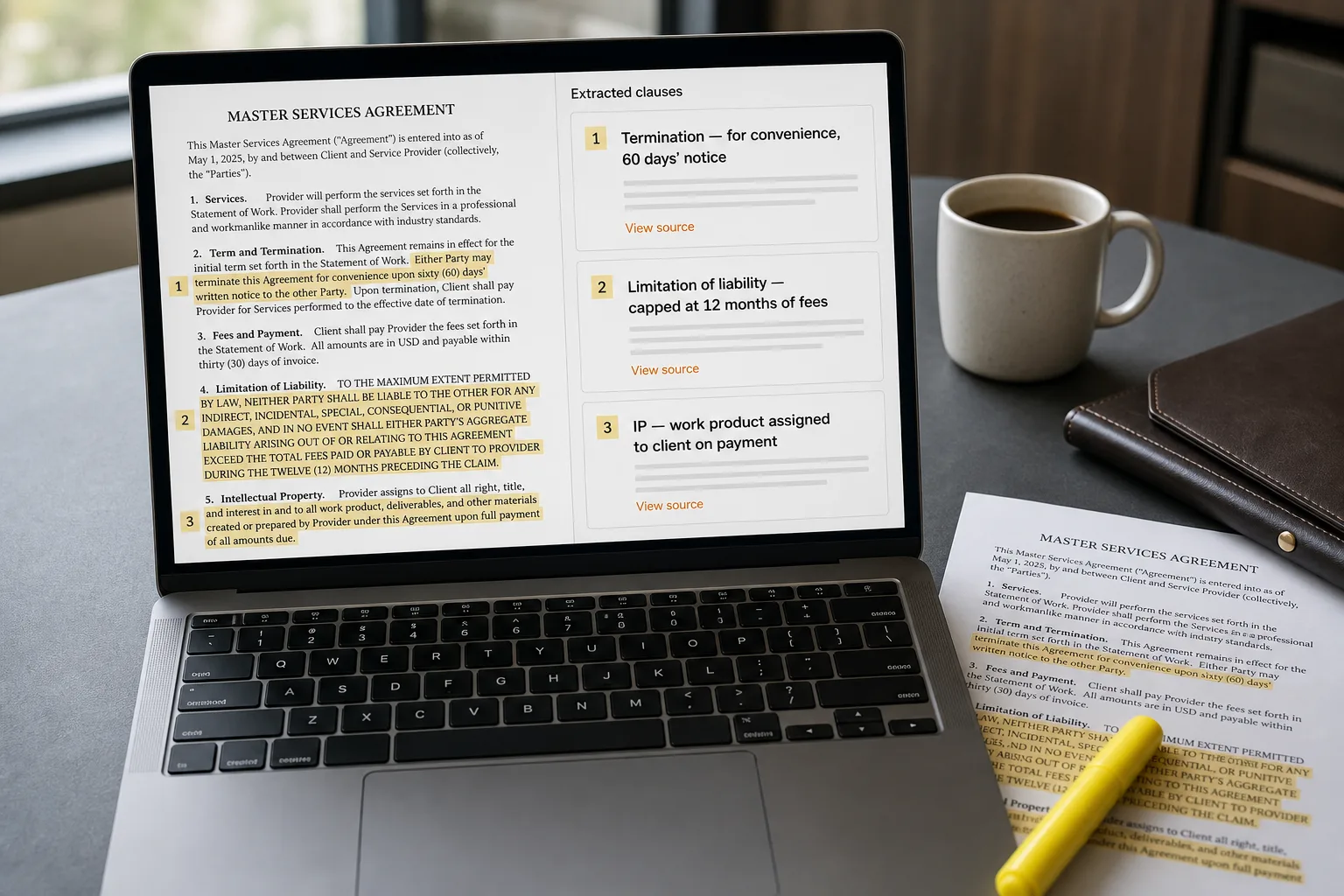
Contract clause extraction means pulling specific clauses out of a contract — termination, liability cap, intellectual property, renewal, governing law — and checking each one against the terms your team has decided are acceptable. A modern AI model can do this in seconds across an inbound NDA, a vendor agreement, or a SaaS subscription.
The point isn’t to replace your lawyer. It’s to change what the lawyer spends time on. NDAs and routine SaaS contracts are roughly 90% identical to the previous one and 10% genuinely worth reading. Most of the senior-attention cost gets burned confirming the 90% instead of digging into the 10%. AI triage inverts that — the lawyer’s hour lands on the contract that actually needs an hour, not on the NDA that needed a glance.
What comes next is the workflow: extract the standard clauses from each inbound contract, compare them to your written playbook of acceptable terms, flag the differences, and let everything else flow through your normal signing process. Nothing in the workflow replaces legal advice — it just sends legal attention where it matters.
Where this fits — and where it doesn't
Use this if you sign 20+ routine contracts a month, your legal team is a bottleneck on time-to-close, and you have a written playbook (formal or informal) of clauses you accept and clauses you redline. Common fits: legal ops teams in growing companies, in-house counsel handling vendor and partner agreements, founders running their own contract pipeline, sales ops teams managing customer paper.
Don’t use this if every contract you sign is a custom negotiation (M&A, complex licensing, regulated industry agreements), your playbook isn’t written down yet (build the playbook first — the AI is useless without it), or your legal counsel is unwilling to share review responsibility with an automated triage layer. The last case is real and worth respecting; the right pace is the pace your legal partner can support.
What you'll need before starting
- A written playbook of standard clauses — what you accept by default, what you typically redline, what’s a hard no. If this doesn’t exist yet, write it first; the AI is the engine, the playbook is the road. A first version can be a one-page Notion doc; it gets more sophisticated over time.
- 20–50 representative contracts of the type you want to triage. The system learns what “standard” looks like for your business from this sample.
- A long-context-capable model API — Claude 5 (1M on every model; there is no smaller variant to fall back to), GPT-5.6 or GPT-6 (~1.05M), or Gemini (1M+). Routine contracts run 5–25k tokens; complex ones can hit 100k+.
- Buy-in from legal counsel that AI triage is an acceptable first pass for routine contract types. This is operational; the lawyer still reviews flagged contracts and signs off on the playbook.
- A clear definition of what the triage does and doesn’t do. “Surfaces non-standard terms for human review” is the right framing. “Automatically approves contracts” is not.
Six steps to a triage your legal team will trust
- Codify the playbook — clauses, acceptable language, redline triggers
For each contract type (NDA, vendor agreement, SaaS subscription, partnership), write down the 8–15 clauses that matter: governing law, term and termination, liability caps, IP ownership, indemnity, confidentiality, payment terms, renewal mechanics, data protection. For each clause, capture three things: what’s clearly acceptable, what triggers a soft flag (acceptable but worth noting), and what triggers a hard flag (requires human review). The playbook is the artifact the AI is comparing against; without it, the AI has no basis to flag anything.
- Extract clauses with structured output, citing source spans
For each inbound contract, ask the model to extract each clause from the playbook, returning the exact source text (verbatim quote with span position) plus a normalised summary in plain English. The verbatim quote matters — it’s how reviewers verify what the contract actually says, not what the model paraphrased. Skipping the source-span requirement is how AI contract review loses trust: the summary is plausible, the actual clause says something different, and a wrong redline goes back to counterparty.
- Compare extracted clauses to the playbook — rules first, model second
Run deterministic rules first: governing law is one of your acceptable jurisdictions; liability cap is at least your minimum; payment terms aren’t longer than your maximum. Use the model only for the harder judgement calls: is this indemnity provision standard or unusual? Does this confidentiality clause include the carve-outs you require? The rule-first pattern is more reliable than letting the model judge everything — deterministic rules don’t drift, and they produce a clean audit trail.
- Generate the triage report — clean pass, soft flags, hard flags
For each contract, produce a one-page report with three sections: (1) clauses that match playbook standard — green, no action; (2) clauses that diverge but within acceptable parameters — yellow, note for awareness; (3) clauses that require human review — red, attached source spans, suggested redline language if applicable. The report is what counsel reads; the format should be optimised for legal-skim, not for AI showcasing. Keep summaries short, keep source quotes verbatim, keep the rationale for each flag explicit.
- Route by flag level — only red-flagged contracts reach counsel
Three routes: (a) all green and no yellow → contract proceeds to standard signing flow with the triage report attached as a record; (b) green plus minor yellow → routes to a non-lawyer reviewer (legal ops, contract manager) for sign-off; (c) any red flag → routes to counsel with the report, the source contract, and suggested redlines. The routing is what saves counsel’s time — the goal is that they only read contracts that genuinely warrant attorney attention.
- Track flag patterns weekly — the triage gets smarter as the corpus grows
Log every flag and the eventual outcome (counsel agreed it needed review, counsel said this is fine, contract redlined and re-extracted). Within a month you’ll see patterns: which clauses generate the most false positives (rule too strict — relax it), which generate the most false negatives (counsel caught something the rules missed — add the rule), which counterparty templates consistently trigger the same flags (worth a vendor-specific playbook). The audit loop is what makes month six dramatically better than month one.
What it costs and what to expect
The cost is small. The freed-counsel-time is the operational metric — that’s what determines whether the workflow is paying off. Track it explicitly; the legal team will thank you.
Other ways to solve this
Full CLM platforms with AI built in (Ironclad, LinkSquares, Workday Contracts [formerly Evisort], Agiloft, ContractPodAi). Turnkey contract lifecycle management with clause extraction, repository, approval workflows, and reporting. Right answer for legal teams that want a complete system rather than building. Trade-off: higher per-month cost, less control over the AI behaviour, and platform lock-in. Strong fit for larger legal teams or regulated industries.
AI-augmented drafting tools (Spellbook, Harvey, LawGeex). Different problem — these help lawyers draft and review faster, not triage at the inbox. Useful complement to the triage workflow; sits at the next step in the pipeline (after triage flags a contract, the lawyer uses Harvey or Spellbook for the review itself). Pricing tends to be per-seat for legal users.
Paralegal triage by human. Still the right answer for low-volume teams where the cost of building exceeds the cost of a paralegal hour. The threshold is roughly 20–30 routine contracts a month; below that, human triage is faster than the system you’d build.
No triage — counsel reads everything. The current baseline at many companies. Honest answer for very-low-volume operations; expensive for anything else. The pain isn’t dollars (counsel is already on payroll); it’s calendar — every signed contract has a counsel-review queue in front of it, and that queue is the bottleneck on time-to-close.
Related work
For the broader document-extraction pattern this fits into, see Extract structured data from PDFs. For classifying contracts by type before triage, see Document classification at scale. For pulling contract-related action items out of email threads (renewal reminders, signature requests), see Email-to-task automation. For the broader privacy-and-data-handling implications of running contracts through an LLM, see AI privacy — what to watch for.
FAQ
Is this legal advice? Is the AI's output privileged?
No, and no. This workflow is a triage and operational tool — it surfaces clauses for human review, it does not provide legal advice. Output is not protected by attorney-client privilege unless an attorney is in the loop and the privilege is explicitly preserved through the workflow design. Talk to your counsel about how the triage output is stored, who sees it, and how it interacts with privilege. For sensitive contracts, the triage should run inside the attorney's workflow (counsel reviews the output as part of their work product) rather than as a standalone ops layer.
What about confidentiality — can we send contracts through an LLM API?
Use a vendor with an enterprise data-exclusion tier (Anthropic Enterprise, OpenAI Team / Enterprise, Google AI Enterprise) that excludes your inputs from training and offers a documented data-retention policy. For highly sensitive contracts (M&A, regulated industries, customer-PII-heavy), consider self-hosting an open-source model — see build a private knowledge base for the architecture. Many in-house legal teams are comfortable with enterprise-tier APIs for routine contracts and reserve self-hosting for the sensitive subset.
How do we keep the playbook current as our business changes?
Quarterly review with the legal team. Each quarter, ask: which clauses have we redlined recently that aren't yet in the playbook? Which standards have shifted (new state privacy laws, new corporate policies, new insurance requirements)? Update the playbook; re-run the triage on the recent contracts to verify the new rules behave as expected. The playbook should evolve at roughly the same pace as your business; static playbooks decay within a year.
What about contracts in other languages?
Modern LLMs handle 30+ languages competently for clause extraction. Quality holds well in major business languages (English, Spanish, French, German, Portuguese, Japanese, Mandarin); drops in lower-resource languages. For multilingual operations, maintain a playbook per language (clause patterns vary by legal tradition) rather than translating one master playbook. The triage workflow itself is identical; the rules and examples differ by jurisdiction.
How is this different from a CLM like Ironclad or LinkSquares?
A CLM is the system of record — repository, approval workflow, e-signature integration, reporting. The triage workflow described here is the AI layer that sits above (or alongside) the CLM. Modern CLMs increasingly bundle the AI triage; pre-AI CLMs require you to layer the triage on top. If you don't have a CLM yet and process meaningful contract volume, evaluate AI-bundled CLM platforms before building. If you have a CLM but limited AI features, the triage workflow described here is a reasonable supplement.
What if the AI surfaces a clause as 'acceptable' but it turns out to be problematic?
That's a false negative, and it's the failure mode the audit loop is designed to catch. Every cleared contract should still go through your standard signing workflow with the triage report attached — the report is supplementary, not authoritative. When counsel reviews a contract that the triage cleared and spots a problem, log the pattern, update the playbook or the rules, and re-test on the historical sample. The system gets better; the human-in-the-loop never goes away for material contracts.