
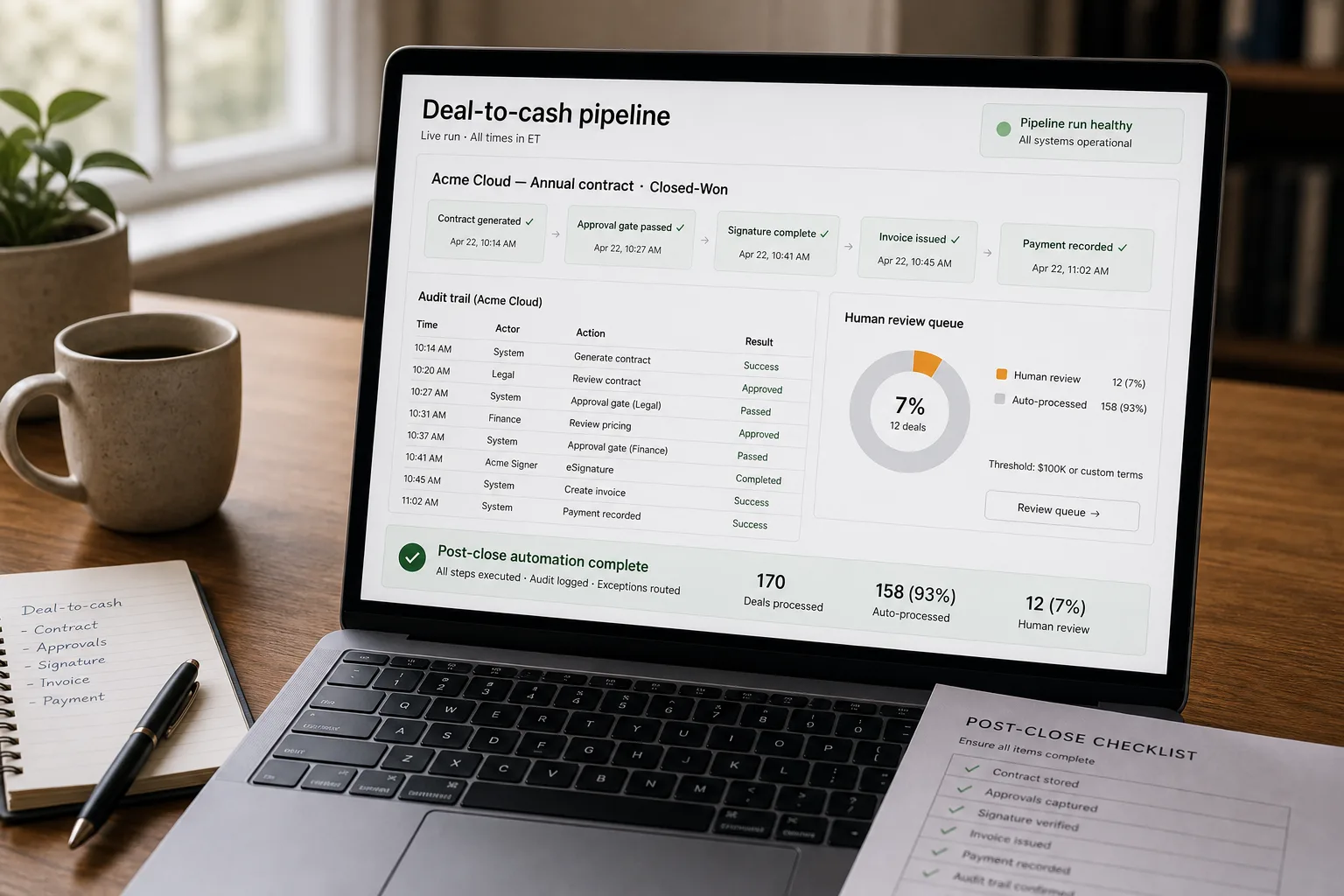
If you run RevOps or finance at a B2B company past series A, most quote-to-cash cycles aren’t slow because any one step is hard. They’re slow because the system boundaries are where work goes to wait.
CRM to CPQ (configure-price-quote) to e-sign to billing to accounting: each handoff is a small amount of human attention and a much larger amount of queueing. Add up a year of deals and the cost is days per deal of finance and ops time, plus a friction-rich onboarding that doesn’t match what was sold.
What follows is the integration that removes the queues: AI-assisted contract generation slotted between systems, automated routing through approval gates, and the audit trail that holds up to financial controls. The architecture, the gate design, and the failure modes worth designing against from day one.
Where this fits — and where it doesn't
Use this if you process 20+ deals per month with non-trivial complexity (pricing variations, custom terms, multi-product), your finance team is consumed by the manual handoffs, and you have meaningful technical infrastructure to support the integration. Common fits: B2B SaaS with annual contracts, services businesses with retainer billing, marketplaces with seller / buyer flows.
Don’t use this if your deal volume is too low to justify the integration effort (under ~10 deals/month), your deals are highly bespoke (every contract is hand-negotiated, and the variability defeats automation), or your finance / billing infrastructure is in transition (build the pipeline against stable systems).
What you'll need before starting
- Defined deal-to-cash flow — write down the current manual process before automating. The pipeline implements the flow you have; vague flow produces vague pipeline.
- CRM with structured deal data — Salesforce, HubSpot, Pipedrive with deal stages, products, pricing, terms.
- Contract templates that map to deal patterns — different templates for different product / price / term combinations.
- E-sign integration — Docusign, Adobe Sign, Dropbox Sign. The signature flow ties the CRM to the contract.
- Billing system — Stripe, Chargebee, NetSuite, Salesforce Billing, custom infrastructure. The invoice flow ties the contract to the customer record.
- Accounting integration — QuickBooks, Xero, NetSuite, or your finance system. Revenue recognition and cash-collection close the loop.
- A finance and ops owner who maintains the integration as systems evolve.
Six steps to a quote-to-cash workflow that runs itself
- Define the deal-pattern taxonomy — what deal shapes need different paths
Map your deal types: simple-single-product, multi-product, multi-year-with-ramp, custom-term, enterprise-with-MSA-addendum, etc. Each pattern needs its own contract template and approval path. Don’t try to handle every variation; cover the 80% with explicit patterns and route the rest to manual review.
- Build the contract-generation step — pull deal data from CRM, populate template
When a deal hits “Closed-Won” (or its equivalent), trigger contract generation. Pull deal data from CRM (parties, pricing, term, products, custom terms in description field) and populate the matching contract template. AI handles the unstructured-to-structured conversion (interpreting the AE’s notes on custom terms into structured contract clauses). Generated contract drafts go to the deal owner / legal for review before signature routing.
- Route for signature with proper approval gates
Before signature routing, run approval gates: customer-name verified against CRM, pricing within authorisation tier (deals above threshold need executive approval), terms compliance-checked (no banned terms, required clauses present). Approved drafts route to e-sign with the right signatories; rejected ones go back to the deal owner. The gates prevent the “we signed something we shouldn’t have” failure mode.
- Create the customer billing record on contract execution
When the contract is fully signed (all parties), trigger billing-system customer creation. Pass the contract details — billing entity, billing contact, payment terms, line items, billing schedule — to your billing system via API. The signed contract is the source of truth; the billing record matches it exactly. Discrepancies between signed contract and billing record are a frequent audit finding; the automated mapping prevents them.
- Issue first invoice and reconcile payment
The billing system issues the first invoice per the contract’s schedule. Payment reconciliation matches incoming payments to invoices; partial payments and adjustments route to AR for review. Successful collection ties the deal-to-cash cycle complete in the accounting system. The cycle-time metric — days from contract signature to first payment — becomes a meaningful KPI for ops to track.
- Build the audit trail — every step linked, every change logged
Every step in the pipeline writes audit records: deal data at contract-generation time, the contract version that was signed, the billing record created, the invoice issued, the payment received. The trail satisfies internal financial controls, supports external audits (SOX, SOC 2), and enables ops to investigate when something goes wrong. Without the audit trail, the pipeline is operationally efficient but governance-weak.
What it costs and what to expect
The cycle-time improvement is the operational ROI; the customer-experience improvement (smooth post-close handoff) is the strategic one. Audit trail integrity is the governance baseline that makes the pipeline acceptable to finance leadership.
Other ways to solve this
Bundled CPQ + billing platforms (Salesforce Revenue Cloud — which now bundles what was Salesforce CPQ + Salesforce Billing — plus Zuora, Chargebee, NetSuite ARM). Right answer for most growing companies. Trade-off: per-month cost; vendor lock-in; less customisation.
Custom integration on top of existing tools. What this pipeline describes. Higher flexibility; meaningful engineering investment.
Manual quote-to-cash. The traditional approach. Works at small deal volume; doesn’t scale past a certain point. The pipeline is the upgrade path.
Don’t automate, hire more finance ops staff. Defensible if you have specific reasons (high-touch enterprise deals where automation isn’t appropriate); usually a worse cost-to-benefit than the pipeline at growing volume.
Related work
For the contract-extraction pattern that powers the AI-generation step, see Contract review and clause extraction. For the invoice processing on the receiving side of vendor relationships, see Automated invoice and receipt processing. For the broader CRM-data-hygiene that quote-to-cash depends on, see CRM data hygiene at scale. For the sales-follow-up generation that complements the post-signature workflow, see Sales follow-up sequences with CRM context.
FAQ
How does this work with our existing CPQ tool?
It complements rather than replaces. The CPQ handles pricing-and-quote generation; the pipeline handles the post-close flow into contracts, signature, and billing. For teams already on Salesforce Revenue Cloud or Zuora, the pipeline adds the AI-augmented contract-generation and finance-integration layers on top.
What about deals that need legal-team review on every contract?
Build the legal-review gate explicitly. The pipeline generates the draft; the draft routes to legal for review before signature. Legal review adds latency but is non-negotiable for some deal types or company stages. The pipeline still accelerates by handling the upstream and downstream work; the legal step is the bottleneck the pipeline can't bypass.
How do we handle deals where the customer wants to negotiate terms?
Most deals fit standard templates; some don't. For the negotiation deals, the pipeline produces the initial draft and then routes to manual handling for the negotiation. After signature, the pipeline resumes for billing and reconciliation. The automation handles the common case; the manual handling stays for the genuinely-bespoke.
What about SOX compliance for the financial controls?
Critical for public companies and increasingly relevant for pre-IPO. The audit trail is the artifact that supports SOX — every change logged, every approval recorded, every system integration documented. Build the audit trail from day one; retrofitting it is expensive. Talk to internal audit before deploying the pipeline in any SOX-bound environment.