
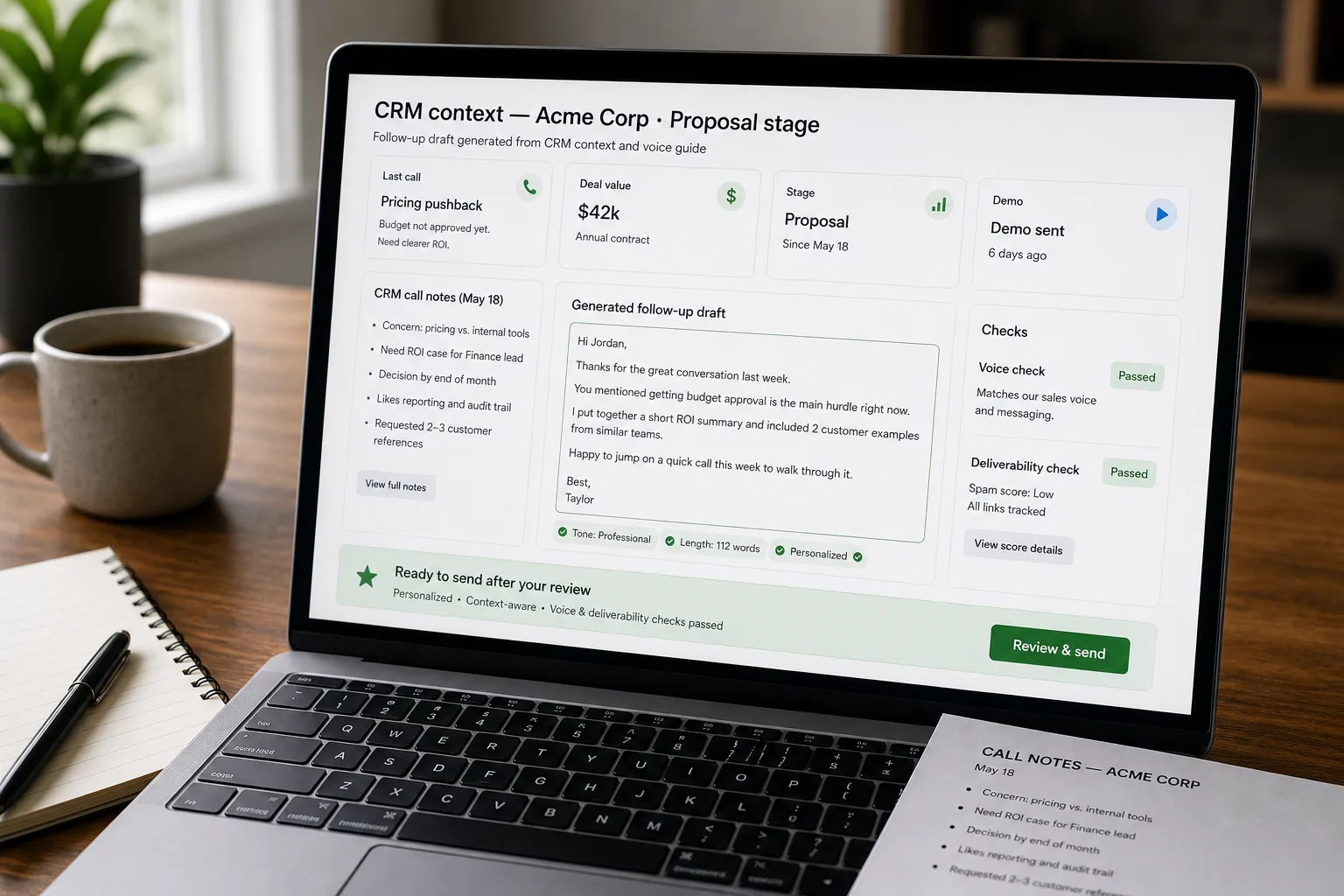
The workflow goes: pull the deal context the rep already has — call notes, deal stage, the customer’s stated priorities, past email history — feed it into an LLM (the technology behind ChatGPT, Claude, and Gemini), enforce a brand-voice prompt that strips the AI tells, and send through your existing sales engagement platform with deliverability hygiene in place.
The rep with 60 active opportunities could write a perfect follow-up for each one. They have the context. They just don’t have the time. The shortcut most teams reach for — “Hi {name}, just following up on our last conversation about {topic}” — saves time and produces reply rates so low the rep would have been better off sending nothing. Buyers spot the prompt-tells (“I hope this email finds you well”, “I wanted to circle back”). So do spam filters.
This piece walks through the pipeline: the CRM-integration that pulls the right context, the prompt design that produces emails reps would actually send, the deliverability hygiene that keeps messages out of the promotions tab, and the A/B testing loop that tunes performance over time. The goal isn’t to remove the rep from the loop — it’s to give them a first draft that already knows what was discussed.
Where this fits — and where it doesn't
Use this if your team manages 30+ opportunities per rep, follow-up email is a meaningful part of the sales motion, and your current reply rates are declining (a common pattern as buyer-side filtering of AI-templated emails increases). Common fits: B2B SaaS sales orgs, agencies running account-management motion, services businesses with long sales cycles.
Don’t use this if your sales motion is primarily inbound (the follow-up problem is different — see Reply suggestions from past conversations), your deals are high-touch enterprise where every email is hand-crafted (the marginal time-saving doesn’t justify the system), or your team isn’t yet on a sales engagement platform with CRM integration (the foundation has to exist first).
What you'll need before starting
- CRM with structured deal data — Salesforce, HubSpot, Pipedrive. Specifically: deal stage, last activity, key customer contacts, call / meeting notes.
- A sales engagement platform (Outreach, Salesloft, Apollo) or direct email-sending infrastructure with deliverability monitoring. Sending generated emails through Gmail without warmup is a deliverability mistake.
- Brand-voice samples — 10–20 of your best reps’ actual follow-ups. The voice anchor is what makes generated emails sound like the team rather than the model.
- A model API key. Cheap to mid-tier models suffice; this is constrained generation, not heavy reasoning.
- A deliverability baseline: current open rate, reply rate, spam complaint rate. The pipeline’s impact is measured against these.
Six steps to follow-ups that get replies
- Pull the deal context — not just contact info, but the conversation history
For each follow-up generation, pull from the CRM: last 3–5 email exchanges with this contact, last call / meeting note, current deal stage and stage history, deal value and product mix, key customer attributes (industry, company size, location). The context is the lever — generated emails are only as good as what you give the model to work with. Generic emails come from generic prompts; specific emails come from CRM-rich prompts.
- Define the email’s purpose — different stages, different shapes
A follow-up after a discovery call is a different email than a follow-up to a stalled deal in negotiation. Define purpose explicitly: discovery follow-up, demo follow-up, proposal follow-up, stalled-deal nudge, post-purchase check-in. Each has a different structure. Generic “follow up” instructions produce generic follow-ups; purpose-specific instructions produce stage-appropriate ones.
- Constrain voice — banned phrases, sample emails, tone anchors
The brand-voice prompt is the differentiator. Include 3–5 sample follow-ups from your best reps (varied stages); include a banned-phrases list of AI-tells (“I hope this email finds you well”, “I wanted to circle back”, “as discussed”, “I trust this finds you well”, “looking forward to your thoughts”); include a tone anchor (“direct, friendly, no fluff” or your actual brand voice). The constraints are what kill the AI flavour. Without them, even strong models default to the generic-corporate voice.
- Generate with structured output — subject line, body, CTA, send time
Ask the model to return: subject line (3–7 words, no “Quick question” or “Following up” formulations), body (under 150 words ideally), specific CTA (one ask, not three), and a recommended send time based on the contact’s timezone and past response patterns. Structured output produces consistent quality and lets the engagement platform schedule sends properly. Free-text generation produces emails of inconsistent length that hurt sequence metrics.
- Apply deliverability hygiene — content checks, image / link discipline, send-rate limits
Before sending: check for spam-trigger phrases (some industries trigger filters on words the AI naturally uses), limit images and tracking pixels (heavy tracking hurts deliverability), avoid links in the first sentence, keep total word count moderate. Apply per-rep send rate limits to avoid the “all sent simultaneously” pattern that flags as automated. The engagement platform handles the send mechanics; the AI handles the content; deliverability hygiene is the layer that prevents content-driven filtering.
- A/B test and tune — same deal stage, different variants
Test variants of the prompt against the same deal stage and segment. Track open rate, reply rate, meeting-booked rate per variant. Variants worth testing: subject-line style (question vs statement), opening (context recap vs direct question), length (50 vs 100 vs 150 words), CTA shape (specific date proposal vs availability ask). Tune from real data after a few weeks; the winning variants become the standard prompt for that stage, the losing variants get retired.
What it costs and what to expect
The reply-rate lift is the headline number. The time-saved-per-rep is what produces the pipeline-velocity improvement; the deliverability hygiene is what keeps the gains durable.
Other ways to solve this
Sales engagement platforms with AI features (Outreach, Salesloft, Apollo). Built-in AI generation tuned for sales follow-up. Right answer for most teams — the platforms handle CRM integration, send mechanics, and deliverability at once. Trade-off: less control over prompt and voice, per-seat cost.
Manual follow-up writing. Still the right answer for high-stakes enterprise deals where every email is consequential. The AI pipeline is for high-volume, mid-deal-value motions; enterprise sales benefits less from automation and more from craft.
Sequences from templates with light personalisation. The traditional approach pre-AI. Templates with merge fields ({first_name}, {company}, {industry}) produce emails that aren’t quite personalised but are deliverable. Lower performance than CRM-context personalisation but a working baseline.
Don’t send follow-ups beyond a thoughtful first message. Some senior reps argue the volume-game has been so eroded by AI templating that the right response is to send fewer, better, hand-crafted emails. Defensible for high-ACV deals; doesn’t scale to SMB sales motions.
Related work
For the upstream outbound-prospecting pipeline that feeds the deals into the CRM, see Outbound prospecting at SDR scale. For the broader pattern of reply-suggestion learning from past conversations, see Reply templates learning from past conversations. For the call-analysis pipeline that feeds the meeting notes into the CRM context, see Sales-call coaching at scale. For the patterns that distinguish AI-templated content from genuinely-personalised, see First-draft marketing copy without the AI tells.
FAQ
How is this different from Outreach's or Salesloft's built-in AI?
Functionally overlapping. The platforms' bundled AI handles the generation and CRM integration; this build-pattern lets you customise prompts, voice, and A/B testing more deeply. For most teams the platform's built-in features are sufficient; build custom when you need very specific voice control or when you're integrating with a CRM the platform doesn't fully support.
What about buyer-side AI detectors that flag generated emails?
Increasingly real. The detectors look for specific phrase patterns; the voice guardrails in step 3 reduce but don't eliminate the signal. The defence-in-depth is: aggressive banned-phrases list, real CRM context (not generic merge fields), varied opening structure across sends, human review and editing on important messages. Don't rely on "the AI flavour will fool detectors" — write emails reps would write.
How do we handle reps with very different writing styles?
Per-rep voice anchors. Pull 10–20 of each rep's best past emails and use them as the voice sample for their generated content. The output sounds like that rep specifically rather than like a generic team voice. Most teams find this worth the per-rep tuning effort; the alternative is a flat team voice that doesn't match any rep's actual style.
What about deals with no recent CRM activity — cold reconnects after months of silence?
Different prompt, different expectations. Cold-reconnect emails benefit from acknowledging the gap explicitly ("It's been a while since our last conversation about X") rather than pretending continuity. Reply rates are structurally lower on cold reconnects regardless of approach; the AI pipeline isn't a substitute for a relationship-rebuild strategy on stalled deals.
How do we measure if the pipeline is actually working?
Three signals. (1) Reply rate over time, segmented by deal stage. (2) Meeting-booked rate per follow-up sent. (3) Deliverability metrics from the sending platform — inbox placement rate, spam complaint rate, domain reputation score. The first two are the sales-performance signals; the third is the durability signal that catches problems before they cause performance drops.