
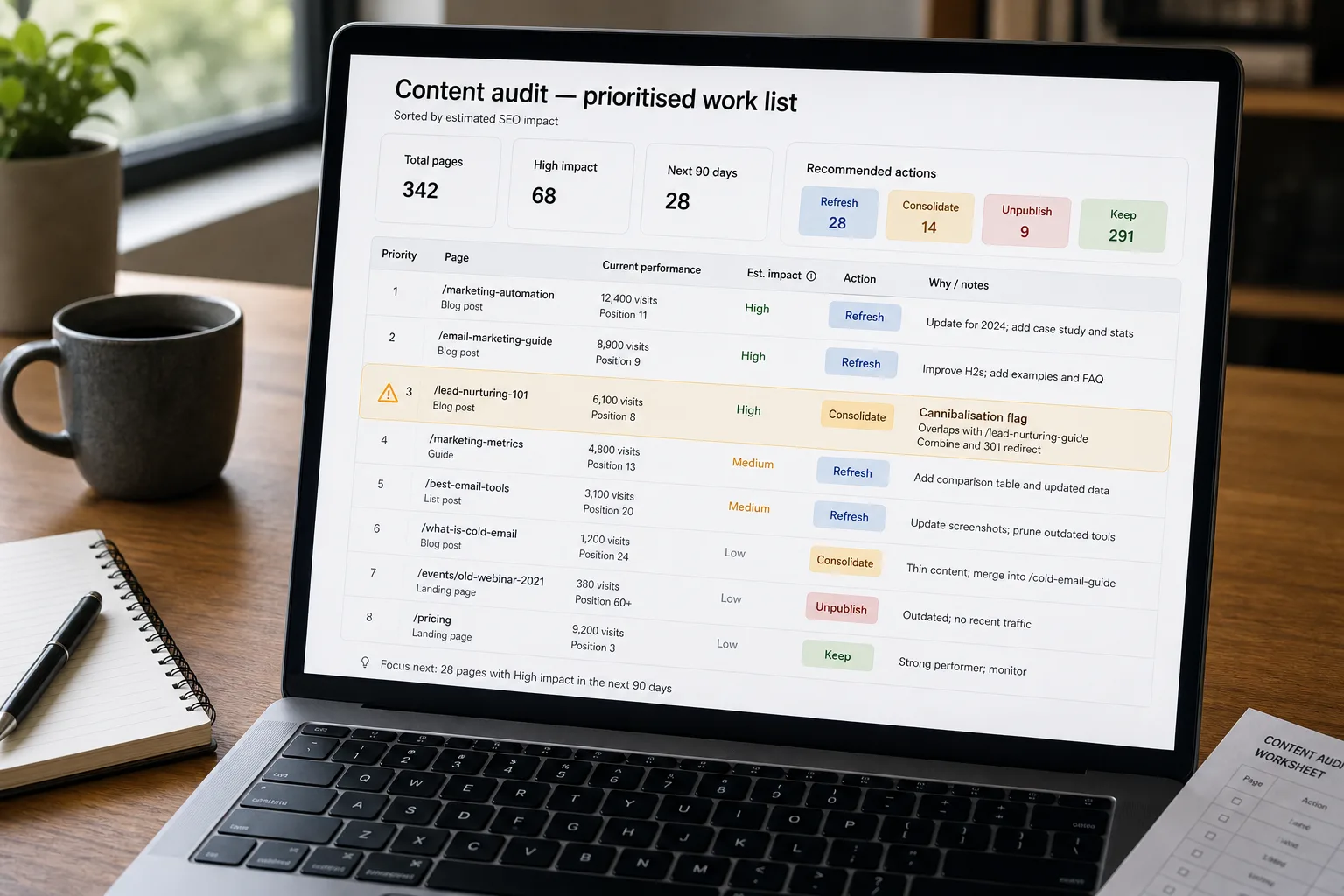
The pipeline goes: crawl every page in your library, pull performance data from Google Search Console, score each page on quality, freshness, performance, and cannibalisation, and produce a prioritised list of pages to refresh, consolidate, or unpublish. Run it on a schedule so the list stays current.
The library that grew organically for five years has a long tail of pages nobody is sure about. The 2020 post that still gets a trickle of traffic but references three deprecated tools. The landing page that duplicates content on a newer page. The docs section that lists a discontinued plan. The standard response — “we’ll do a content audit next quarter” — produces a 200-row spreadsheet, gets worked through to row 40, and gets abandoned. The next quarter starts the cycle over.
This piece walks through the continuous version: crawl, score, prioritise, act, repeat. Each step is described below.
Where this fits — and where it doesn't
Use this if you have 200+ pages of content (blog, marketing, docs), your organic-traffic strategy depends on the library’s overall quality, and your team has bandwidth to act on the audit output. Common fits: content-marketing teams at B2B SaaS, ecommerce with large category and product page libraries, services businesses with deep content programs.
Don’t use this if your content library is small enough that manual review is faster (under ~100 pages), you’ve recently completed a major audit and the library is in good shape, or you don’t have content-team capacity to act on the findings. The pipeline produces a list; without action, the list is shelfware.
What you'll need before starting
- Sitemap or content inventory — a list of all the pages you want to audit, with URLs and meta data.
- Google Search Console access for per-page performance data — impressions, clicks, average position, CTR.
- Optional but recommended: an SEO platform (Ahrefs, Semrush) for backlink data, keyword rankings, and competitor comparison.
- A model API key for the content-quality and freshness analysis.
- A defined ownership model — who acts on refresh suggestions, who can decide to unpublish, who owns the audit cadence.
Six steps to continuous content audit
- Crawl the library — capture content, meta, and link graph
Use a crawler (Screaming Frog, Ahrefs Site Audit, custom) to capture every page’s content, title, meta description, internal links, and last-modified date. Store the data in a structured form that supports per-page analysis. The crawl is the input; daily or weekly cadence is fine.
- Pull performance data from Search Console
For each page, pull last-90-day performance: impressions, clicks, average position, query terms ranking. The performance data is what distinguishes “page that produces traffic” from “page that just exists.” Without it, the audit can’t prioritise.
- Score each page on quality, freshness, and performance dimensions
For each page, run an LLM analysis producing: (a) quality score (does the content actually answer the queries it ranks for, is it well-written, does it reference outdated tools / features); (b) freshness score (when was it last updated, are the facts still current, are referenced products still active); (c) performance score (organic traffic, ranking trend, CTR); (d) cannibalisation flag (does this page compete with another page on the same site for the same query). The composite score drives prioritisation.
- Detect cannibalisation across the site
For each pair of pages with semantic similarity above a threshold, check for query-level competition. If two pages rank in the top 20 for the same query, you have cannibalisation — they’re competing with each other instead of consolidating signal. The pipeline flags candidates for consolidation; the human decision is which page becomes canonical and what happens to the other.
- Produce the prioritised action list — refresh, consolidate, unpublish, keep
For each page, output a recommended action: refresh (good performance, freshness issues — update the content), consolidate (cannibalising with another page — merge), unpublish (no performance, no fresh utility — remove and redirect), keep (performing well, current). Sort by impact — high-traffic pages with quality issues first; long-tail pages with no traffic last.
- Run on a cadence — quarterly full audit, monthly delta audit
Quarterly: full audit of the library, full action list. Monthly: delta audit on new pages and recently-modified ones, smaller action list. The cadence is what catches drift before it accumulates; without it, the library drifts toward staleness and the audit becomes a periodic emergency rather than ongoing maintenance.
What it costs and what to expect
The unpublish percentage is often the most-resisted finding; teams have emotional attachment to content that no longer earns its place. The refresh impact is the operational ROI; well-refreshed pages often outperform new pages on the same topic.
Other ways to solve this
SEO platforms with built-in audit (Ahrefs Site Audit, Semrush Site Audit, Sitebulb). Right answer for most teams. Trade-off: less customisation, per-month cost.
Manual content review. Doesn’t scale to 1,000+ pages. Useful as a complement on the high-priority subset.
Search Console alerts only. Real-time but shallow; surfaces specific issues but not the comprehensive picture.
Don’t audit — focus on new content. Defensible if the existing library is small; increasingly costly as content accumulates.
Related work
For the upstream content-strategy patterns, see Prompt engineering patterns for content teams. For the programmatic-SEO pattern where audit is critical, see Programmatic SEO at scale. For the broader content-performance attribution that complements audit, see Content performance attribution. For the FAQ-from-docs pattern that audit surfaces documentation gaps for, see Generate FAQ content from existing docs.
FAQ
How is this different from Ahrefs Content Audit or Semrush Content Audit?
Functionally overlapping. The platforms ship turnkey audit workflows; build custom for control over the scoring weights, integration with the rest of your content workflow, or coverage of content the platforms don't see (gated content, internal docs). For most teams, the platforms are sufficient and the faster path.
Should we unpublish pages or 301-redirect them?
Almost always 301-redirect. Unpublishing without redirect drops any existing backlinks and ranking signal; redirecting consolidates the signal into a related page. The exception is pages that should genuinely disappear (legal removals, deprecated product references with no relevant replacement) — those get 410-gone responses rather than 301s.
How do we know if a refresh is working?
Measure pre-refresh and post-refresh organic traffic on the same page over 60–90 days. Successful refreshes produce a step-function increase in traffic; unsuccessful ones produce flat or declining traffic and may indicate the topic is no longer competitive or the refresh missed what was outdated. Track refresh effectiveness as a meta-metric over time.
What about content that gets traffic from sources other than organic search (social, paid, direct)?
Score those pages separately. The pipeline's audit logic is SEO-focused; pages that earn their traffic from other channels need a different evaluation. Often the right move is to maintain them for the non-SEO traffic and not optimise them for organic. Tagging pages by primary traffic source prevents the audit from suggesting unpublishing pages that are healthy on a non-SEO basis.