
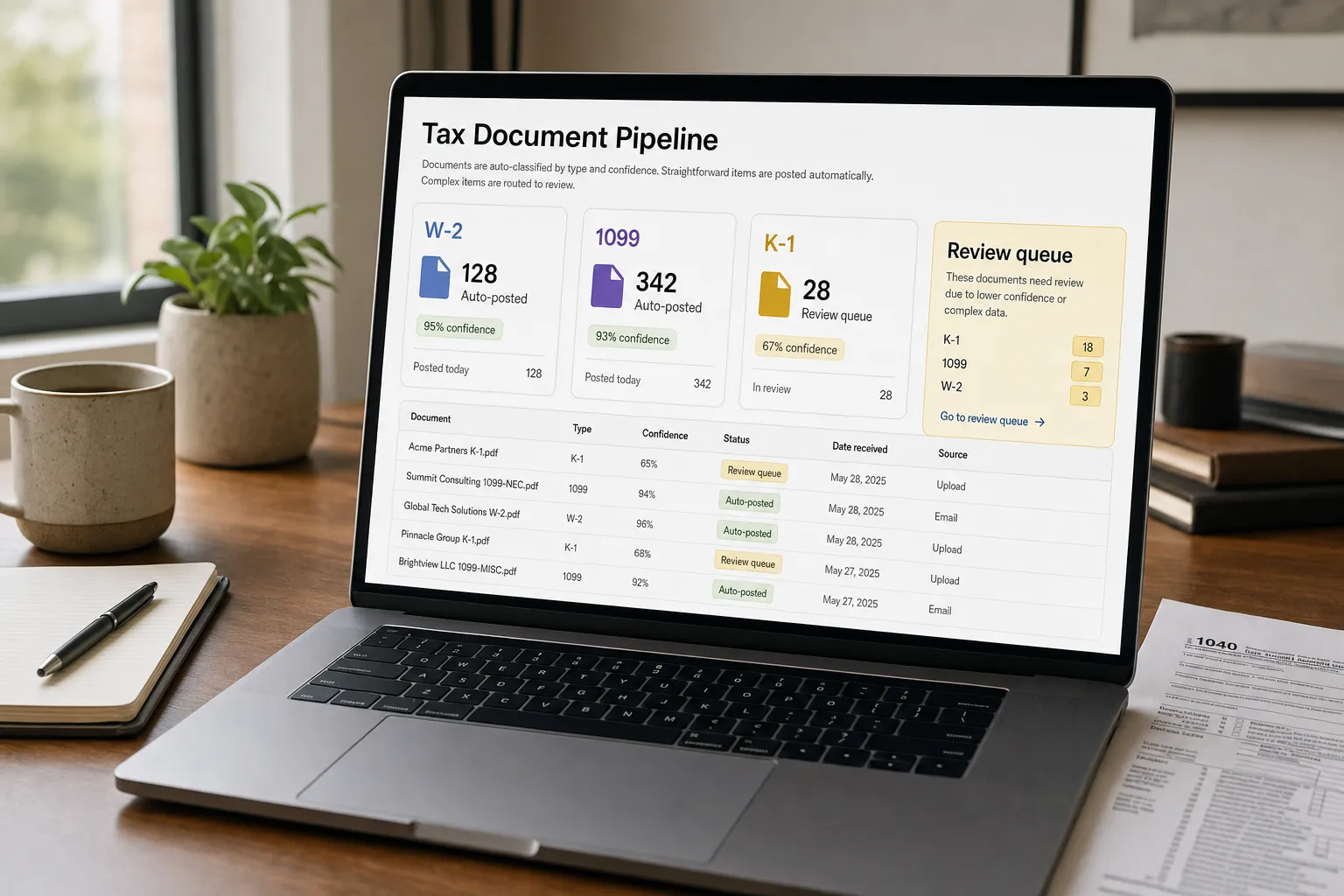
The pipeline goes: take each incoming document, classify what it is (W-2, 1099-NEC, K-1, charitable donation receipt, brokerage summary, mortgage statement), extract the relevant fields with OCR — optical character recognition, software that reads text from images and PDFs — and push the data into the tax software. Anything the system isn’t confident about lands in a reviewer queue.
The reason this matters: tax-document collection is the most labor-intensive part of any accounting firm’s tax season. Clients email PDFs, scanned receipts, photographed brokerage statements, and screenshots in any order across several weeks. Junior staff sort them, key them into the tax software, and chase the missing pieces. By the time the senior CPA does the actual strategy work, half the firm’s hours have already gone to data entry.
This piece walks through the pipeline end to end: the classifier, the extraction layer, the validation rules, the exception queue, and the integration with tax-prep software.
Where this fits — and where it doesn't
Use this if you handle 50+ tax returns per season (or your finance team processes meaningful tax documentation), client document submission is currently messy, and your tax-prep software has API access for data import. Common fits: accounting firms, CPA practices, finance teams at growing companies, individual practitioners with growing client bases.
Don’t use this if your tax practice is small enough that manual processing is faster (under ~30 returns per season), your tax software doesn’t support programmatic data import (you’d have to manually re-enter from the pipeline output, defeating the purpose), or your client base has highly bespoke document types that the OCR layer can’t reliably handle.
What you'll need before starting
- Sample tax documents covering the types your clients send — W-2s, 1099-NEC, 1099-MISC, 1099-DIV, 1099-INT, 1099-B, K-1s, receipts, charitable-donation acknowledgments, mortgage statements, brokerage summaries.
- A specialised OCR service for the structured tax forms — AWS Textract has specific tax-form support; Document AI has tax processors.
- A vision-capable LLM for the messy long tail — handwritten notes, photographed receipts, unusual forms.
- API access to your tax software — Drake, Lacerte, ProConnect, UltraTax, TaxSlayer Pro, ProSeries.
- A reviewer queue and a workflow person to manage exceptions. The pipeline doesn’t replace human judgement on tricky cases; it eliminates the work on routine ones.
Six steps to a tax-document pipeline
- Build the document classifier — first, identify what each document is
For each incoming document, classify by type. Use embedding-based classification for the standard types (W-2s look similar across employers; 1099-NECs follow IRS templates); fall back to LLM classification for the unusual ones. Output: document type, year, taxpayer / filer identification, and a confidence score.
- Apply type-specific extraction
Each document type has a defined schema. W-2: wages, federal withholding, state withholding, Social Security wages, Medicare wages, Box 12 codes, etc. 1099-NEC: payer info, recipient info, non-employee compensation amount, federal income tax withheld. Use specialised OCR services where they exist (Textract Tax-and-Invoice has type-specific extraction); LLM extraction for the long tail. Verbatim source quotes alongside extracted values for the audit trail.
- Validate against business rules and prior-year comparison
Run rules: (a) extracted EIN matches a valid format; (b) Social Security number digit pattern; (c) state matches a valid US state; (d) amounts are non-negative where appropriate; (e) cross-form consistency (multiple W-2s sum correctly); (f) year-over-year comparison flagging large changes from prior year. The validation catches OCR misreads and unusual values; both warrant a human glance.
- Route by confidence and dollar amount
High confidence + low / typical values → auto-post to tax software with the source document linked. Medium confidence or flagged validation → reviewer queue with side-by-side document and extracted fields. Low confidence or unusual values → full review with the source document attached. The routing structure keeps the reviewer focused on the cases that need attention.
- Handle the client follow-up workflow — missing documents
The pipeline knows what should have arrived (last year’s documents) and what has arrived (this year’s). The gap is the missing-document list. Generate client-specific outreach: “We received your W-2 from [Employer]; we don’t yet have your 1099 from [Brokerage].” The automated chase-list is often as valuable as the extraction itself; missing documents are the largest source of season-end firm delays.
- Track exceptions weekly during tax season
The exception queue grows during peak season; weekly review tunes the pipeline. Patterns surface: a specific brokerage’s 1099 always fails extraction (build a custom extractor for it); a specific document type produces too many false positives in the validation (loosen the rule). The pipeline gets noticeably better in week 4 than in week 1 with active tuning.
What it costs and what to expect
The cost is small; the time-saved-per-return at typical firm volumes is substantial. The strategic value is freeing senior tax expertise for the work it should actually be doing.
Other ways to solve this
Built-in tax-software AI features. Drake, Lacerte, and others increasingly bundle OCR and AI features. Right answer for firms that want minimal extra tooling. Trade-off: vendor-tied; less control over the extraction logic.
Specialised tax-automation services (TaxDome, Karbon, Canopy with AI). Bundled with practice-management features. Right for firms wanting a complete workflow platform.
Outsource the data-entry layer to offshore staff. Established practice; works at scale. The AI pipeline is increasingly cheaper for routine work; offshore staff stays valuable for the complex cases.
Manual data entry by junior staff. The traditional approach. The AI pipeline displaces this with discipline; the freed staff move to advisory and review work.
Related work
For the broader document-extraction pattern, see Extract structured data from PDFs. For the invoice-processing pattern that shares architecture, see Automated invoice and receipt processing. For the broader document-classification framework, see Document classification at scale. For the data-entry-from-scanned-forms pattern, see Data entry automation from scanned forms.
FAQ
What about confidentiality — tax documents contain SSNs and other sensitive data?
Use enterprise-tier services with BAA-equivalent agreements for tax-document handling. Redact sensitive fields where possible before sending to AI tools, or use specialised tax-OCR services with explicit tax-industry compliance. The AICPA has issued guidance on AI use in tax practice; review it for current best practices.
Does the AI handle state tax forms too?
Variable. Federal forms are templated and consistent; state forms vary widely. Most pipelines handle the common state forms (CA, NY, TX, FL employer / withholding documents) reliably; less common state forms need per-form tuning. Plan for higher manual-review rates on state-specific documents.
How do we handle prior-year comparisons when this is a new client?
Without prior-year data, you lose the year-over-year validation. New clients should be flagged for higher review even with automation; the comparison tooling is most valuable for established client relationships. Some firms run prior-year extraction once when onboarding clients to bootstrap the comparison data.
What about audit support — does the pipeline produce IRS-acceptable documentation?
Yes if you preserve the audit chain. Every extracted field links back to the source document; the source documents are retained; the AI's classification and extraction decisions are logged. The audit trail is the artifact; the AI is the engine. IRS-acceptable practice is the standard tax-prep documentation discipline plus the linkage to AI-assisted extraction.
