
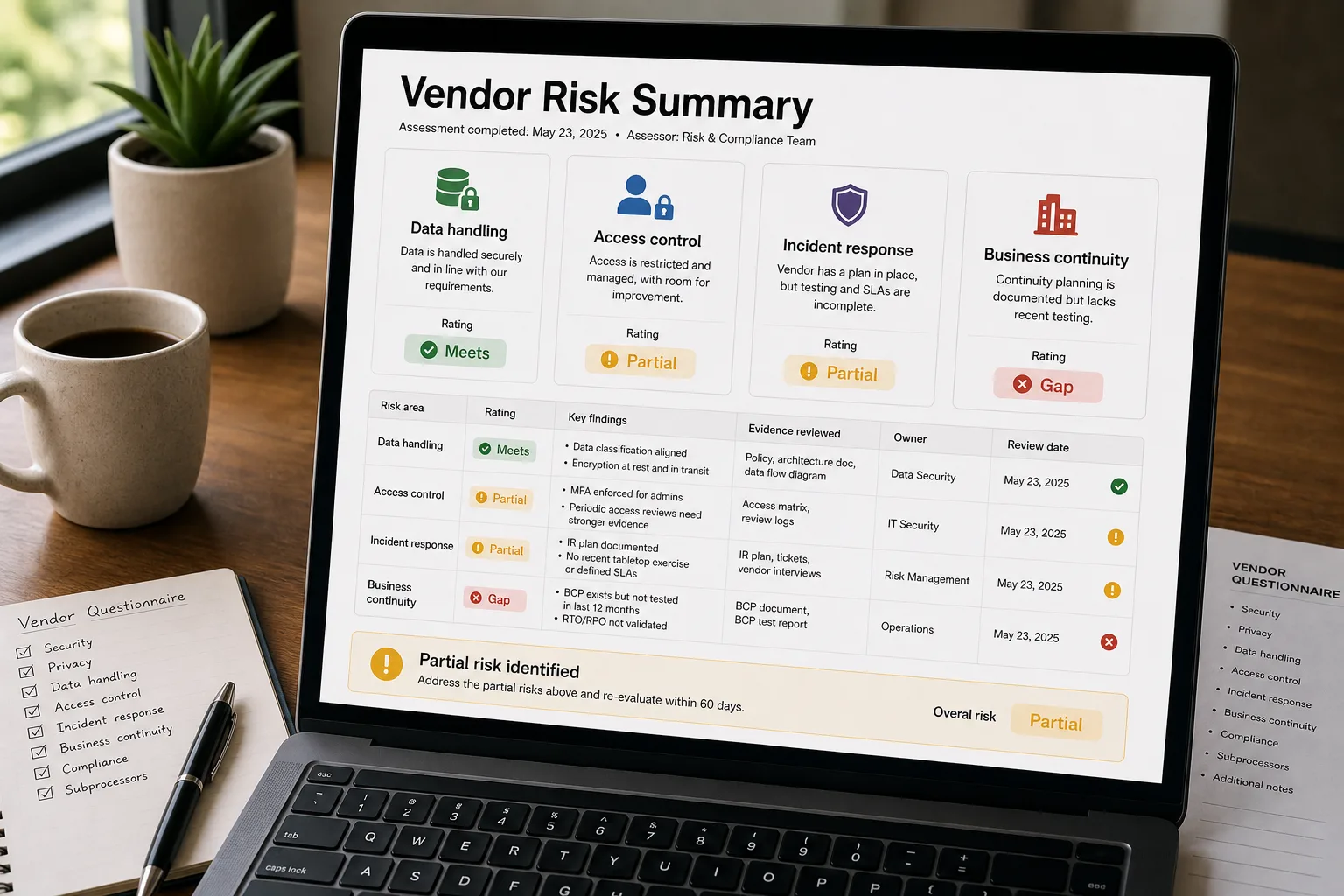
The pipeline goes: take the security artifacts a vendor sends during procurement — SOC 2 report, SIG questionnaire, DPA (data processing agreement), custom security PDF — extract the answers against a structured comparison schema, compare each one against your company’s security baseline, and flag the gaps. The security analyst reviews the flagged gaps rather than reading every document end-to-end.
The reason this matters: the SOC 2 report runs 60 pages, the SIG form has 200 questions, the DPA is 15 pages, and the vendor’s custom security PDF varies. The analyst reads, takes notes, compares against the baseline, writes a memo to procurement. The work takes 4–8 hours per vendor. Procurement closes 5–10 vendor deals a month. The analyst’s calendar is half-consumed by vendor reviews instead of operational security work.
This piece walks through the pipeline end to end: the baseline schema, the extraction layer, the comparison logic, the gap-flagging rules, and the summary the security and procurement teams actually need to make a decision.
Where this fits — and where it doesn't
Use this if you process 5+ vendor security reviews per month, your security team is consumed by manual review, and your security baseline is documented well enough to compare against. Common fits: B2B SaaS with growing vendor inventories, financial-services and healthcare companies with strict third-party requirements, security-mature mid-market and enterprise teams.
Don’t use this if your vendor volume is low enough that manual review is faster, your security baseline isn’t written down (write it first), or your TPRM tool already handles this (use what you have).
What you'll need before starting
- A documented security baseline — what your company requires of vendors. Encryption standards, data-residency requirements, breach-notification timelines, sub-processor restrictions, etc.
- Access to vendor-submitted security artifacts — SOC 2 reports, SIG questionnaires, DPAs, custom security PDFs, ISO certifications.
- A long-context model API. Vendor security packages are 50–200+ pages; the extraction needs to handle this comfortably.
- A risk-rating framework — what counts as low / medium / high vendor risk, and what controls each requires.
- A security operator who reviews flagged gaps. The AI extracts and compares; humans decide the residual risk.
Six steps to vendor reviews that take hours instead of days
- Codify the security baseline into a structured comparison schema
Convert your security requirements into a structured set of yes/no or detail questions: “Does the vendor encrypt data in transit?” / “Data residency options offered?” / “Breach-notification timeline?” / “Sub-processor consent required?” The schema is the comparison target; without it, the AI doesn’t know what to look for.
- Extract answers from vendor documents with structured output
For each vendor’s security package (SOC 2 report, SIG form, DPA, custom PDFs), run extraction against the baseline schema. For each baseline question, the AI returns: extracted answer, verbatim source quote, and confidence score. The verbatim quote is the audit anchor; it lets the human reviewer verify without re-reading the source document.
- Compare extracted answers against the baseline — flag gaps
For each question, deterministic comparison: does the vendor’s answer meet your baseline? Three outcomes: meets (green), partial (yellow — meets some but not all conditions), gap (red — doesn’t meet). The comparison is rules-based, not LLM judgement; deterministic outcomes are defensible to procurement.
- Generate the vendor risk summary — green / yellow / red per category
Roll the question-level results into a category summary: data handling, access control, incident response, business continuity, compliance certifications. The summary is what procurement reads; the underlying detail is available when needed. Categories with red flags get explicit callouts and recommended follow-up actions.
- Route by risk level — auto-approve, conditional, requires deep review
Three routes per vendor: (a) all green or only minor yellows → auto-approve with the risk summary documented; (b) some red flags but routine pattern → security analyst review with the gaps and recommended mitigations; (c) major red flags or unusual pattern → full security review with the vendor, possibly including a security questionnaire follow-up. The routing structure keeps human time on the cases that actually need it.
- Track approved vendors and their risk evolution over time
Vendor security posture changes. New SOC 2 reports, breach events, ownership changes. Tie the pipeline into a vendor inventory; re-run assessments annually or on triggering events (vendor reports a breach, vendor’s parent company changes, regulatory landscape shifts). Without the ongoing review, approval-at-onboarding decays into stale-risk over time.
What it costs and what to expect
The time-saved-per-vendor is the operational ROI; the strategic value is the security team’s ability to scale vendor reviews with vendor inventory growth.
Other ways to solve this
Third-party risk management platforms (Whistic, OneTrust, Vanta TPRM, Drata Vendor Risk). Bundle vendor questionnaires, automated risk scoring, and approval workflows. Right answer for most growing companies.
External security ratings (SecurityScorecard, BitSight). Provide ongoing security ratings of vendors based on external observables. Useful complement to questionnaire-based assessment; doesn’t replace it.
Manual review by security analyst. Traditional approach. The AI pipeline displaces the bulk of this; security analysts shift to reviewing flagged cases.
Don’t review — trust vendor’s word. Defensible for very-low-risk vendor categories; increasingly indefensible at scale or for vendors handling sensitive data.
Related work
For the broader contract-review pattern that complements vendor risk, see Contract review and clause extraction. For renewal-tracking that links to vendor inventory, see Lease and vendor renewal tracking. For the compliance-evidence pipeline these reviews feed, see Compliance evidence collection for SOC 2 / ISO 27001. For the broader procurement-evaluation framework, see AI procurement checklist for non-technical buyers.
FAQ
How is this different from Whistic or OneTrust?
Functionally overlapping. The TPRM platforms bundle questionnaire workflows, scoring, and approval routing; the AI pipeline approach lets you customise the extraction and comparison logic. For most teams, the platforms are the faster path; custom builds make sense at enterprise scale or for unique requirements.
What about vendors that won't share their SOC 2 report?
Common with smaller vendors. The fallback is a security questionnaire — your custom form covering the baseline questions, sent to the vendor. The same extraction pipeline works on questionnaire responses as on formal reports. For vendors that won't share or fill out forms, treat that as a risk signal.
How do we handle vendors whose security posture changes over time?
Annual re-assessment is the baseline cadence; trigger-event re-assessment (vendor reports a breach, vendor goes through ownership change, vendor's SOC 2 expires) is the supplement. The pipeline's incremental cost is low enough that re-assessing on each renewal cycle is practical.
Does this work for AI-vendor specifically — extra considerations?
Yes, plus AI-specific questions: model training on customer data, data retention, model-update notification, indemnification. Build an AI-vendor baseline supplement to the standard security baseline. See AI procurement checklist for non-technical buyers for the AI-specific question set.