
If you run a support team serving customers in multiple languages, the failure modes are familiar. The customer who emails in French from a Paris-based operation doesn’t want a six-hour delay while the ticket is forwarded. The customer who emails in Mandarin doesn’t want an answer back through Google Translate that’s technically correct and culturally tone-deaf. The customer in Brazilian Portuguese doesn’t want their carefully-phrased billing complaint answered with European-Portuguese formality.
Multilingual support is one of those problems where the naive solution — “we’ll just machine-translate everything” — produces a worse experience than not offering support in the language at all.
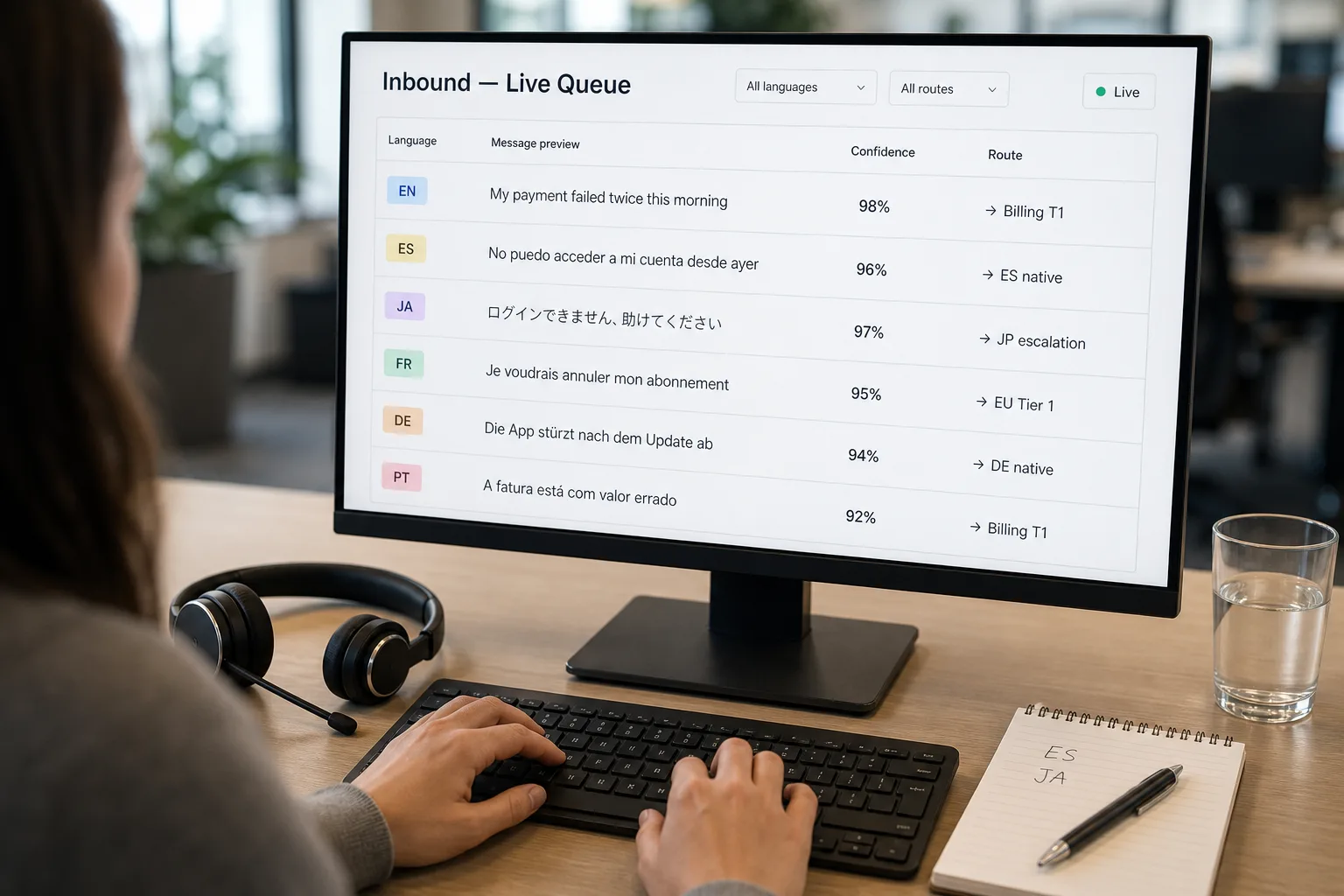
The fix is layered. AI handles the routine cases: language detection, simple translation, structural-not-cultural questions. Humans handle the cases where nuance, tone, or culture matters. The pipeline routes intelligently based on language, message complexity, and topic — not “all French goes to AI, all English to humans.”
This piece is that routing pipeline: the detection-and-classification layer, the translation tiers, the cultural-escalation rules, and the practical limits of where AI translation works versus where it actively hurts.
Where this fits — and where it doesn't
Use this if you have customers in 3+ languages where you don’t have native speakers on the team, your inbound volume in non-primary languages is growing, and the cost of slow or poor multilingual responses is starting to show up in churn or NPS. Common fits: B2B SaaS expanding internationally, ecommerce serving global customers, services businesses with multinational client bases.
Don’t use this if your customer base is concentrated in 1–2 languages where you have native speakers (just staff appropriately), your business is in a regulated category where every customer communication needs human review (legal, medical, financial — translate for context, don’t auto-respond), or your products’ complexity requires technical-language fluency the AI doesn’t have in lower-resource languages.
What you'll need before starting
- A helpdesk platform with API access — Intercom, Zendesk, Front, Help Scout, Freshdesk. The pipeline integrates rather than replacing.
- A model API with strong multilingual support — Claude, GPT, and Gemini all handle the major business languages well; quality drops for lower-resource languages.
- A specialised translation service as a fallback or quality tier — DeepL for European pairs, Google Translate for breadth, Unbabel for human-in-the-loop quality.
- A clear policy on which message types can use AI translation vs which need human review. Standard support questions: AI. Complaints, churn risk, legal-tone messages: human.
- Native-speaker reviewers for the languages where you’ll provide AI-assisted responses. Even if they don’t handle the first response, they review samples to catch drift.
Six steps to multilingual support that respects nuance
- Detect the language on every inbound message — confident, not best-guess
Run language detection on every inbound. Major-language detection is reliable (English / Spanish / French / German / Japanese / Mandarin / Portuguese / Italian); lower-resource languages have higher error rates. Where detection confidence is low, treat the message as language-uncertain and route to a queue that includes the customer’s account-level language preference (from CRM) as a tiebreaker. Wrong-language responses are worse than slow responses; calibrate detection conservatively.
- Classify the message — routine vs sensitive, simple vs nuanced
For each detected message, classify it: routine question vs complaint vs cancellation request vs legal-tone vs technical issue. The classification drives routing: routine questions can use AI translation and AI-drafted responses; cancellation requests and complaints go to human escalation regardless of language. Don’t apply blanket policies by language; apply them by message type within language. See Triage inbound email at scale for the broader triage pattern; this is a multilingual extension.
- Route by language + message type — not by language alone
The routing matrix: native-speaker available + routine → native speaker. Native speaker available + sensitive → native speaker. No native speaker + routine → AI translation + AI-drafted response in target language. No native speaker + sensitive → human-in-the-loop service (Unbabel, ConvergeOne) or escalation to a managing human-translator partnership. Auto-respond with AI only on routine messages where the cost of a tone-deaf reply is low.
- Translate context, not just text — pass the conversation history
When using AI translation, translate the customer’s message plus any prior thread context plus your KB articles relevant to the topic. Translation-without-context produces literal renderings that miss the conversational flow; translation-with-context produces responses that read as natural. The same applies to outbound: when drafting a response in the target language, the model needs the customer’s actual message in their language, not a translated version that lost nuance.
- Apply cultural-context rules — formality, idiom, structural conventions
Languages have cultural conventions that affect support communication. Japanese support replies are more formal than English ones; Brazilian Portuguese is warmer than European Portuguese; German support is more direct than US English. Bake these conventions into the prompts: “respond in formal Japanese keigo, use desu/masu form throughout”; “respond in Brazilian Portuguese with conversational warmth, use você not tu”. Without explicit cultural rules, AI translation produces responses that are grammatically correct and tonally wrong.
- Sample-review weekly with native speakers — catch the drift before customers do
For each language you support via AI, have a native speaker review a random sample of responses each week. They flag: cultural-tone misses, grammatical errors, translation choices that lose nuance, terminology errors specific to your product. The sample review is what makes the system maintainable — without it, drift accumulates silently and customers in non-English markets get a quality erosion that doesn’t surface until churn.
What it costs and what to expect
The cost is much lower than staffing native speakers for every language; the auto-response acceptance rate is the operational ROI. The strategic value is the time-to-coverage when entering a new market — weeks rather than the months of hiring a native-speaker team.
Other ways to solve this
Native-speaker staffing per market. The highest-quality answer; doesn’t scale to many languages at small volume. Strong fit for the 2–3 major markets where volume justifies it; pair with AI-assisted for the long tail.
Human-in-the-loop translation services (Unbabel, Lilt, Smartling). AI does the first pass; a human translator reviews and edits. Right answer for material content (legal, complaints, customer-facing pages); cost is meaningful but quality is high.
Helpdesk-bundled multilingual support (Intercom, Zendesk, Front). All major platforms now ship multilingual AI assistance. Right answer for most teams — the integration is done. Trade-off: less control over cultural-tone rules.
English-only with apology. Some teams choose to operate in English only and direct customers to translation tools they can use themselves. Honest answer for very-early-stage companies; becomes increasingly disrespectful of customer effort as you scale into markets.
Related work
For the broader translation-tool comparison that powers the translation tier, see AI translation services compared. For the upstream triage that classifies inbound messages by type, see Triage inbound email at scale. For the reply-drafting pattern that the multilingual response builds on, see Draft customer support replies that hold up to scrutiny. For the broader hallucination-and-misunderstanding risk in AI-generated responses, see AI hallucinations explained.
FAQ
Should we tell customers their reply was AI-translated?
Increasingly the right answer, especially in jurisdictions with AI-disclosure requirements (parts of the EU, some US states). Many customers appreciate the transparency; the disclosure framing matters more than the disclosure itself. "This response was drafted with AI assistance and reviewed for your language" lands better than "This is an AI-generated translation." When the response is fully automated, lean toward disclosure; when a human has reviewed, the case is weaker.
What about right-to-left languages — Arabic, Hebrew?
Modern models handle RTL languages reasonably; UI rendering is where most failures occur. Ensure your helpdesk platform properly handles RTL text in both inbound and outbound; some platforms don't render RTL correctly in agent views, which causes formatting issues. Test end-to-end with native speakers; the model side is usually fine, the rendering side often isn't.
How do we handle multilingual customers — same person emailing in different languages over time?
Customer-level language preference in the CRM, combined with per-message detection. If the customer typically writes in English but sends one message in Spanish, respond in Spanish for that conversation; the next conversation goes back to their default. Don't lock customers into a language; they choose per message, and the system follows.
What about code-switched messages (multiple languages in one message)?
Common in some markets (Singapore, India, parts of Europe). Detect the dominant language; treat embedded phrases in other languages as cited content the response should also use. Don't "correct" code-switching in the response by responding in a single language; mirror the customer's communication style where it's natural. Specify in the prompt that code-switching is acceptable in the response if the customer used it.
How do we measure if the multilingual support is actually working?
Three signals. (1) CSAT / NPS in each non-English market — compare to English baseline. (2) Time-to-first-response by language. (3) Escalation rate by language — if the AI pipeline produces more escalations in language X than in English, the pipeline isn't working for X. The CSAT signal is the truest; the time-to-first-response is the operational one; escalation rate by language is the quality-drift detector.