
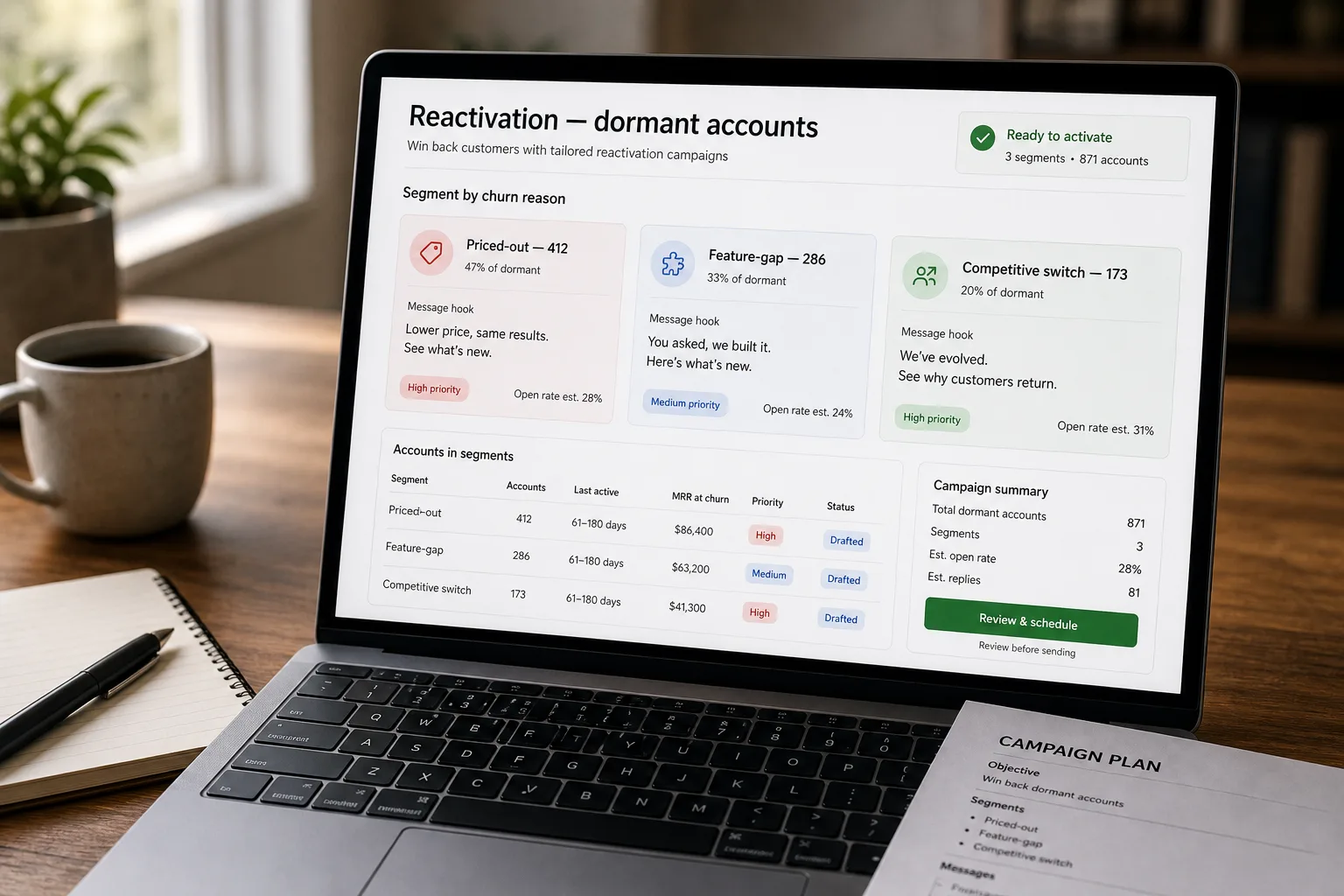
If you run marketing ops or RevOps at a growing SaaS company, your dormant-account list is bigger than the active-customer list. Almost all of it is one nudge away from either re-engaging or being permanently dead.
The “we miss you” email blast — generic, sent to everyone who churned in the last 18 months, hitting their spam folder — is the worst version of the reactivation motion. It generates zero re-activations and burns the sending domain you’d want to use for outbound. The good version is segmented, references the specific reason the customer left, and lands in the inbox.
The pipeline that fixes this knows why the customer churned (from customer-success notes, support history, billing pattern, exit survey if available), segments accordingly, and produces messages that reference the specific churn reason in the customer’s voice rather than corporate generic.
Where this fits — and where it doesn't
Use this if you have a dormant-account list of 200+ accounts, you have meaningful context on why they left (CS notes, exit survey, support patterns), and your product has enough room to have changed since they churned. Common fits: SMB SaaS with usage-driven churn, products with active development that addresses past complaints, marketplaces with seller / buyer reactivation motions.
Don’t use this if your churn happened mostly for reasons you can’t address (acquisition, market exit, regulatory change), your product hasn’t materially changed since they left (reactivating to the same product they rejected isn’t compelling), or your dormant list is small enough that direct CS outreach is more leverage than a campaign.
What you'll need before starting
- A dormant-account list with the reason-for-churn context where available — CRM notes from cancellation, support history, exit survey responses, billing-event history.
- A marketing automation platform with deliverability discipline — Customer.io, Iterable, HubSpot, Salesforce Marketing Cloud.
- A separate sending domain for reactivation campaigns. Don’t use the domain you send active-customer comms from; reactivation has different deliverability characteristics and you don’t want to contaminate the primary.
- A model API key for the personalisation generation. Cheap-tier models handle this work.
- Clear unsubscribe and consent handling — dormant accounts are often legally distinct from active customers for the purposes of CAN-SPAM, GDPR, CASL. Honor the legal framework strictly; reactivation campaigns are a frequent compliance failure point.
Six steps to a reactivation that actually lands
- Define dormancy thresholds and re-engagement eligibility
Dormancy is product-specific. For monthly-active products, 60 days without login might be dormancy; for quarterly-use products, 6 months is more appropriate. Define explicit thresholds per product behaviour. For each dormant account, also check eligibility: did they explicitly request not to be contacted? Are they within the legal cooldown period? Have they been re-engaged recently? Eligibility filters reduce list size but increase responsiveness.
- Segment by likely churn reason — not by recency alone
The reason-for-churn drives the reactivation message. Common segments: (a) priced-out (price was the issue — emphasise new pricing tiers or value framing); (b) feature-gap (a specific missing capability — emphasise that we now ship it); (c) competitive switch (left for another product — emphasise differentiation against the likely alternative); (d) usage-decline-with-no-stated-reason (just went quiet — emphasise check-in tone, not transactional ask); (e) team-departure (the champion left — different motion, often outreach to the new team). The segment is the prompt’s primary input.
- Generate per-segment messages with explicit churn-reason references
For each segment, generate messages that explicitly acknowledge the churn reason. Priced-out segment: “When you left we were priced at $X — we now have a tier at $Y that fits the use case you described.” Feature-gap segment: “You mentioned you needed [specific feature]. We shipped it last month.” The specificity is the differentiator. Generic “we miss you” emails get treated as spam; specific references get treated as worth reading.
- Apply deliverability discipline — separate domain, gradual ramp, list hygiene
Reactivation sending is high-risk for deliverability because dormant addresses include obsolete contacts, bounced historical sends, and people who’ve forgotten signing up. Use a separate sending domain warmed up appropriately. Run list hygiene first — remove hard bounces, suppression-list entries, addresses inactive for 18+ months. Ramp send volume gradually (don’t blast the whole list day one). Monitor inbox-placement metrics weekly; pause if reputation drops.
- Sequence the outreach — single touch, then follow-up, then opt-down
Three-message sequence works for most segments. Touch 1: the personalised reactivation message. Touch 2 (10–14 days later): a different angle if no engagement. Touch 3 (3–4 weeks later): a clear “is this still relevant?” with a one-click opt-out and an option to receive less-frequent contact. The opt-down option is what distinguishes a respectful reactivation from a spam motion; recipients who opt down are still customers, just not now.
- Track outcomes — reactivations, re-engagement, opt-outs, complaints
Measure: actual reactivation rate (returned to active usage), email engagement rate (opens, clicks), opt-out rate, complaint rate. The complaint rate is the most important — if reactivation campaigns generate spam complaints above 0.1%, your reputation is degrading and the motion is netting negative. Adjust segment definitions, messaging, and frequency based on the outcome data quarterly.
What it costs and what to expect
The reactivation rate lift from segmented + personalised vs generic is the headline win. The complaint-rate ceiling is the operational guardrail.
Other ways to solve this
Lifecycle marketing platforms with reactivation modules (Customer.io, Iterable, Klaviyo, Braze). Built-in dormant-account workflows and templates. Right answer for most teams. Trade-off: less customisation, per-month cost.
CS-led reactivation (high-touch). For high-value accounts, CS reach-out beats automated email. The pipeline handles bulk; CS handles the named accounts worth a personal call.
Win-back surveys without reactivation. Some teams forego reactivation entirely and instead survey dormant accounts to learn why they left. Information-rich; less revenue-impacting. Pairs well with reactivation campaigns; the survey informs the segmentation.
Don’t reactivate — focus on net-new. Defensible at some stages. Honest answer for companies whose churn was driven by structural product / market issues that haven’t been fixed.
Related work
For the churn-detection pipeline that produces the dormant-account list with context, see Detect churn signal from support patterns. For the broader composite customer-health score that informs reactivation prioritisation, see Customer health scoring from product and support signals. For the deliverability discipline that overlaps with outbound, see Outbound prospecting at SDR scale. For the cross-channel feedback aggregation that surveys feed into, see Voice-of-customer reports from cross-channel feedback.
FAQ
How long after churn should we wait before reactivation?
Varies by product. Cool-down periods of 30–90 days are typical — soon enough that the customer remembers you, late enough that the reasons for leaving may have evolved. Don't reactivate within a week of cancellation; that often hits the customer in the unsubscribe-and-block window. Don't wait 2+ years; reactivation rates drop sharply past that horizon.
What about CAN-SPAM and GDPR for dormant addresses?
Strict compliance is non-negotiable. Honour opt-out and unsubscribe lists rigorously; check the legal basis for the contact (was it consented, is the consent still valid under your jurisdiction's terms). For EU-based contacts, GDPR adds explicit-consent requirements that complicate dormant-list outreach. Talk to legal counsel; reactivation campaigns are a frequent CAN-SPAM and GDPR enforcement target.
How is this different from generic re-engagement campaigns?
Generic re-engagement is sent to your full list regardless of churn context; reactivation is targeted at confirmed-dormant accounts with churn-reason context. The personalisation depth is the differentiator — "we noticed you haven't logged in" is generic re-engagement; "you mentioned you needed feature X when you left — we ship it now" is reactivation. The two are sometimes used interchangeably in vendor marketing; they're structurally different motions.