
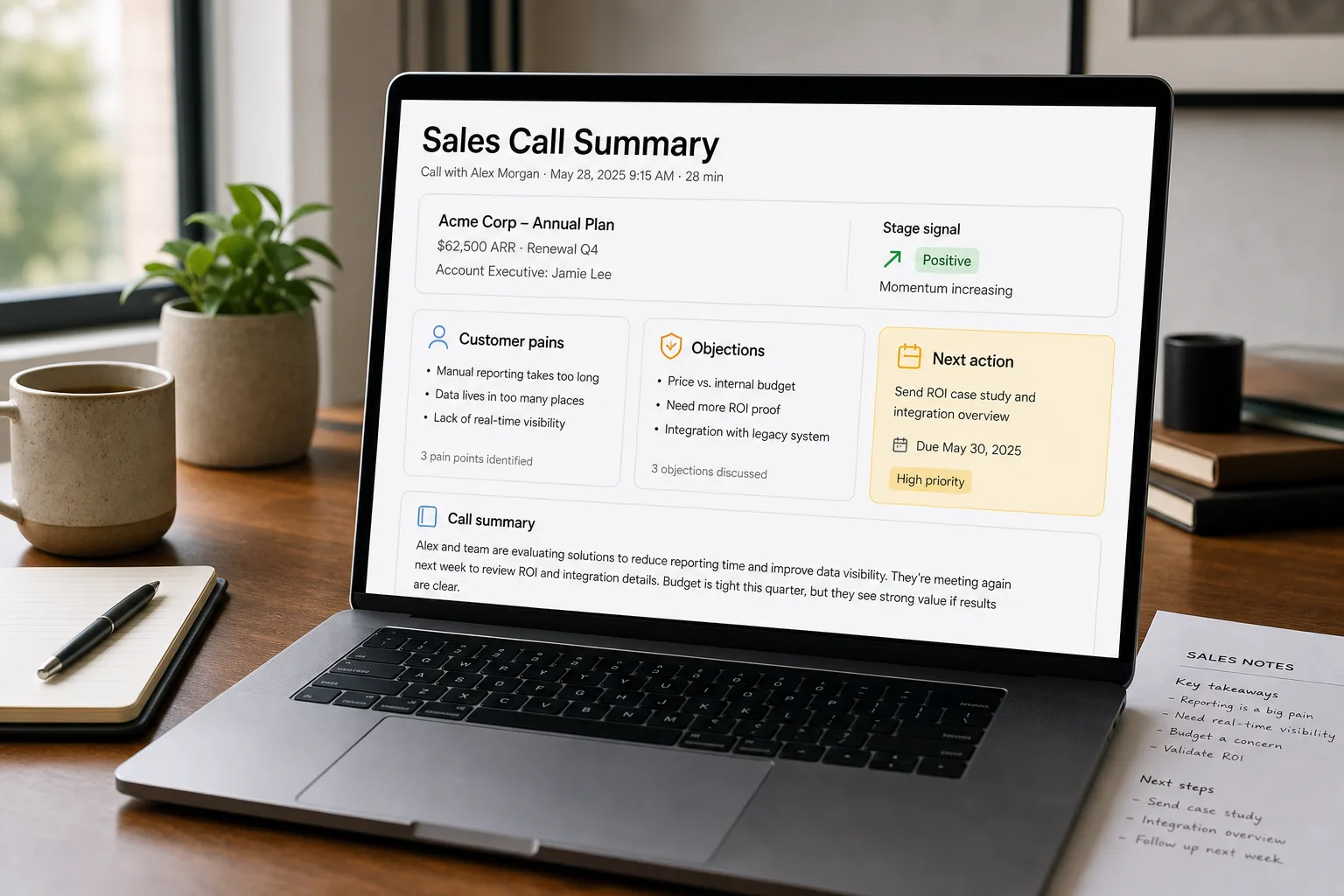
The workflow goes: capture the call (Zoom, Teams, Google Meet, or device audio), transcribe it, tag each transcript to the deal or contact it belongs to in the CRM, and surface the patterns across calls back to the sales manager or research lead. Each transcript is a working asset. The patterns across calls are where the real value lives.
This is different from the general meeting-summary workflow (Meeting summaries people actually read), which handles the daily-standup case well. Sales calls and customer interviews need CRM integration and cross-call pattern detection. Without those, the recordings pile up unread.
This piece walks through the workflow for that specific class of recording (sales calls, discovery calls, customer interviews, churn conversations): the tool-decision tree between revenue-intelligence platforms and lightweight notetakers, the consent step everyone skips, and the integrations that make the data useful instead of just stored.
Where this fits — and where it doesn't
Use this if your sales motion is consultative (multi-call sales cycles, real discovery, deal coaching matters), or your customer research depends on calls (interviews, churn calls, expansion calls), and you want the conversations to feed coaching, deal intelligence, or qualitative pattern detection. Common fits: B2B SaaS sales, professional services, consulting, agencies, customer success, product research.
Don’t use this if your sales is transactional (single-call close, low-touch volume), the prospect base culturally rejects recording (small markets, certain regulated industries), or you don’t have anyone whose job is to act on the surfaced patterns. The pipeline produces nothing if no human sees what it surfaces.
What you'll need before starting
- Calls happening on a platform the tool can capture from — Zoom, Teams, Google Meet, Aircall, Dialpad, or device audio (Granola’s path).
- A documented consent process. In the US, federal ECPA permits one-party consent; eleven states (California, Florida, Illinois, Maryland, Massachusetts, Michigan, Montana, Nevada, New Hampshire, Pennsylvania, Washington) require all-party consent. EU GDPR requires explicit consent and lawful basis for recording. Solve this before turning any tool on.
- A CRM (Salesforce, HubSpot, Pipedrive, Close) — the value of this category compounds when transcripts are tied to deals and contacts.
- A receiver — either a sales manager doing coaching, a research function consuming patterns, or a leader who reviews aggregate trends. Without one, the recordings pile up unread.
Five steps to a working sales-conversation pipeline
- Pick the tool tier that matches what you’ll actually do with the data
Three tiers, each fitting a different use:
- Lightweight notetakers (Granola, Otter, Fireflies) — best for: founders running their own discovery calls, small teams (1–10 reps), customer research that doesn’t need pipeline analytics. Setup: 30 minutes. Cost: free–$39/seat/month (Granola Business $14, Granola Enterprise $35; Otter Business $30; Fireflies Enterprise $39). Limit: shallow CRM integration, no rep coaching analytics.
- Conversation intelligence (Otter for Sales, Salesloft Conversations, Avoma) — best for: small-to-mid sales teams (10–50 reps) that want call recording + coaching surface + light deal intelligence without buying enterprise-tier. Setup: a week. Cost: $19–$120/seat/month (Avoma Starter $19; full-stack Avoma reaches ~$77; Otter for Sales / Salesloft Conversations land mid-band).
- Revenue intelligence platforms (Gong, Chorus, Clari Copilot) — best for: mid-market+ sales teams (50+ reps) where deal scoring, pipeline forecasting, competitive intelligence, and rep coaching at scale matter. Setup: 2–6 weeks with IT involvement. Cost: highly variable — Clari Copilot ~$1,440–$1,920/seat/year, Gong $1,200–$2,400/seat/year plus a $5K–$50K platform fee, Chorus repriced to ~$8,000/seat/year in April 2026. Limit: heavy implementation; serious procurement and change-management work.
The mistake teams make: buying the enterprise tier when the lightweight tier matches their actual workflow, or sticking with lightweight when the team has scaled past it. Re-evaluate yearly.
- Get consent right — this is the step everyone skips
Practical consent flow that covers most jurisdictions: (1) include “may be recorded for quality and training purposes” in calendar invites and meeting confirmations; (2) verbal disclosure at the start of the call (“Just letting you know, I have a notetaker on this call — is that okay?”); (3) document the prospect’s consent in your CRM. For EU prospects, the verbal disclosure should be more explicit and the lawful basis (consent or legitimate interest) should be documented. Bot-free tools like Granola don’t get you out of this — covert recording is more legally risky than visible-bot recording, not less. Default rule: be explicit regardless of what your tool’s UI does or doesn’t show.
- Set up the structured summary template — sales calls aren’t generic meetings
Override the default summary with a sales-specific structure:
- Stage signal: where in the buying journey is this prospect? (awareness / evaluating / negotiating / closing).
- Pains expressed: bullet list, in their words.
- Objections raised: bullet list — flag anything new vs. your standard objection library.
- Competitors mentioned: any names dropped, with the context (positively or negatively).
- Decision-makers: who else needs to be in the next call? Who has budget authority?
- Commitments made: what did the rep promise to do, by when?
- Next step: agreed action and date.
This shape is what turns “we had a good call” into something pipeline-actionable. Most revenue-intelligence platforms ship something like this; lightweight tools need a custom prompt.
- Wire transcripts into the CRM — not just a separate folder
Every transcript / summary should auto-attach to the deal record (or contact / account record for non-sales calls). The integration is what makes the data compounding — at any point in the deal cycle, you can see the conversation history without leaving the CRM. Lightweight tools handle this through the deal-attach feature most CRMs now expose; revenue-intelligence platforms turn it into the foundation for pipeline analytics. The wrong setup: transcripts in a folder nobody opens — same dead-archive problem as general meeting summaries.
- Build the weekly pattern review — coaching beats archiving
Once a week (45–60 minutes), the sales manager or sales-ops lead reviews the surfaced patterns: which competitors are coming up more, which objections are landing, which reps are following the playbook, which deals have stalled signals. The transcripts are the reference; the patterns are the action item. Without this loop, the tool produces a beautiful archive that nobody opens. With it, the team’s win rate improves measurably over a quarter.
What it costs and what to expect
The win-rate uplift is the actual ROI. The transcription is just the input — the value is what the coaching and manager-review loops do with it.
Other ways to solve this
Self-built Whisper pipeline. For privacy-bound teams (regulated industries, jurisdictions with strict data-residency requirements), run Whisper locally, then process transcripts with your own LLM and CRM integration. More engineering work; complete data control. Right answer when no SaaS vendor’s compliance posture is acceptable.
Manual notes + structured CRM template. Still defensible for very small teams (1–3 reps) and very high-touch sales (six-figure deals where the rep takes notes intentionally). Lower scale; higher fidelity if the rep is disciplined.
Hybrid: lightweight notetaker + standalone CRM coaching. Cost-effective middle path — Granola or Otter for the recording, a separate process (manager 1:1s, deal reviews) for the coaching layer. Doesn’t compound as well as integrated revenue intelligence; cheaper for small teams.
Customer research-only (no sales tooling). Tools like Dovetail and Sprig (covered in Find patterns in customer feedback) handle the customer-interview / research side better than sales-focused platforms — different workflow, different output shape. If you don’t have a sales motion at all, those are the right tools.
FAQ
Is it legal to record sales calls without telling the prospect?
Almost never the right move. Federally in the US, ECPA allows one-party consent (the rep can consent for themselves), but eleven states require all-party consent — and you don't always know which state the prospect is in. EU GDPR is even stricter. The legal exposure of covert recording vastly exceeds the convenience of skipping the disclosure. Default to explicit consent regardless of what the tool's UI shows.
Can the AI tell who's speaking — rep vs. prospect?
Yes — speaker diarisation is now standard. Quality is highest when each speaker is on a separate audio channel (each on their own device); degrades sharply on a shared conference-room mic. For sales calls, where each speaker typically dials in separately, diarisation is reliable; for in-person meetings or shared rooms, expect mistakes worth checking.
Does this category really justify the enterprise pricing?
For mid-market+ sales teams with 50+ reps, yes — the deal-scoring, pipeline-forecasting, and rep-coaching analytics that platforms like Gong and Chorus provide are hard to replicate cheaply, and the win-rate uplift compounds. For smaller teams, the answer is usually no — the lightweight tier captures most of the value without the implementation burden. Don't buy enterprise on hope; pilot at the lower tier first and upgrade when the team has outgrown it.
What about objection handling — can the AI suggest responses in real time?
Increasingly yes. Real-time "Battle Card" features in Gong, Chorus, and Clari Copilot surface suggested responses to objections during the call. Quality varies; opinion among sales leaders is split on whether they help (faster response on tough objections) or hurt (reps reading from a screen, less engagement). Pilot before mandating; many teams find them more useful in post-call review than live.
How do we keep the transcripts secure?
Same posture as any other sensitive customer data: enterprise contracts on the recording vendor (BAA if you handle PHI, GDPR DPA for EU prospects), access controls at the team level (not every rep needs to see every call), retention limits (delete recordings after their useful life), and redaction tooling for sensitive content. See AI privacy — what to watch for for the broader vendor evaluation.
Should I record customer-research calls the same way as sales calls?
Same recording infrastructure, different downstream workflow. Sales calls feed CRM and coaching; research calls feed a customer-intelligence platform like Dovetail and pattern-detection tools. Both can use the same notetaker for capture; the value layers differ. Many teams use Granola or Otter for capture across both, then route the output to different systems based on call type tagged in the calendar invite.