
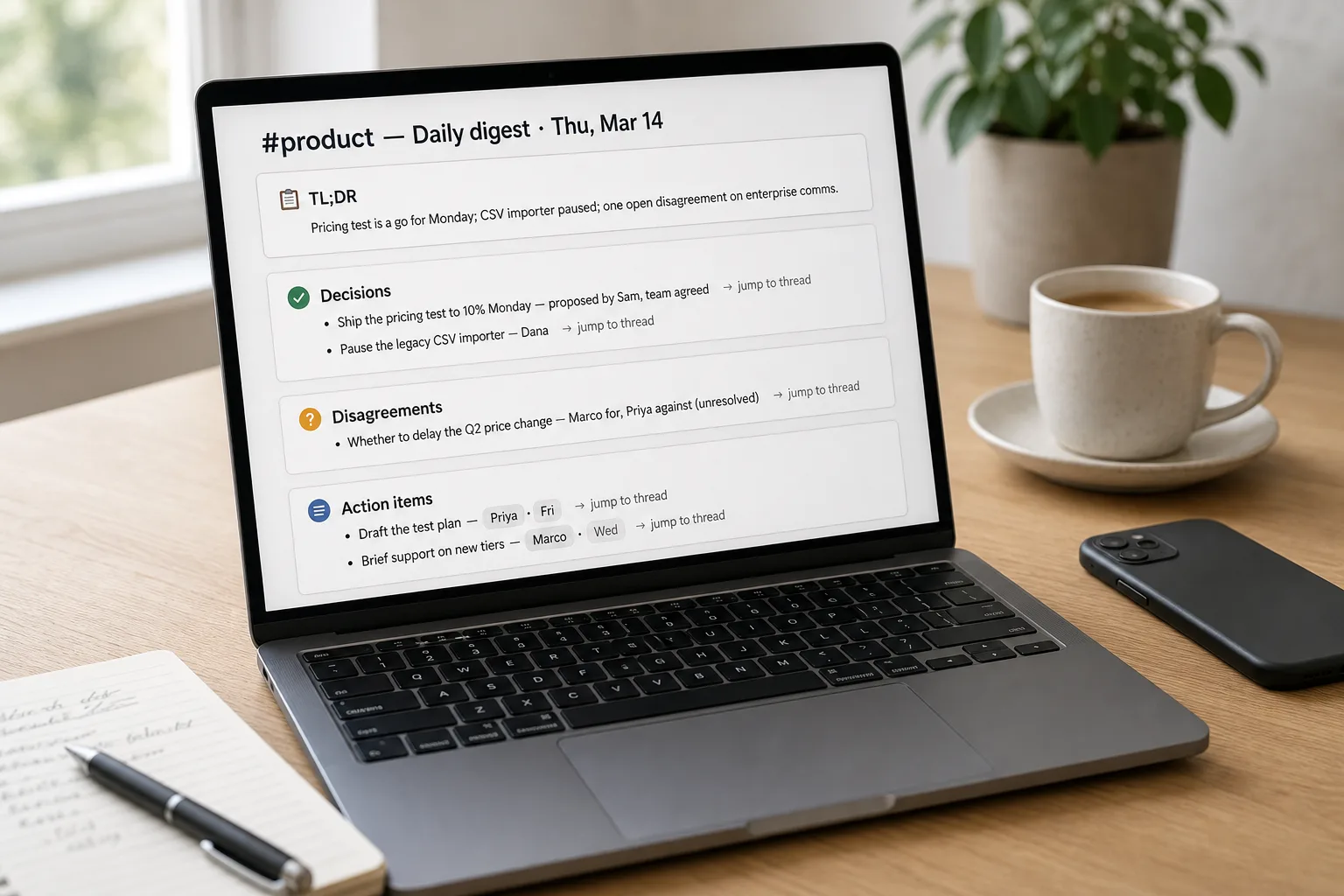
The workflow goes: pull a channel’s messages for a given window, hand them to an AI with a structured prompt, and produce a digest that lists decisions, action items, and disagreements — each attributed to the person who said it. Send the digest somewhere people actually read.
A busy Slack channel is the modern equivalent of walking into a meeting that’s been going for a week. It branched into seven threads. Three decisions were made in DMs you can’t see. Action items are scattered across messages with no clear owner. The default behaviour for catching up is to scroll, which is slow, or to give up, which is what most people actually do.
Most AI summaries produce wallpaper — a polite narrative paragraph that mentions everyone, attributes nothing precisely, and skips the disagreements that were the point. This piece is the workflow that produces summaries people actually use: structured, attributed, surfacing dissent rather than smoothing over it, with action items that have owners and dates. The pattern is closely related to summarising email threads, adapted for Slack’s threaded structure and the looser attribution of channel chatter.
Where this fits — and where it doesn't
Use this if your team has channels that regularly produce 50+ messages a day, members are distributed across time zones or work asynchronously, and the cost of missing channel decisions is real (coordination drift, duplicate work, decisions getting re-litigated). The workflow works best for channels where the value is “what did we decide and who’s doing what” — project channels, ops channels, cross-team coordination channels.
Don’t use this if the channel is highly conversational or social (lunch coordination, banter, watercooler) — there’s nothing structural to summarise, and the attempt produces flat output that suggests the team is more transactional than it is. Don’t use it for channels with confidentiality constraints that exceed your AI vendor’s data terms — HR channels, legal channels, private executive channels are often on a deny-list at the input boundary. And don’t use it for channels where the real conversation is happening in DMs — the summary will be missing exactly the part that mattered.
What you'll need before starting
- API access to Slack — either via a workspace-level Slack app (for automated summarisation) or copy-paste from the channel’s “View source” / export for one-off use.
- A model API key with a context window large enough to hold a day or week of channel traffic — Claude 5 (1M), GPT-5.6 or GPT-6 (~1.05M), or Gemini (1M+) all work for typical channels.
- A standing summarisation prompt (built in step 3 below). Save it somewhere reusable — Claude Project, Custom GPT, a note-taking app, or a Slack bot config.
- A clear decision about which channels get summarised — start with one or two high-value ones, not the whole workspace.
- A distribution plan. Where the summary lands matters more than how good it is. We’ll get to this in step 6.
Six steps to a digest people actually read
- Pick the scope — channel, time window, and threaded-reply policy
Decide what you’re summarising: a single channel for a day, multiple channels for a week, a single thread, or a project that spans channels. The right scope is usually the smallest one that captures the audience’s catch-up need. Daily summaries of one busy channel beat weekly mega-summaries that try to cover everything — readers are catching up after a vacation or a missed time zone, not reading the org’s whole week.
- Extract the relevant slice — messages plus thread metadata, not the kitchen sink
Pull messages within the time window, including threaded replies. For each message, preserve: author, timestamp, message text, and the thread parent (if any). Strip emoji-only reactions unless they’re the decision signal (a thumbs-up on a proposal often is the agreement). Skip channel-join / channel-leave / pinned-message noise. Slack’s conversations API gives you all of this; the cleanup matters more than the API choice.
- Use a structured prompt — not “summarise this channel”
The default summary is too narrative for catch-up. Override with explicit sections, same shape as the email-thread workflow:
- TL;DR: 2 sentences — what shifted, what’s new.
- Decisions made: bullet list with who proposed, who agreed.
- Open questions: unresolved threads with the last message.
- Disagreements: bullets where members pushed back, even if a decision was reached. Do not smooth over.
- Action items: bullets with owner and due date; flag any item without either.
- Skip: pleasantries, scheduling tangents, off-topic threads.
Save this as the standing template. Adjust the section list once a quarter as channel-use patterns shift.
- Handle threaded replies — flatten with attribution, don’t collapse
Slack’s threaded-reply structure is the biggest difference from email. Threads can have ten replies branching off a single top-level message, and decisions often live in the threads rather than the main channel. Flatten threads into the chronological flow — preserve the parent-child relationship as “[in thread on Alex’s message]” — rather than treating threads as separate conversations. The alternative (summarising main + each thread separately) produces fragmented output that misses cross-thread decisions.
- Verify attribution — channel chatter is looser than email
Channel attribution failures are more common than email-thread ones because Slack’s looser back-and-forth produces more ambiguous pronoun chains. Spot-check three claims per summary against the source. Pay particular attention to decisions attributed to specific people — the wrong attribution there has the same trust cost as in email, and the recovery is just as expensive.
- Distribute where readers already are — pin in the channel, not in a side folder
The number-one reason summaries go unread is distribution. The most effective pattern is to pin the summary as a top-level message in the same channel each day or week — readers see it when they open the channel anyway. The second-best is a dedicated #channel-digests channel members can choose to follow. The worst is a Notion doc nobody opens or an email that hits a folder named “Slack Digests.” Distribution is the workflow step that determines whether the summary is useful or just generated content.
What it costs and what to expect
The cost number tells you this is approachable. The distribution number tells you the workflow’s actual leverage is in where the summary lands, not in the prompt sophistication.
Other ways to solve this
Slack AI’s built-in summary feature. Available on Slack’s paid plans; produces decent summaries without setup. Right answer if you want a working solution today and don’t need team-specific structure. Trade-off: less control over the summary shape (no explicit disagreement preservation, no custom action-item formatting), and the cost is bundled in seat pricing.
Workplace AI assistants (Glean, Notta, Otter for Slack, Microsoft Copilot for Teams). Same pattern adapted for cross-tool workplace search. Right for teams that want summarisation across Slack + email + docs in one place. Higher monthly cost; broader integration; less control over the per-channel prompt.
Manual TLDR by a designated channel owner. Still works for small teams or channels where one person tracks the discussion anyway. Zero cost; perfect attribution; doesn’t scale past one or two channels, and creates a single-point-of-failure if that person leaves.
Don’t summarise — restructure the channel. Many channels that “need a summary” are signals the conversation should be in a different tool: a shared doc for design decisions, a Linear ticket for project coordination, a dedicated decisions log. The best summary is the conversation that didn’t need one. Audit your high-volume channels — some should stay; some should be refactored.
Related work
For the email-thread version of this pattern, see Summarize long email threads. For the upstream filter that decides which inbound channels matter most, see Triage inbound email at scale. For the meeting-summary version of the workflow, see Meeting summaries people actually read. For pattern-detection across many summarised channel digests over time, see Find patterns in customer feedback.
FAQ
What about DMs and private channels?
Two layers. For DMs: you generally shouldn't summarise other people's DMs even if you have admin access — the trust cost is high and the legal cost can be higher. For private channels: treat them like sensitive email — opt-in per channel, with the channel's members explicitly aware that summarisation is happening. The technical pattern is the same; the consent layer is where private channels are different.
How does this work for huddles and audio?
Slack huddles support transcripts on paid plans; route the transcript through the standard meeting-summary workflow (see meeting summaries people actually read) rather than the channel-summarisation flow. The shape of the conversation is different — meetings have agendas, channels don't — so the prompt is different too.
Can I summarise across multiple channels at once?
Yes, with two caveats. (1) The summary should group findings by channel, not blend them — readers want to know what changed in each scope. (2) Cross-channel summaries beyond about five channels stop being useful; readers can't act on a digest that spans the whole org. Better to summarise per-channel and let readers pick the ones they care about.
What about ephemeral or edited messages?
Slack doesn't have native disappearing messages, but it does have edits and deletions. Capture message text at the moment of summarisation; if a message is later edited, the summary reflects the original. This is usually fine — the historical record is what readers want — but worth noting if your team uses edits heavily.
How do we handle multilingual channels where members reply in different languages?
All three flagship models handle code-switching reasonably. Specify the summary language explicitly in the prompt — without that, the model picks based on whichever language dominated, which can surprise. For teams that operate in two languages roughly equally, generate two summaries (one per language) rather than a hybrid that pleases no one.
Does Slack's built-in AI summary do this well enough?
For default catch-up needs, yes. For teams that care about specific structure (always show disagreements, always flag action items without owners, always pin in-channel), the custom-prompt workflow gives more control. Start with Slack AI as a baseline; switch to custom prompts when you find yourself rewriting the default summary every day. The cost-of-switching is low and the benefit compounds.